
Flow's Product updated trigger and the product triggers of this app
Field by field: what Shopify Flow's Product updated trigger sends, its five-field limit, and which product triggers add old values and percent changes.
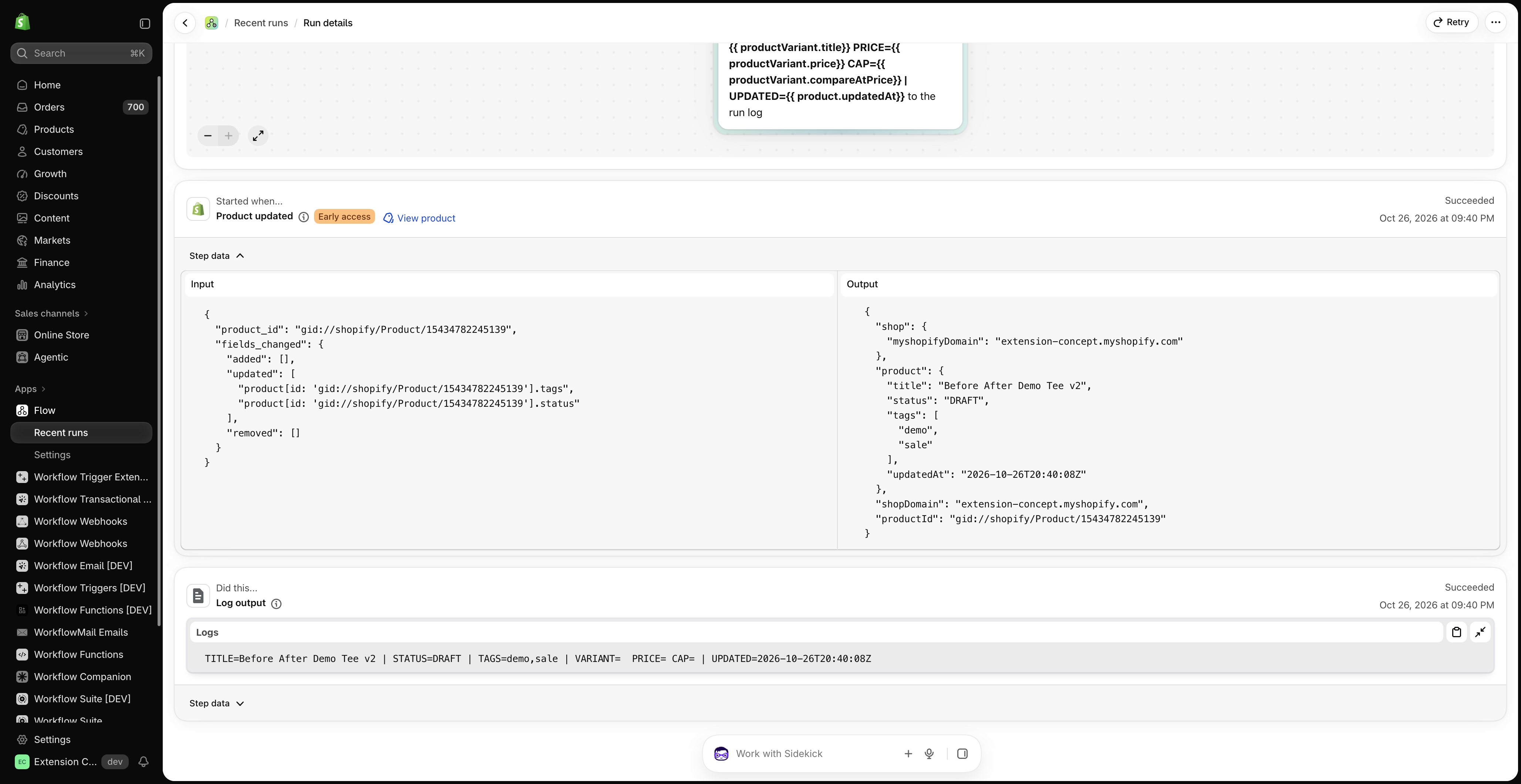
Flow's Product updated trigger starts a workflow when one of up to five fields of a product, its variants, options or media changes. Shopify's help page says what the workflow gets: "The Product updated trigger provides only the current values of the product and its variants, options, and media." and "The previous values of the fields that changed aren't available in the workflow."
This app has a trigger for each kind of product change, and each one carries the value before and after: the old and the new price with the difference in percent, the old handle for a redirect, the tags that were added or removed. This page compares them field by field. The statements about Flow's trigger come from Shopify's help page and from our tests on a development store on October 26 and November 20, 2026.
What Product updated sends
A workflow started by Product updated can read:
| Variable | Content | Always present |
|---|---|---|
product |
the product, current values | yes |
shop |
the shop | yes |
productVariant |
the variant that changed, current values | only when a variant field is monitored and a variant changed |
| Product option, media, combined listing product | the item that changed | only when such a field is monitored |
What it does not send:
- No previous value. There is no old price, old title, old status or old tag list.
- No list of changed fields to branch on. Flow shows the changed paths in the step data of a run, but in our tests they were not offered as a variable in the workflow editor.
- No numbers about the change: no difference, no percent change, no direction.
What Product updated can watch
| Group | Fields |
|---|---|
| Product | category, combinedListingRole, descriptionHtml, giftCardTemplateSuffix, handle, metafield.value, productType, requiresSellingPlan, status, tags, templateSuffix, title, vendor |
| Variants | variants.barcode, variants.barcodes, variants.compareAtPrice, variants.inventoryPolicy, variants.media, variants.metafield.value, variants.position, variants.price, variants.productVariantComponents, variants.requiresComponents, variants.showUnitPrice, variants.taxable, variants.title |
| More groups | media, options and option values, bundle components, combined listings |
Not on the list: SKU, cost per item and weight (they belong to the inventory item, see Flow's Inventory item updated trigger, and SKU, cost and stock in this app), the unit price, stock quantities and sales channels.
The five-field limit
Each Product updated trigger monitors 1 to 5 fields. The limit applies per workflow, not per store: in our test two workflows with five fields each both ran on one edit. To monitor more fields you build more workflows and repeat their conditions and actions.
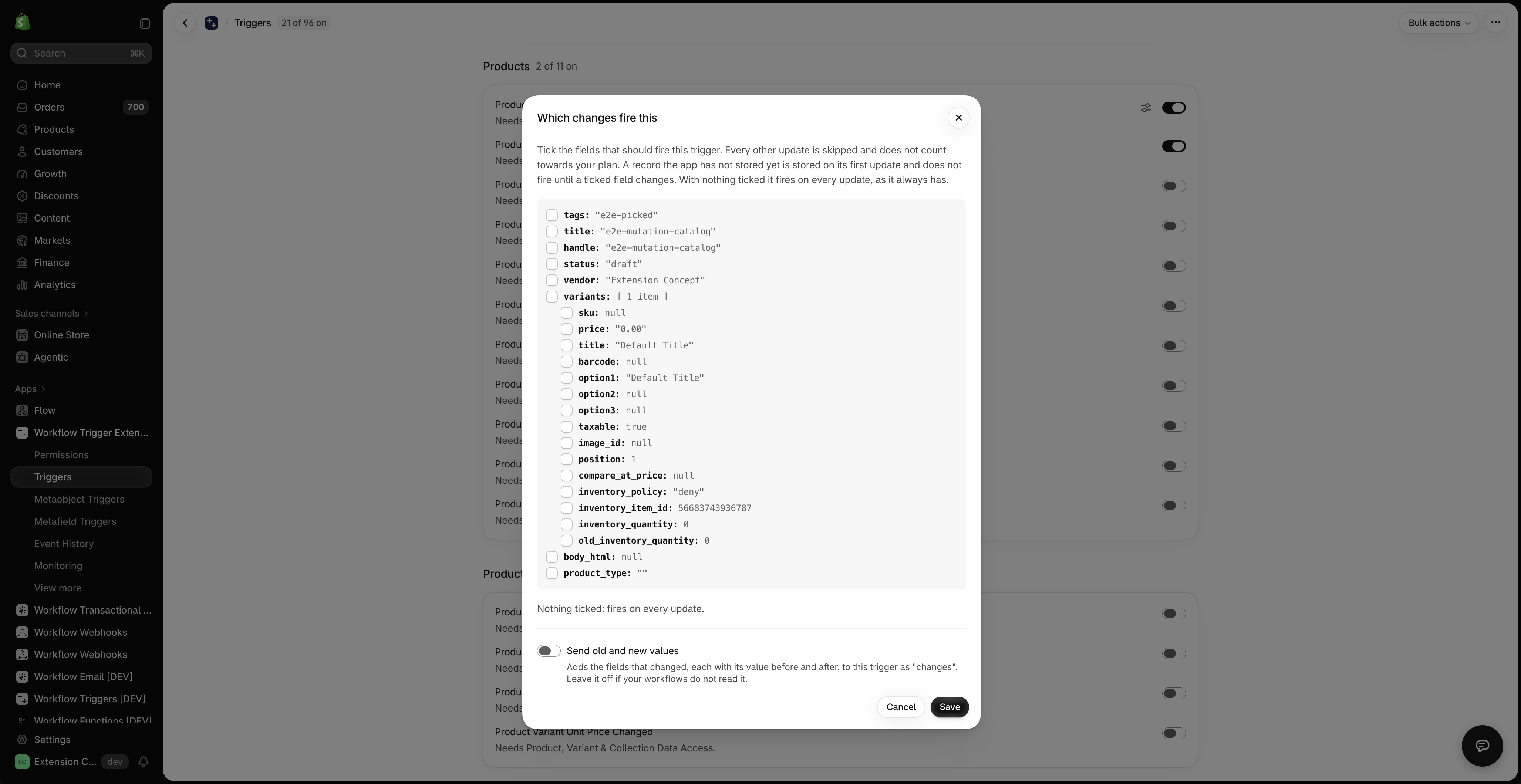
This app has no such limit. Every tracked field has its own trigger, and the generic Product Update trigger can be narrowed to any number of fields in its settings. See Watch more than five fields in one workflow.
Field by field
| What changed | Flow's Product updated | Trigger of this app | Before and after |
|---|---|---|---|
| Price | variants.price, new value only |
Product Variant Price Changed | priceChange.oldPrice, newPrice, delta, percentChange, direction |
| Compare-at price | variants.compareAtPrice, new value only |
Product Variant Price Changed | priceChange.oldCompareAtPrice, newCompareAtPrice |
| Unit price | not on the list (only variants.showUnitPrice) |
Product Variant Unit Price Changed | unitPriceChange.oldUnitPrice, newUnitPrice, delta, percentChange, direction |
| Cost per item | not on Product updated. Inventory item updated has unitCost, new value only |
Product Variant Cost Changed | variantCostChange.oldCost, newCost, delta, percentChange, direction |
| SKU | not on Product updated. Inventory item updated has sku, new value only |
Product Variant SKU Changed | skuChange.oldSku, newSku |
| Barcode | variants.barcode, variants.barcodes, new value only |
Product Variant Barcode Changed | the old and new primary barcode, the old and new barcode lists, and what was added and removed |
| Stock at a location | not on the list | Inventory Level Changed at Location, Out of Stock at Location, Back in Stock at Location | inventoryLevel.oldAvailable, newAvailable, delta, and the location |
| Title | title, new value only |
Product Title Changed | oldTitle, newTitle |
| Handle | handle, new value only |
Product Handle Changed | oldHandle, newHandle, ready for a URL redirect |
| Description | descriptionHtml, new value only |
Product Description Changed | oldDescription, newDescription |
| Status | status, new value only |
Product Status Changed | oldStatus, newStatus |
| Vendor | vendor, new value only |
Product Vendor Changed | oldVendor, newVendor |
| Product type | productType, new value only |
Product Type Changed | oldType, newType |
| Tags | tags, the list after the change |
Product Tags Added, Product Tags Removed | addedTags, removedTags, previousTags, currentTags |
| Sales channels | not on the list | Product Published to Channel, Product Unpublished from Channel | channels.added, channels.removed, channels.current |
| Product metafield | metafield.value, new value only |
Product Metafield Update | metafield.value, metafield.previousValue |
| Variant metafield | variants.metafield.value, new value only |
Product Variant Metafield Update | metafield.value, metafield.previousValue |
| Several of these in one workflow | five at most | Product Update, narrowed to the fields you tick | changes.fields and changes.items with field, oldValue, newValue, one item per variant |
| Options, media, template and other product fields | yes, within the five fields | Product Update narrowed to those fields. For their value before and after, the custom trigger template Product fields changed (before and after) | |
| Bundle components, combined listings | yes, within the five fields | no trigger |
Behaviour differences worth knowing
- A new product. Shopify's help page says that, depending on the fields you monitor, adding a product can also start the workflow: every product has at least one variant, so a workflow that monitors
variants.priceruns when a product is added. The change triggers of this app remember a new product and fire from its first real change on. - Several fields in one save. Flow's trigger runs once and does not say which field changed. This app fires the matching trigger for each kind of change, each with its own values before and after.
- A save that changes nothing starts neither.
- Looking back. Shopify stores workflow runs for 14 days after a run has completed. This app has its own Event History with the values of every event, and an events block on the record's page in the Shopify admin. See Event history and troubleshooting and Trigger events on a record's admin page.
Workflows that need the value before
- Redirect the old URL when a handle changes. The redirect goes from
oldHandletonewHandle. Without the old handle there is nothing to redirect from. Redirect old product URLs when a product handle changes - Tag a real markdown.
priceChange.percentChangeLess than or equal to-10separates a price drop of 10 percent from every other price edit. Tag products when a variant price drops by 10 percent or more - Mark a product as on sale, and unmark it. The compare-at price was empty and is set now, or the other way round. Tag products as on sale when a compare at price is added and Remove the sale tag when a compare at price is removed
- Tag new arrivals. Product Status Changed with
oldStatusEqual todraftandnewStatusEqual toactiveis true when a product goes live, and not when an archived product is restored. Tag products as new arrivals when their status changes to active - Keep the previous title or SKU. Save the previous title when a product title changes and Save the previous SKU when a variant SKU changes
- Notice when a product leaves a sales channel. Tag products when they are unpublished from the Online Store
Which one to use
- Flow's Product updated: you only need to know that one of up to five fields changed, or you watch options, media, bundle components or combined listings.
- This app: your workflow compares before and after (price drops, renamed products, removed tags), needs SKU, cost, stock per location or sales channels in the same place, or watches more than five fields in one workflow.
Both can run on the same store.
Does Product updated give the old price?
No. Shopify's help page says the trigger provides only the current values. Product Variant Price Changed carries the old and the new price, the difference, the change in percent and the direction.
Does Product updated run when a product is created?
It can. Shopify's help page says that a workflow monitoring a variant field such as variants.price runs when a product is added, because every product has at least one variant. Setting product fields such as title or tags when a product is added does not start it.
Can Product updated watch the SKU or the cost?
Not on the product. Shopify has put both on the inventory item: the Inventory item updated trigger can watch sku and unitCost, again with the current value only. Product Variant SKU Changed and Product Variant Cost Changed carry the value before and after.
How do I react only to a price drop of a certain size?
Use Product Variant Price Changed with a condition on priceChange.percentChange, for example Less than or equal to -10. The app works out the percentage, because a Flow condition cannot calculate.
Next steps
- Product triggers, step by step and Product variant triggers, step by step - every product and variant trigger with an example.
- Flow's updated triggers and Workflow Trigger Extensions - the overview of all nine updated triggers.
- Old and new values: what a workflow can do with them - all values before and after, by trigger.