

Custom triggers
The built-in triggers cover the changes most stores care about. A custom trigger covers the rest: you pick a Shopify event, write a few lines of JavaScript to decide whether it matters and what to send, and it becomes a trigger you can use in Shopify Flow.
Three things it solves that a built-in trigger cannot:
- Fire only on your condition. "Only when an order over 500 EUR gets the
viptag" is one line of code, instead of a workflow that runs on every order and then filters. - Fire on a transition, not a state. Your code sees the value before and after the change, so "status went from draft to active" or "stock crossed below 5" is possible. A condition on the current value cannot express that.
- Send exactly the fields you want. Reshape the event into the values your workflow actually uses, rather than reading them back out one by one.
A custom trigger does not even need a Shopify event: it can also run on a schedule and decide for itself what changed.
How it works
- Choose what makes it run: one Shopify event, or a schedule.
- For an event, pick the event it listens to - any Shopify event the app already receives - or start from a template, which picks the event and fills in the code.
- Capture a real payload. Make that change in your store and the app grabs the exact event body.
- Write a transform - return an object to fire, return
nullto skip. - Test it against the captured event, and see precisely what your workflow would receive.
- Switch it on.
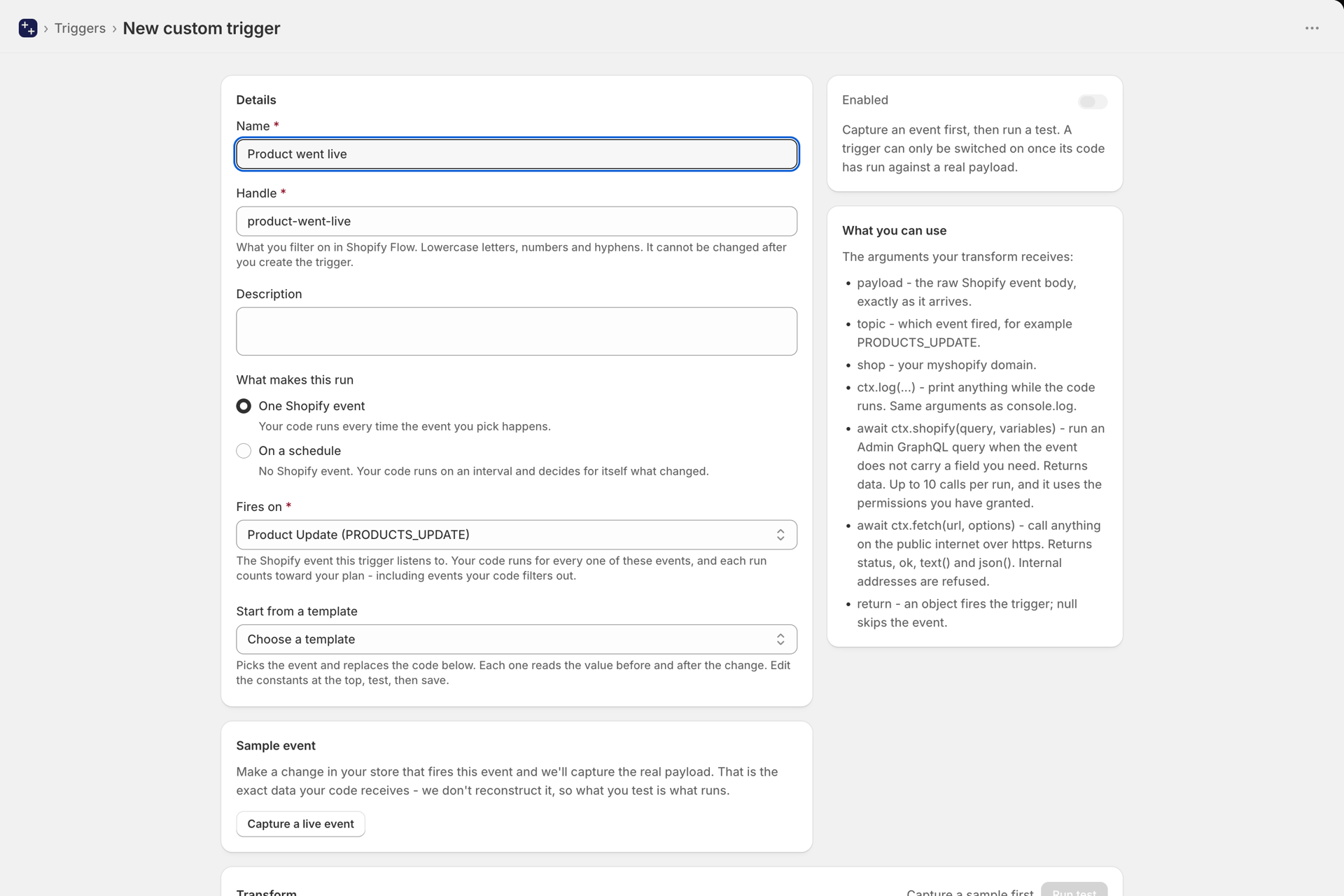
Writing the transform
Your trigger is a JavaScript module that exports a function named transform. It receives four arguments:
payload- the raw Shopify event body, exactly as it arrives.topic- which event fired, for examplePRODUCTS_UPDATE.shop- your myshopify domain.ctx-ctx.log(...)prints to the log panel next to the editor,ctx.shopify(...)runs an Admin GraphQL query, andctx.fetch(...)calls a URL on the public internet.
What you return decides what happens:
- Return an object and the trigger fires, carrying that object.
- Return
nulland the event is skipped. This is how filtering works - there is no separate filter language to learn. - Leave the file empty and it fires on every event of that type.
/**
 * Only fire for high-value orders carrying the vip tag.
 */
export async function transform(payload, topic, shop, ctx) {
  const total = parseFloat(payload.total_price || "0");
  const tags = (payload.tags || "").split(",").map(t => t.trim());

  if (total < 500) return null;
  if (!tags.includes("vip")) return null;

  ctx.log("firing for", payload.name, total);

  return {
    orderId: payload.admin_graphql_api_id,
    orderNumber: payload.name,
    total,
    currency: payload.currency,
    customerEmail: payload.email,
  };
}
The value before the change
Shopify's own events tell you what a record looks like now. They never tell you what it looked like before, so "did this just become active?" cannot be answered from the event alone. The app keeps a baseline of every record it watches, compares each update against it, and hands your code the difference.
On Product Update, Order Update and Customer Update, payload._changes lists every tracked field this update changed, each with oldValue and newValue:
- Products:
title,handle,description,status,vendor,productType,tags - Orders:
financialStatus,fulfillmentStatus,tags,note,lineItems, andcustomAttributes.<name> - Customers:
tags,note,state(ENABLED,DISABLED,INVITED,DECLINED)
It is an empty list when the update was outside those fields - an inventory change, for example - or when the app is seeing the record for the first time. The sample event you capture in the editor shows the field, so you can see its real shape before you write against it.
/**
 * Fire only when a product BECOMES active - not on every later edit of an
 * active product, which is what a condition on the current status would do.
 */
export async function transform(payload, topic, shop, ctx) {
  const change = (payload._changes || []).find((c) => c.field === "status");
  if (!change) return null;
  if (change.oldValue !== "draft" || change.newValue !== "active") return null;

  return {
    productId: payload.admin_graphql_api_id,
    title: payload.title,
    oldStatus: change.oldValue,
    newStatus: change.newValue,
  };
}
The more specific events carry their own old and new values, so you do not need _changes there: a price change has oldPrice, newPrice and percentChange; an inventory change has _oldAvailable, _newAvailable and _delta; a metafield change has previousValue next to metafield.value.
Start from a template
Under Fires on in the editor, Start from a template picks the event and fills in working code. Edit the constants at the top, test, then save. Each template reads a value before and after the change:
- A product, order or customer field changed from one value to another - status went from draft to active, an order became paid, an account became enabled.
- Price dropped by more than N percent - a real markdown, not every price edit.
- Stock fell below a threshold - fires once, at the moment stock crosses the line, not on every sale while it is already low.
- Product metafield number crossed a threshold - a rating fell below 3, a margin went above 40.
- Order paid by a high-value customer - reads the customer's lifetime spend from your store and fires only above the amount you set.
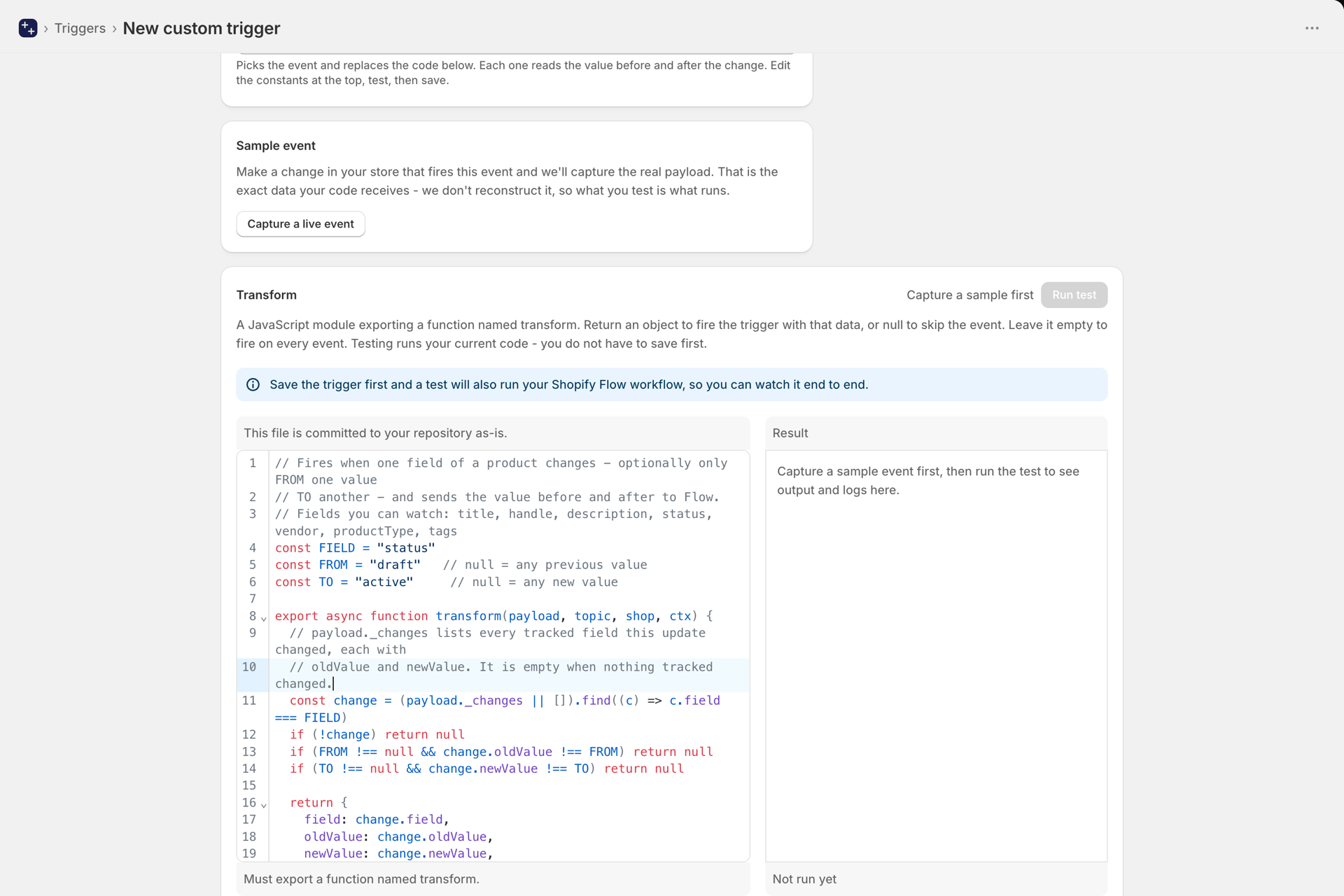
Fetching extra data with ctx.shopify
Webhook bodies only carry the fields Shopify sends. When you need something else - a customer's order count, a variant's inventory, a metafield - query the Admin API directly from your transform:
export async function transform(payload, topic, shop, ctx) {
  const data = await ctx.shopify(`
    query($id: ID!) {
      customer(id: $id) { numberOfOrders tags }
    }
  `, { id: payload.customer.admin_graphql_api_id });

  // Only fire for repeat customers
  if (data.customer.numberOfOrders < 5) return null;

  return {
    orderId: payload.admin_graphql_api_id,
    orderCount: data.customer.numberOfOrders,
  };
}
It returns the query's data, and throws if the query has errors so a mistake shows up in your test rather than silently producing nothing.
Three limits worth knowing:
- Up to 10 calls per run. Enrichment needs a handful; more than that is usually a loop. Fetch what you need in one query where you can.
- It reads, it does not write. It uses the permissions you have granted, and the app only ever asks for read access. A query for order data fails unless Order Data Access is granted on the Permissions page. To change something in your store, do it in the Flow actions that follow the trigger.
- Your store's credentials never reach your code. The query is run by the app on your behalf, so there is no access token inside the sandbox to leak.
ctx.fetch(url, options) works like the browser's fetch for anything on the public internet: a supplier's stock feed, an exchange rate, your own API. Internal and private network addresses are refused. If your trigger code is saved to GitHub, do not put an API key in it.
Triggers that run on a schedule
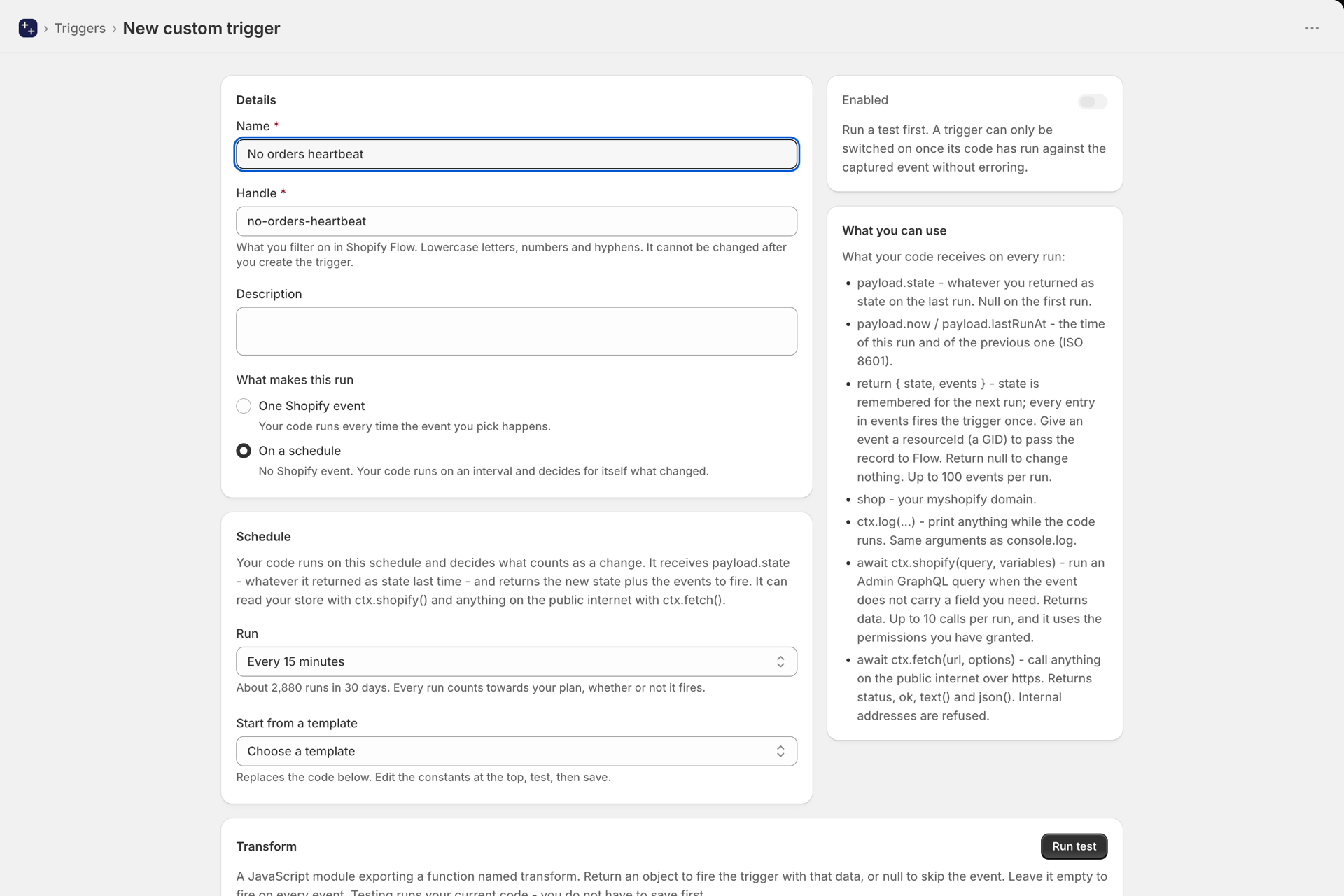
Shopify Flow reacts when something happens. It cannot react when something does not happen, and it cannot see anything outside your store. For that, choose On a schedule under What makes this run. There is no Shopify event behind such a trigger: your code runs on an interval, from every 30 seconds up to once a day, and decides for itself what counts as a change.
It is the same transform function, with a different payload and a different return value:
payload.state- whatever your code returned asstateon its previous run.nullon the first run.payload.nowandpayload.lastRunAt- timestamps.- Return
{ state, events }: the new state to remember (up to 32 KB) and a list of events to fire (up to 100 per run). Each event fires Custom Trigger once; an event'sresourceId, if you set one, becomes the record id in Flow. Returnnullwhen there is nothing to report.
Make the first run only remember, never fire. On its first run your code has nothing to compare with, so everything would look new. Store what you see and return no events, and switching the trigger on never floods your workflows. All the templates do this.
// Fires when a value at a JSON URL changes, with the value before and after.
const URL = "https://api.example.com/stock/1042"

export async function transform(payload, topic, shop, ctx) {
  const res = await ctx.fetch(URL, { headers: { accept: "application/json" } })
  if (!res.ok) throw new Error("The URL answered with HTTP " + res.status)
  const value = String((await res.json()).stock)

  // The first run only remembers the value.
  const previous = payload.state ? payload.state.value : undefined
  if (previous === undefined || previous === value) return { state: { value } }

  return {
    state: { value },
    events: [{ oldValue: previous, newValue: value }],
  }
}
Templates for scheduled triggers, under Start from a template in the Schedule card:
- Product, order or customer not updated for N days - stale catalogue reviews, stuck orders, win-back. Each record fires once per quiet period, and anything already overdue when you switch it on does not fire all at once.
- A value outside Shopify changed - a supplier stock feed, an exchange rate, a price list, with the difference and the percentage for numbers.
- New item in an RSS or Atom feed - supplier news, a listing feed, a status page.
- No orders for N hours - a heartbeat for your store. Fires once when orders stop and once when they return.
Test runs your code once without firing anything and without storing the state, so you can run it as often as you like.
Using it in Shopify Flow
Every custom trigger arrives in Flow as the same trigger: Custom Trigger. Add it to a workflow, then add a condition on Trigger handle equals your trigger's handle.
That handle is shown on the trigger's page and never changes, even if you rename the trigger - so your workflow keeps working.
Each key your transform returns becomes a field on the trigger, and the whole object is also available as JSON if you would rather parse it yourself.
Keep the code in GitHub
You can connect a GitHub repository so your trigger code lives under version control. Changes become reviewable in a pull request, you can see who changed what, and you can roll back a transform that stopped working.
Connect it on the Developer page, under Connections. You choose which repositories the app can see, and you can revoke that access from GitHub at any time.
Once a repository is selected, every existing trigger is written to it immediately, and it stays in step in both directions:
| What you do | What happens |
|---|---|
| Create, edit or duplicate a trigger in the app | The file is committed to your repository |
| Delete a trigger in the app | The file is removed from your repository |
| Push a change to the connected branch | The trigger's code is updated in the app |
Each trigger is one file named after its handle, containing exactly the module you see in the editor - nothing wrapped around it. That means you can open it in your own editor, run it, and lint it like any other JavaScript file.
Going back to an earlier version
You do not need to know git to undo a change. Once a repository is connected, the editor shows a Version dropdown listing every previous version of that file with its date and author. Pick one and it loads into the editor as an unsaved change, so you can read it first - saving is what puts it back.
Test while you edit locally
If you are editing the file in your own editor, you can run it against the captured sample event without saving it to the app first. Use an API key with the execute level from the Developer page:
curl -X POST https://shopify.workflow-trigger-extensions.app/api/v1/triggers/custom/high-value-vip-order/test \
  -H "Authorization: Bearer ftk_your_key_here" \
  -H "Content-Type: application/json" \
  -d "$(jq -Rn --rawfile c flow-triggers/high-value-vip-order.js '{code:$c}')"
You get back the same result the app's Test button shows: whether it would fire, the output object, your ctx.log lines and the run time.
Nothing is fired and nothing is saved by this endpoint, and it does not use any plan allowance - so it is safe to run on every save from a file watcher. (The Run test button inside the app does fire your Flow workflow, so you can watch it run end to end; that is also free.)
You can also fetch the sample payload on its own with a read key, save it locally, and run the file entirely offline:
curl https://shopify.workflow-trigger-extensions.app/api/v1/triggers/custom/high-value-vip-order/test \
  -H "Authorization: Bearer ftk_your_key_here"
Does a custom trigger use my plan allowance?▾
Yes, and it counts every event it inspects - not only the ones it fires on. If your trigger listens to Product Update and your store has 60,000 product updates a month, that is 60,000 events even if your code fires on 100 of them.
We receive, deduplicate and queue each of those events, then run your code in an isolated sandbox - all before your code decides whether to fire. The count reflects that work.
Put another way: it costs the same as the built-in trigger on the same event would have. You are not charged extra for filtering, and testing is always free. A scheduled trigger counts once per run.
Is testing free?▾
Yes. Both the Run test button in the app and the /test API endpoint are exempt, even though Run test genuinely fires your Flow workflow so you can watch it run. Only live executions use your allowance, so you can iterate on a transform as much as you like.
Why is payload._changes empty?▾
Either the update was outside the tracked fields - an inventory or variant change on a product, for example - or the app has no baseline for that record yet. The baseline is stored the first time the app sees a record, so the very first update of a record it has never seen carries no old value. Every update after that does.
Can my code change data in my store?▾
No. ctx.shopify runs with the read permissions you granted, and the app never asks for write access. That is deliberate: a trigger that edits the record it listens to starts itself again, which is the loop Shopify switches workflows off for. Change data in the Flow actions that follow the trigger.
Can I change the handle later?▾
No, and that is deliberate. Your Flow workflow filters on the handle, so changing it would silently stop that workflow running. You can rename the trigger freely - the handle stays put.
The handle is also the filename in your GitHub repository, so it never moves either.
What happens if my code has a bug?▾
The event is skipped and the error is recorded on the trigger, so you can see what went wrong. A failing transform never blocks anything else - your other triggers, custom or built-in, carry on unaffected.
Where does my code run?▾
In an isolated sandbox, separate from the rest of the app, with a short time limit and no access to your store's credentials. It only ever sees the event payload you captured, plus whatever you fetch with ctx.shopify or ctx.fetch.
What if I edit the file in GitHub and in the app at the same time?▾
Whichever you save last wins. Saving in the app commits over the file, and pushing to the connected branch overwrites the code held in the app. If you work mostly in your repository, treat the app's editor as read-only to avoid surprising yourself.
Can a file in my repository create a new trigger?▾
No. A trigger also needs to know which Shopify event it listens to, and the file only contains code - guessing the event would wire it to the wrong thing. Create the trigger in the app first, then edit its file freely.
Can it fire on events the app does not already receive?▾
No. A custom trigger listens to the events the app already subscribes to for your store, which depends on the permissions you have granted. Grant the permission for a resource and its events become available to custom triggers too. For anything else, run it on a schedule.
Next steps
- Developer API, MCP, GitHub and trigger simulation - manage and test triggers from your own code or an AI assistant.
- Generate trigger code with AI - describe the trigger in plain English and let AI write the code.
- Plans and usage - what counts as an event and how the allowance works.
- How triggers work - the built-in triggers and how they fire.