
Product variant triggers, step by step
Step-by-step Shopify Flow tutorials for variant price, SKU, barcode and unit price changes, with old and new values, delta and percent change.
Shopify reports a changed variant as "the product was updated". These four triggers look inside: they fire once per variant whose price, SKU, barcode or unit price changed, with the value before and after. Price and unit price also carry delta, percentChange and direction, because a Flow condition cannot do arithmetic and money arrives as text.
On this page: Product Variant Price Changed, Product Variant SKU Changed, Product Variant Barcode Changed, Product Variant Unit Price Changed
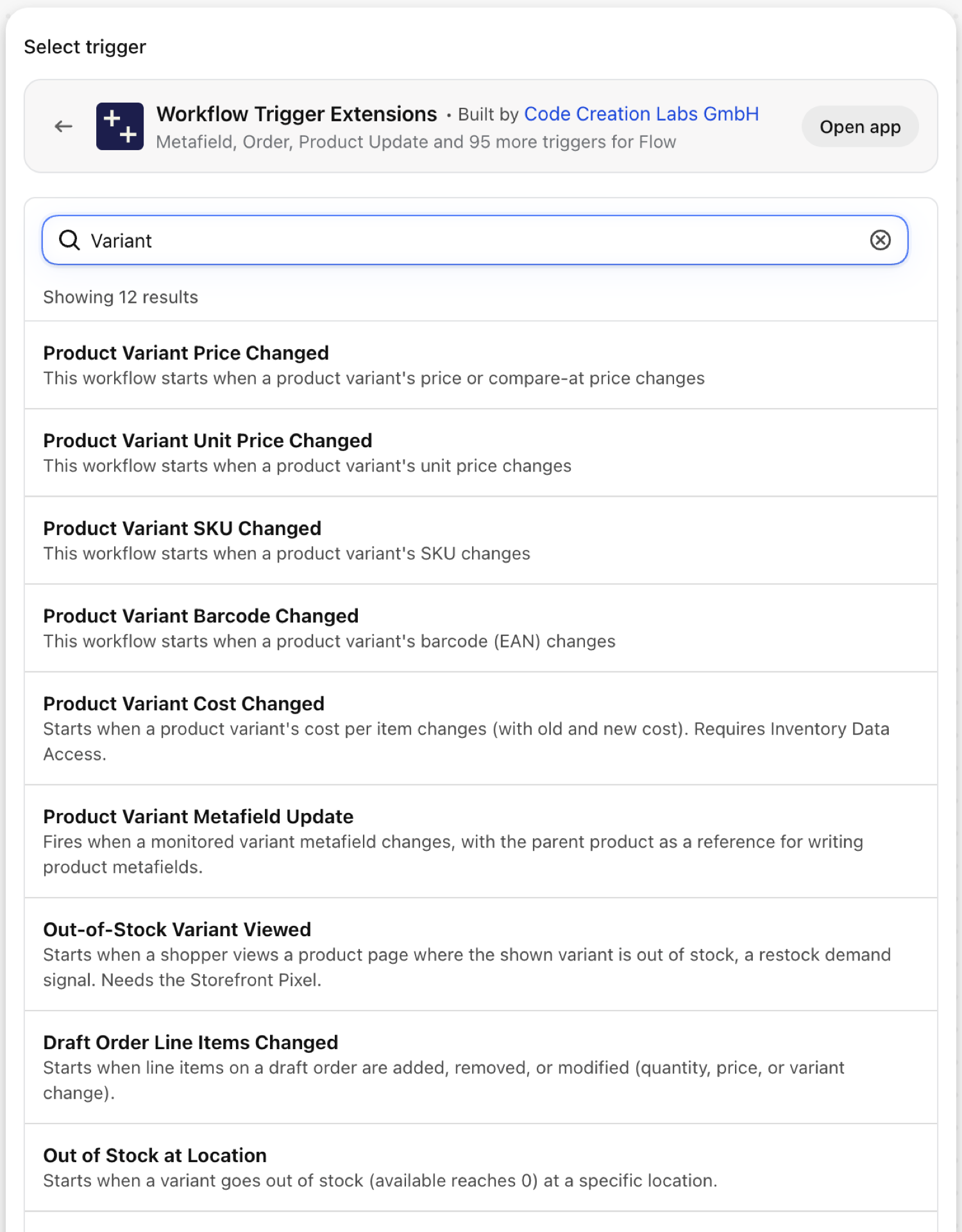
Product Variant Price Changed
Fires once per variant whose price or compare-at price changed. A product with five variants that all get a new price fires five times.
| Fires from | Shopify webhook plus change detection |
| Permission | Product, Variant & Collection Data Access |
| Switched on | Turning on a Flow workflow that uses it switches it on. Its own switch is on the app's Triggers page |
Use it for
- Alert merchandising about markdowns above a threshold.
- Keep bundle, B2B or marketplace prices in step with the component price.
- Catch pricing mistakes: a price that fell by more than half is rarely intended.
What Product Variant Price Changed sends to your workflow
| Variable in Flow | Type | What it holds |
|---|---|---|
productVariant |
Object | The product variant with updated price |
productVariant.id |
ID | Global ID of the product variant |
productVariant.title |
Text | The title of the variant |
productVariant.sku |
Text | The SKU of the variant |
productVariant.barcode |
Text | The barcode (EAN) of the variant |
productVariant.price |
Money (amount, currencyCode) | The current price of the variant |
productVariant.compareAtPrice |
Money (amount, currencyCode) | The compare-at price of the variant |
productVariant.product |
Object | The product this variant belongs to |
productVariant.product.id |
ID | Global ID of the product |
productVariant.product.title |
Text | The title of the product |
productVariant.product.handle |
Text | The handle of the product |
priceChange |
Object | The price change details (old and new values) |
priceChange.oldPrice |
Money (amount, currencyCode) | The previous price |
priceChange.newPrice |
Money (amount, currencyCode) | The new price |
priceChange.oldCompareAtPrice |
Money (amount, currencyCode) | The previous compare-at price |
priceChange.newCompareAtPrice |
Money (amount, currencyCode) | The new compare-at price |
priceChange.delta |
Number | New value minus old value. Null when either side is unknown |
priceChange.percentChange |
Number | Change as a percentage of the old value (-12.5 = dropped by 12.5 percent). Null when the old value is 0 or unknown |
priceChange.direction |
Text | increase, decrease or unchanged |
eventId |
Text | The id of this event. Search for it in the app's Event History to see exactly what was sent. |
Example: Alert on markdowns of more than 10 percent
- Pick Product Variant Price Changed as the trigger.
- Add a Condition:
priceChange.percentChangeLess than-10. - Add Send internal email:
{{productVariant.product.title}} / {{productVariant.title}}: {{priceChange.oldPrice.amount}} -> {{priceChange.newPrice.amount}} {{priceChange.newPrice.currencyCode}} ({{priceChange.percentChange}}%). - Turn the workflow on and change a test variant's price.
Product Variant SKU Changed
Fires once per variant whose SKU changed.
| Fires from | Shopify webhook plus change detection |
| Permission | Product, Variant & Collection Data Access |
| Switched on | Turning on a Flow workflow that uses it switches it on. Its own switch is on the app's Triggers page |
Use it for
- Tell the warehouse or ERP that a SKU was renamed before the next order arrives with the new one.
- Block accidental SKU edits on live products.
What Product Variant SKU Changed sends to your workflow
| Variable in Flow | Type | What it holds |
|---|---|---|
productVariant |
Object | The product variant with updated SKU |
productVariant.id |
ID | Global ID of the product variant |
productVariant.title |
Text | The title of the variant |
productVariant.sku |
Text | The SKU of the variant |
productVariant.barcode |
Text | The barcode of the variant |
productVariant.price |
Money (amount, currencyCode) | The current price of the variant |
productVariant.product |
Object | The product this variant belongs to |
productVariant.product.id |
ID | Global ID of the product |
productVariant.product.title |
Text | The title of the product |
productVariant.product.handle |
Text | The handle of the product |
skuChange |
Object | The SKU change details (old and new values) |
skuChange.oldSku |
Text | The previous SKU |
skuChange.newSku |
Text | The new SKU |
eventId |
Text | The id of this event. Search for it in the app's Event History to see exactly what was sent. |
Example: Send old and new SKU to the warehouse system
- Pick Product Variant SKU Changed as the trigger.
- Add Send HTTP request to your ERP or WMS endpoint with a JSON body containing
{{skuChange.oldSku}},{{skuChange.newSku}}and{{productVariant.id}}. - Add a Condition in front if blank SKUs should be ignored:
skuChange.oldSkuNot empty and exists. - Turn the workflow on.
Product Variant Barcode Changed
Fires once per variant whose barcode (EAN, UPC, ISBN) changed.
| Fires from | Shopify webhook plus change detection |
| Permission | Product, Variant & Collection Data Access |
| Switched on | Turning on a Flow workflow that uses it switches it on. Its own switch is on the app's Triggers page |
Use it for
- Re-submit a product to a marketplace or Google Merchant Center that matches on GTIN.
- Reprint shelf labels for retail locations.
What Product Variant Barcode Changed sends to your workflow
| Variable in Flow | Type | What it holds |
|---|---|---|
productVariant |
Object | The product variant with updated barcode |
productVariant.id |
ID | Global ID of the product variant |
productVariant.title |
Text | The title of the variant |
productVariant.sku |
Text | The SKU of the variant |
productVariant.barcode |
Text | The barcode (EAN) of the variant |
productVariant.price |
Money (amount, currencyCode) | The current price of the variant |
productVariant.product |
Object | The product this variant belongs to |
productVariant.product.id |
ID | Global ID of the product |
productVariant.product.title |
Text | The title of the product |
productVariant.product.handle |
Text | The handle of the product |
barcodeChange |
Object | The barcode change details (old and new values) |
barcodeChange.oldBarcode |
Text | The previous barcode |
barcodeChange.newBarcode |
Text | The new barcode |
eventId |
Text | The id of this event. Search for it in the app's Event History to see exactly what was sent. |
Example: Ask retail to reprint a label
- Pick Product Variant Barcode Changed as the trigger.
- Add Send internal email to the store team:
{{productVariant.product.title}} / {{productVariant.title}}: barcode {{barcodeChange.oldBarcode}} is now {{barcodeChange.newBarcode}}. - Turn the workflow on.
Product Variant Unit Price Changed
Fires once per variant whose unit price changed, the "price per 100 g" that some countries require next to the price.
| Fires from | Shopify webhook plus change detection |
| Permission | Product, Variant & Collection Data Access |
| Switched on | Turning on a Flow workflow that uses it switches it on. Its own switch is on the app's Triggers page |
Use it for
- Re-check legally required unit prices after a price or a pack size change.
- Update printed price tags that show the unit price.
What Product Variant Unit Price Changed sends to your workflow
| Variable in Flow | Type | What it holds |
|---|---|---|
productVariant |
Object | The product variant with updated unit price |
productVariant.id |
ID | Global ID of the product variant |
productVariant.title |
Text | The title of the variant |
productVariant.sku |
Text | The SKU of the variant |
productVariant.barcode |
Text | The barcode (EAN) of the variant |
productVariant.price |
Money (amount, currencyCode) | The current price of the variant |
productVariant.unitPrice |
Money (amount, currencyCode) | The current unit price of the variant |
productVariant.product |
Object | The product this variant belongs to |
productVariant.product.id |
ID | Global ID of the product |
productVariant.product.title |
Text | The title of the product |
productVariant.product.handle |
Text | The handle of the product |
unitPriceChange |
Object | The unit price change details (old and new values) |
unitPriceChange.oldUnitPrice |
Money (amount, currencyCode) | The previous unit price |
unitPriceChange.newUnitPrice |
Money (amount, currencyCode) | The new unit price |
unitPriceChange.delta |
Number | New value minus old value. Null when either side is unknown |
unitPriceChange.percentChange |
Number | Change as a percentage of the old value (-12.5 = dropped by 12.5 percent). Null when the old value is 0 or unknown |
unitPriceChange.direction |
Text | increase, decrease or unchanged |
eventId |
Text | The id of this event. Search for it in the app's Event History to see exactly what was sent. |
Example: Review unit prices that rose
- Pick Product Variant Unit Price Changed as the trigger.
- Add a Condition:
unitPriceChange.directionEqual toincrease. - Add Send internal email with
{{unitPriceChange.oldUnitPrice.amount}}and{{unitPriceChange.newUnitPrice.amount}}. - Turn the workflow on.
Next steps
- Complete trigger reference - every trigger on one page.
- Choosing the right trigger - which one fits your case.
- Custom triggers - when no built-in trigger fits, write your own.
- Event history and troubleshooting - see what fired and what it carried.
- Trigger events on a record's admin page - the latest events of one record, on its own page in the Shopify admin.