
Market triggers, step by step
Step-by-step Shopify Flow tutorials for Shopify Markets: market created, updated, deleted and status changed.
Four triggers for Shopify Markets: created, updated, deleted, and the status change that matters most - a market going live.
On this page: Market Created, Market Updated, Market Status Changed, Market Deleted
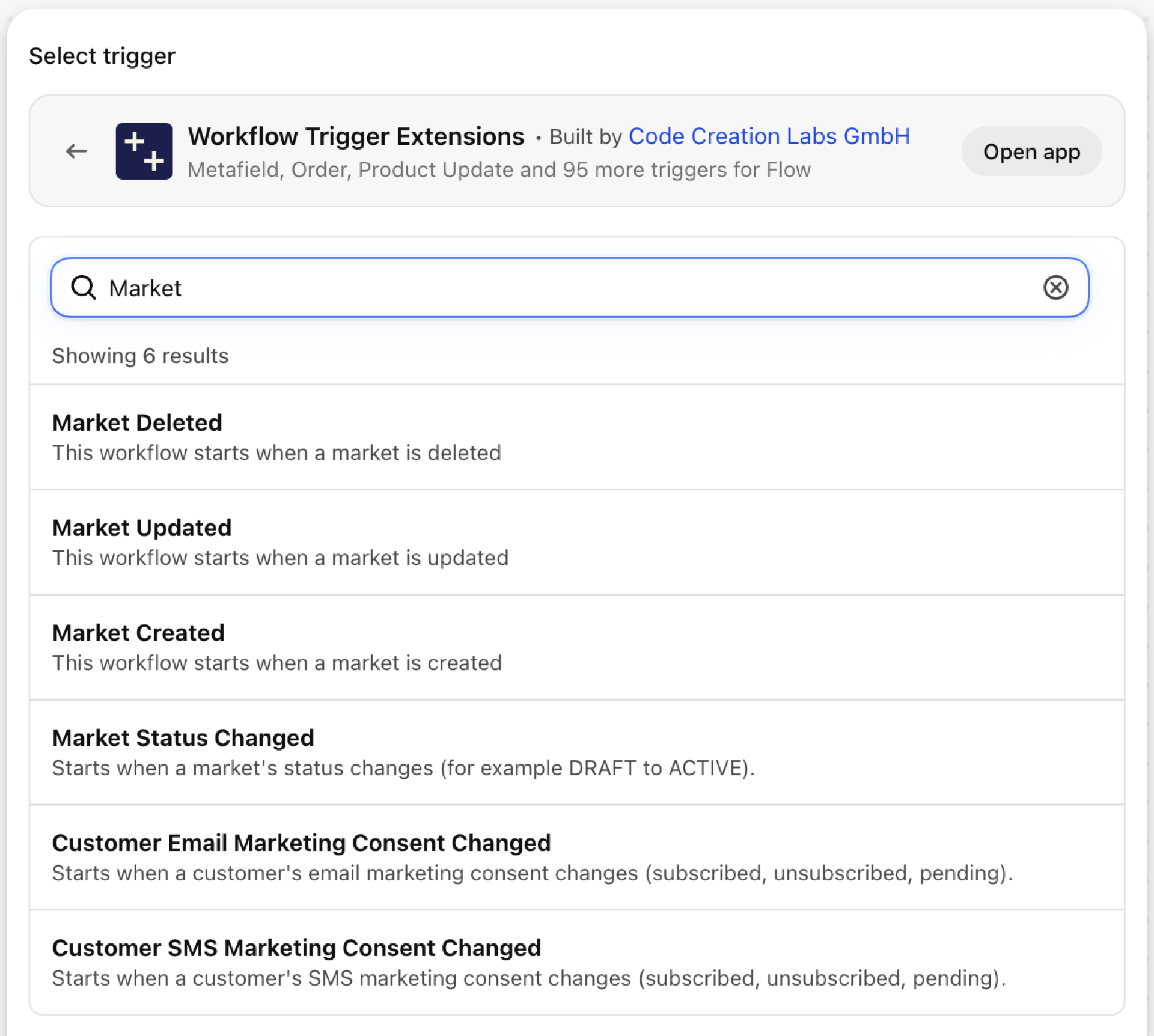
Market Created
Fires when a market is created.
| Fires from | Shopify webhook |
| Permission | Markets Data Access |
| Switched on | Turning on a Flow workflow that uses it switches it on. Its own switch is on the app's Triggers page |
Use it for
- Start the launch checklist for a new country: translations, duties, payment methods.
What Market Created sends to your workflow
| Variable in Flow | Type | What it holds |
|---|---|---|
market |
Object | The created market |
market.id |
ID | The Shopify GID of the market |
market.name |
Text | The merchant-visible name of the market |
market.handle |
Text | The handle of the market |
market.type |
Text | The market type (REGION, POINT_OF_SALE, B2B) |
market.status |
Text | The market status (ACTIVE, DRAFT) |
market.enabled |
True / false | Whether the market is enabled (deprecated - prefer status) |
market.primary |
True / false | Whether this is the shop's primary market |
eventId |
Text | The id of this event. Search for it in the app's Event History to see exactly what was sent. |
Example: Open a launch checklist for a new market
- Pick Market Created as the trigger.
- Add Send internal email (or a request to your project tool):
New market {{market.name}} ({{market.type}}) was created with status {{market.status}}. - Turn the workflow on.
Market Updated
Fires when a market is edited.
| Fires from | Shopify webhook |
| Permission | Markets Data Access |
| Switched on | Turning on a Flow workflow that uses it switches it on. Its own switch is on the app's Triggers page |
Use it for
- Review changes to live markets.
What Market Updated sends to your workflow
| Variable in Flow | Type | What it holds |
|---|---|---|
market |
Object | The updated market |
market.id |
ID | The Shopify GID of the market |
market.name |
Text | The merchant-visible name of the market |
market.handle |
Text | The handle of the market |
market.type |
Text | The market type (REGION, POINT_OF_SALE, B2B) |
market.status |
Text | The market status (ACTIVE, DRAFT) |
market.enabled |
True / false | Whether the market is enabled (deprecated - prefer status) |
market.primary |
True / false | Whether this is the shop's primary market |
eventId |
Text | The id of this event. Search for it in the app's Event History to see exactly what was sent. |
Example: Review edits to active markets
- Pick Market Updated as the trigger.
- Add a Condition:
market.statusEqual toACTIVE. - Add Send internal email with
{{market.name}}. - Turn the workflow on.
Market Status Changed
Fires when the status of a market changes, for example DRAFT to ACTIVE.
| Fires from | Shopify webhook plus change detection |
| Permission | Markets Data Access |
| Switched on | Turning on a Flow workflow that uses it switches it on. Its own switch is on the app's Triggers page |
Use it for
- Announce a market launch.
- Get warned when a live market is deactivated.
What Market Status Changed sends to your workflow
| Variable in Flow | Type | What it holds |
|---|---|---|
market |
Object | The market whose status changed |
market.id |
ID | The Shopify GID of the market |
market.name |
Text | The merchant-visible name of the market |
market.handle |
Text | The handle of the market |
market.type |
Text | The market type (REGION, POINT_OF_SALE, B2B) |
market.status |
Text | The market status (ACTIVE, DRAFT) |
market.enabled |
True / false | Whether the market is enabled (deprecated - prefer status) |
market.primary |
True / false | Whether this is the shop's primary market |
oldStatus |
Text | The previous market status (for example DRAFT) |
newStatus |
Text | The new market status (for example ACTIVE) |
eventId |
Text | The id of this event. Search for it in the app's Event History to see exactly what was sent. |
Example: Announce a market going live
- Pick Market Status Changed as the trigger.
- Add a Condition:
newStatusEqual toACTIVE. - Add Send internal email:
{{market.name}} is live (was {{oldStatus}}). - Turn the workflow on.
Market Deleted
Fires when a market is deleted. Only the id and the time remain.
| Fires from | Shopify webhook |
| Permission | Markets Data Access |
| Switched on | Turning on a Flow workflow that uses it switches it on. Its own switch is on the app's Triggers page |
Use it for
- Clean up market-specific settings in other systems.
What Market Deleted sends to your workflow
| Variable in Flow | Type | What it holds |
|---|---|---|
marketId |
Text | The Shopify GID of the market |
deletedAt |
Text | The timestamp when the market was deleted |
eventId |
Text | The id of this event. Search for it in the app's Event History to see exactly what was sent. |
Example: Log a deleted market
- Pick Market Deleted as the trigger.
- Add Send internal email with
{{marketId}}and{{deletedAt}}. - Turn the workflow on.
Next steps
- Complete trigger reference - every trigger on one page.
- Choosing the right trigger - which one fits your case.
- Custom triggers - when no built-in trigger fits, write your own.
- Event history and troubleshooting - see what fired and what it carried.