
Order triggers, step by step
Step-by-step Shopify Flow tutorials for order tags, notes, attributes, line items, fulfillment, and status change triggers.
Shopify Flow has good triggers for the big moments of an order: created, paid, fulfilled, cancelled. What it lacks is everything in between. These ten triggers fire on the edits that happen to an order after it exists, each with the detail of what changed.
On this page: Order Update, Order Tags Added, Order Tags Removed, Order Note Changed, Order Attributes Changed, Order Line Items Changed, Order Fulfillment Changed, Order Display Status Changed, Order Financial Status Changed, Order Shipping Address Changed
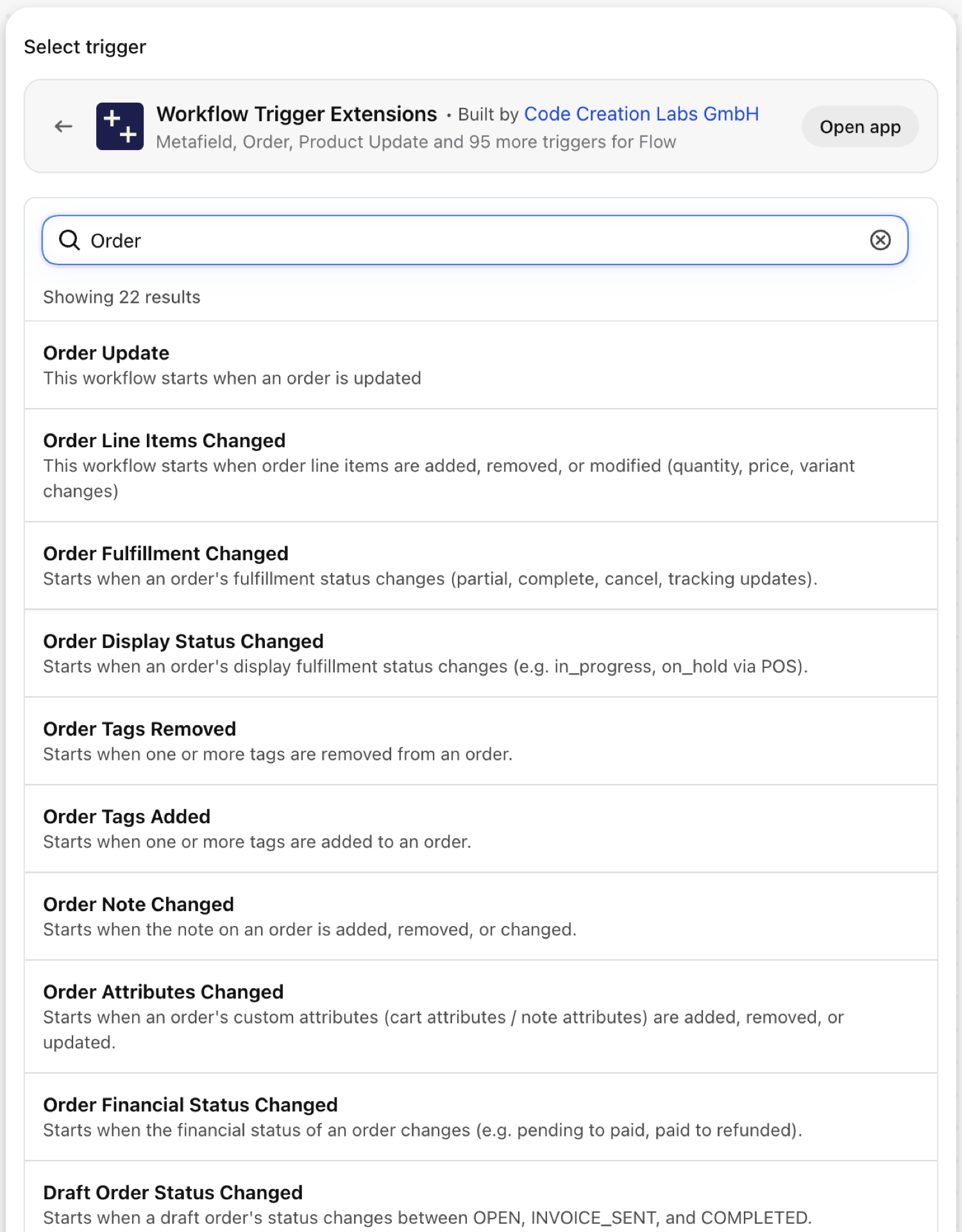
Order Update
Fires on every update of an order. It carries changes: the tracked fields that changed (financial status, fulfillment status, tags, note, line items, custom attributes) with the value before and after.
| Fires from | Shopify webhook plus change detection |
| Permission | Order Data Access |
| Switched on | Turning on a Flow workflow that uses it switches it on. Its own switch is on the app's Triggers page |
Use it for
- One workflow that reacts to several kinds of order edits.
- A change log of orders for customer service.
What Order Update sends to your workflow
| Variable in Flow | Type | What it holds |
|---|---|---|
order |
Order (Shopify) | The order that was updated. A full Shopify order, so all of its fields and Flow's own order actions are available. |
payload |
Text | JSON object containing the GID of the order that was updated (e.g. {"id":"gid://shopify/Order/123"}) |
changes |
Object | Which tracked fields changed (financial status, fulfillment status, tags, note, line items, custom attributes), with the old and new value of each |
changes.fields |
List of text | Names of the tracked fields that changed |
changes.items |
List of objects | Old and new value per changed field |
changes.items (each).field |
Text | The field that changed: financialStatus, fulfillmentStatus, tags, note, lineItems or customAttributes. |
changes.items (each).oldValue |
Text | The value before the update. Long values are shortened |
changes.items (each).newValue |
Text | The value after the update. Long values are shortened |
eventId |
Text | The id of this event. Search for it in the app's Event History to see exactly what was sent. |
Example: Write tracked order changes to the order's timeline via your helpdesk
- Pick Order Update as the trigger.
- Add a Condition:
changes.fieldsNot empty and exists. - Add Send HTTP request to your helpdesk with
{{order.name}}in the body. Flow's text fields accept Liquid, so aforloop overchanges.itemsadds one line per change with itsfield,oldValueandnewValue. - Turn the workflow on.
Order Tags Added
Fires when at least one tag is added to an order.
| Fires from | Shopify webhook plus change detection |
| Permission | Order Data Access |
| Switched on | Turning on a Flow workflow that uses it switches it on. Its own switch is on the app's Triggers page |
Use it for
- Let staff start a process by tagging:
gift-wrap,hold,priority. - React to tags from fraud, subscription or fulfillment apps.
What Order Tags Added sends to your workflow
| Variable in Flow | Type | What it holds |
|---|---|---|
order |
Order (Shopify) | The order whose tags changed. A full Shopify order, so all of its fields and Flow's own order actions are available. |
addedTags |
Text | Comma-separated list of tags that were added to the order |
removedTags |
Text | Comma-separated list of tags that were removed from the order in the same update (may be empty) |
currentTags |
Text | Comma-separated list of all current tags on the order |
previousTags |
Text | Comma-separated list of all previous tags on the order before this update |
eventId |
Text | The id of this event. Search for it in the app's Event History to see exactly what was sent. |
Example: Hold fulfillment when an order is tagged hold
- Pick Order Tags Added as the trigger.
- Add a Condition:
addedTagsIncludeshold. - Add a For each over
order.fulfillmentOrderswith the action Hold fulfillment order. - Turn the workflow on. Build the mirror image with Order Tags Removed and Release fulfillment order hold.
Order Tags Removed
Fires when at least one tag is removed from an order.
| Fires from | Shopify webhook plus change detection |
| Permission | Order Data Access |
| Switched on | Turning on a Flow workflow that uses it switches it on. Its own switch is on the app's Triggers page |
Use it for
- Release what a tag was holding back.
- Close a task when the
needs-reviewtag is taken off.
What Order Tags Removed sends to your workflow
| Variable in Flow | Type | What it holds |
|---|---|---|
order |
Order (Shopify) | The order whose tags changed. A full Shopify order, so all of its fields and Flow's own order actions are available. |
removedTags |
Text | Comma-separated list of tags that were removed from the order |
addedTags |
Text | Comma-separated list of tags that were added to the order in the same update (may be empty) |
currentTags |
Text | Comma-separated list of all current tags on the order |
previousTags |
Text | Comma-separated list of all previous tags on the order before this update |
eventId |
Text | The id of this event. Search for it in the app's Event History to see exactly what was sent. |
Example: Release the hold when the tag is removed
- Pick Order Tags Removed as the trigger.
- Add a Condition:
removedTagsIncludeshold. - Add a For each over
order.fulfillmentOrderswith Release fulfillment order hold. - Turn the workflow on.
Order Note Changed
Fires when the note of an order is added, changed or cleared, by staff or by the customer at checkout edits.
| Fires from | Shopify webhook plus change detection |
| Permission | Order Data Access |
| Switched on | Turning on a Flow workflow that uses it switches it on. Its own switch is on the app's Triggers page |
Use it for
- Alert the warehouse to notes added after the order was placed.
- Parse delivery instructions.
What Order Note Changed sends to your workflow
| Variable in Flow | Type | What it holds |
|---|---|---|
order |
Order (Shopify) | The order whose note changed. A full Shopify order, so all of its fields and Flow's own order actions are available. |
oldNote |
Text | The previous note on the order (empty if the note was not set before) |
newNote |
Text | The new note on the order (empty if the note was cleared) |
eventId |
Text | The id of this event. Search for it in the app's Event History to see exactly what was sent. |
Example: Alert the warehouse to a late note
- Pick Order Note Changed as the trigger.
- Add a Condition:
order.displayFulfillmentStatusNot equal toFULFILLED. - Add Send internal email:
{{order.name}} note changed from "{{oldNote}}" to "{{newNote}}". - Turn the workflow on.
Order Attributes Changed
Fires when the custom attributes of an order (cart attributes, note attributes) are added, removed or changed. Each item in changes.items has a changeType, the key and both values.
| Fires from | Shopify webhook plus change detection |
| Permission | Order Data Access |
| Switched on | Turning on a Flow workflow that uses it switches it on. Its own switch is on the app's Triggers page |
Use it for
- React to attributes written by a delivery date picker, a gift option or a B2B form.
- Detect when staff corrects an attribute after the order.
What Order Attributes Changed sends to your workflow
| Variable in Flow | Type | What it holds |
|---|---|---|
order |
Order (Shopify) | The order whose custom attributes changed. A full Shopify order, so all of its fields and Flow's own order actions are available. |
changes |
Object | Detected attribute changes. Each item has a changeType (added, removed, or changed), the key, and the old and new values. |
changes.items |
List of objects | List of detected attribute changes |
changes.items (each).changeType |
Text | Type of change: added, removed, changed |
changes.items (each).key |
Text | The attribute key (a.k.a. note_attribute name) |
changes.items (each).oldValue |
Text | The previous value (empty string when changeType is 'added') |
changes.items (each).newValue |
Text | The new value (empty string when changeType is 'removed') |
eventId |
Text | The id of this event. Search for it in the app's Event History to see exactly what was sent. |
Example: React to a changed delivery date
- Pick Order Attributes Changed as the trigger.
- Add a Condition: At least one of
changes.itemshaskeyEqual todelivery_date. - Add Send internal email. Flow's text fields accept Liquid, so a
forloop overchanges.itemsprints each entry'skeywith itsoldValueandnewValue. - Turn the workflow on.
Order Line Items Changed
Fires when an order is edited: an item added or removed, a quantity, price or variant changed. Each entry in changes.items says which kind (added, removed, quantity_changed, price_changed, variant_changed) with old and new values.
| Fires from | Shopify webhook plus change detection |
| Permission | Order Data Access |
| Switched on | Turning on a Flow workflow that uses it switches it on. Its own switch is on the app's Triggers page |
Use it for
- Tell the warehouse that a picked order changed.
- Re-run fraud or margin checks after an edit.
- Sync order edits to an ERP, which Shopify's own order webhooks make painful.
What Order Line Items Changed sends to your workflow
| Variable in Flow | Type | What it holds |
|---|---|---|
order |
Order (Shopify) | The order that was updated. A full Shopify order, so all of its fields and Flow's own order actions are available. |
changes |
Object | Detected line item changes with old and new values |
changes.items |
List of objects | List of detected changes |
changes.items (each).changeType |
Text | Type of change: added, removed, quantity_changed, price_changed, variant_changed |
changes.items (each).lineItemId |
ID | Line item ID (if available) |
changes.items (each).productTitle |
Text | Product title |
changes.items (each).variantTitle |
Text | Variant title |
changes.items (each).oldVariantId |
ID | Old variant GID (for removed or variant_changed) |
changes.items (each).newVariantId |
ID | New variant GID (for added or variant_changed) |
changes.items (each).oldProductId |
ID | Old product GID (for removed or variant_changed) |
changes.items (each).newProductId |
ID | New product GID (for added or variant_changed) |
changes.items (each).oldQuantity |
Number | Old quantity (for quantity_changed) |
changes.items (each).newQuantity |
Number | New quantity (for quantity_changed) |
changes.items (each).oldPrice |
Text | Old price (for price_changed) |
changes.items (each).newPrice |
Text | New price (for price_changed) |
changes.items (each).lineItemData |
Text | Full line item data as JSON |
eventId |
Text | The id of this event. Search for it in the app's Event History to see exactly what was sent. |
Example: Stop the warehouse when an item is removed
- Pick Order Line Items Changed as the trigger.
- Add a Condition: At least one of
changes.itemshaschangeTypeEqual toremoved. - Add Add order tags
edited-recheckand Send internal email that lists theproductTitleandvariantTitleof each entry inchanges.items(a Liquidforloop in the email body). - Turn the workflow on.
Order Fulfillment Changed
Fires when the fulfillment status of an order changes (null, partial, fulfilled, restocked) and on fulfillment events in between: a line fulfilled, a fulfillment cancelled, tracking added or changed.
| Fires from | Shopify webhook plus change detection |
| Permission | Order Data Access |
| Switched on | Turning on a Flow workflow that uses it switches it on. Its own switch is on the app's Triggers page |
Use it for
- Send your own shipping notification with tracking.
- Detect cancelled fulfillments.
- Update an ERP per shipment rather than per order.
What Order Fulfillment Changed sends to your workflow
| Variable in Flow | Type | What it holds |
|---|---|---|
order |
Order (Shopify) | The order whose fulfillment status changed. A full Shopify order, so all of its fields and Flow's own order actions are available. |
oldFulfillmentStatus |
Text | The previous REST fulfillment status (null, partial, fulfilled, restocked) |
newFulfillmentStatus |
Text | The new REST fulfillment status (null, partial, fulfilled, restocked) |
changes |
Object | Detected fulfillment changes with details |
changes.items |
List of objects | List of detected changes |
changes.items (each).changeType |
Text | Type of change: status_changed, line_item_fulfilled, line_item_unfulfilled, tracking_updated |
changes.items (each).lineItemId |
ID | Line item ID (for line_item_fulfilled/unfulfilled) |
changes.items (each).productTitle |
Text | Product title |
changes.items (each).variantTitle |
Text | Variant title |
changes.items (each).oldFulfillmentStatus |
Text | Old fulfillment status (e.g. null, partial, fulfilled, restocked) |
changes.items (each).newFulfillmentStatus |
Text | New fulfillment status (e.g. null, partial, fulfilled, restocked) |
changes.items (each).fulfillmentId |
ID | Fulfillment ID (for tracking_updated) |
changes.items (each).trackingNumber |
Text | Tracking number |
changes.items (each).trackingUrl |
Text | Tracking URL |
changes.items (each).trackingCompany |
Text | Tracking company |
eventId |
Text | The id of this event. Search for it in the app's Event History to see exactly what was sent. |
Example: Forward new tracking numbers
- Pick Order Fulfillment Changed as the trigger.
- Add a For each over
changes.items. - Inside the loop add a Condition: the loop item's
trackingNumberNot empty and exists. - Add Send HTTP request with
{{order.name}}and the loop item'strackingNumberandtrackingUrl. Pick them with Add variable: Flow lists the loop item next to the trigger's data. - Turn the workflow on.
Order Display Status Changed
Fires when the fulfillment status as the admin displays it changes: unfulfilled, in_progress, on_hold, scheduled, partially_fulfilled, fulfilled. Shopify sends no webhook for these, so the app checks on a schedule.
| Fires from | Checked on a schedule, because Shopify sends no webhook for it |
| Permission | Order Data Access |
| Switched on | Turning on a Flow workflow that uses it switches it on. Its own switch is on the app's Triggers page |
Use it for
- React when a fulfillment service or POS marks an order In progress.
- Escalate orders that are put On hold.
What Order Display Status Changed sends to your workflow
| Variable in Flow | Type | What it holds |
|---|---|---|
order |
Order (Shopify) | The order whose display fulfillment status changed. A full Shopify order, so all of its fields and Flow's own order actions are available. |
oldDisplayFulfillmentStatus |
Text | The previous display fulfillment status (e.g. unfulfilled, in_progress, partially_fulfilled, fulfilled, on_hold, scheduled) |
newDisplayFulfillmentStatus |
Text | The new display fulfillment status (e.g. unfulfilled, in_progress, partially_fulfilled, fulfilled, on_hold, scheduled) |
fulfillmentStatus |
Text | The current fulfillment status (unfulfilled, partial, fulfilled, restocked) |
changes |
Object | Detected display status changes with details |
changes.items |
List of objects | List of detected changes |
changes.items (each).changeType |
Text | Type of change: order_status_changed, fulfillment_display_status_changed |
changes.items (each).fulfillmentId |
ID | Fulfillment ID (for per-fulfillment display status changes) |
changes.items (each).oldDisplayStatus |
Text | Previous display status |
changes.items (each).newDisplayStatus |
Text | New display status |
eventId |
Text | The id of this event. Search for it in the app's Event History to see exactly what was sent. |
Example: Escalate orders that go on hold
- Pick Order Display Status Changed as the trigger.
- Add a Condition:
newDisplayFulfillmentStatusEqual toon_hold. - Add Send internal email to customer service with
{{order.name}}. - Turn the workflow on.
Order Financial Status Changed
Fires when the financial status of an order changes, for example pending to paid, paid to partially_refunded or refunded, authorized to voided.
| Fires from | Shopify webhook plus change detection |
| Permission | Order Data Access |
| Switched on | Turning on a Flow workflow that uses it switches it on. Its own switch is on the app's Triggers page |
Use it for
- React to bank transfers and invoices that are marked paid days after the order.
- Tell accounting about refunds.
- Release an order for fulfillment only once it is paid.
What Order Financial Status Changed sends to your workflow
| Variable in Flow | Type | What it holds |
|---|---|---|
order |
Order (Shopify) | The order whose financial status changed. A full Shopify order, so all of its fields and Flow's own order actions are available. |
oldFinancialStatus |
Text | The previous financial status (e.g. pending, authorized, paid) |
newFinancialStatus |
Text | The new financial status (e.g. paid, partially_refunded, refunded, voided) |
eventId |
Text | The id of this event. Search for it in the app's Event History to see exactly what was sent. |
Example: Release B2B orders when the invoice is paid
- Pick Order Financial Status Changed as the trigger.
- Add a Condition:
oldFinancialStatusEqual topendingandnewFinancialStatusEqual topaid. - Add Remove order tags
awaiting-paymentand a For each overorder.fulfillmentOrderswith Release fulfillment order hold. - Turn the workflow on.
Order Shipping Address Changed
Fires when the shipping address of an order changes after it was placed. shippingAddress is one line, shippingAddressDetails the separate fields.
| Fires from | Shopify webhook plus change detection |
| Permission | Order Data Access + Customer Data Access |
| Switched on | Turning on a Flow workflow that uses it switches it on. Its own switch is on the app's Triggers page |
Use it for
- Stop or re-route a shipment when the address changes after picking started.
- Re-run address validation or a fraud check.
What Order Shipping Address Changed sends to your workflow
| Variable in Flow | Type | What it holds |
|---|---|---|
order |
Order (Shopify) | The order whose shipping address changed. A full Shopify order, so all of its fields and Flow's own order actions are available. |
shippingAddress |
Text | The order's current shipping (delivery) address as a single formatted line (may be empty) |
shippingAddressDetails |
Object | The order's current shipping (delivery) address as structured fields (may be empty) |
shippingAddressDetails.firstName |
Text | First name on the address |
shippingAddressDetails.lastName |
Text | Last name on the address |
shippingAddressDetails.name |
Text | Full name, derived from firstName and lastName |
shippingAddressDetails.company |
Text | Company or organization name |
shippingAddressDetails.address1 |
Text | First line - street address or PO box number |
shippingAddressDetails.address2 |
Text | Second line - apartment, suite, or unit |
shippingAddressDetails.city |
Text | City, district, village, or town |
shippingAddressDetails.province |
Text | Region - province, state, or district |
shippingAddressDetails.provinceCode |
Text | Region code (for example ON) |
shippingAddressDetails.zip |
Text | ZIP or postal code |
shippingAddressDetails.country |
Text | Country name |
shippingAddressDetails.countryCode |
Text | Two-letter country code (for example US) |
shippingAddressDetails.phone |
Text | Phone number on the address |
eventId |
Text | The id of this event. Search for it in the app's Event History to see exactly what was sent. |
Example: Hold an order whose address changed
- Pick Order Shipping Address Changed in Flow. It needs Order and Customer Data Access; when you switch it on from the Triggers page the app asks for both in one dialog.
- Add a Condition:
order.displayFulfillmentStatusNot equal toFULFILLED. - Add Add order tags
address-changedand Send internal email to the warehouse. - Turn the workflow on.
Next steps
By default the app watches orders from the last 60 days, which is what Shopify grants. To react to edits on older orders, extend the order history on the Permissions page. See Permissions and data access.
- Complete trigger reference - every trigger on one page.
- Choosing the right trigger - which one fits your case.
- Custom triggers - when no built-in trigger fits, write your own.
- Event history and troubleshooting - see what fired and what it carried.
- Trigger events on a record's admin page - the latest events of one record, on its own page in the Shopify admin.