
Draft order triggers, step by step
Step-by-step Shopify Flow tutorials for draft orders: status, line items, tags, notes, attributes and the opt-in email and address triggers.
Draft orders are where B2B quotes, wholesale orders and phone orders live, and Shopify Flow has almost nothing for them. These ten triggers cover the life of a draft: edits, status, tags, notes and, opt-in, the contact data.
On this page: Draft Order Update, Draft Order Status Changed, Draft Order Line Items Changed, Draft Order Tags Added, Draft Order Tags Removed, Draft Order Note Changed, Draft Order Attributes Changed, Draft Order Email Changed, Draft Order Shipping Address Changed, Draft Order Billing Address Changed
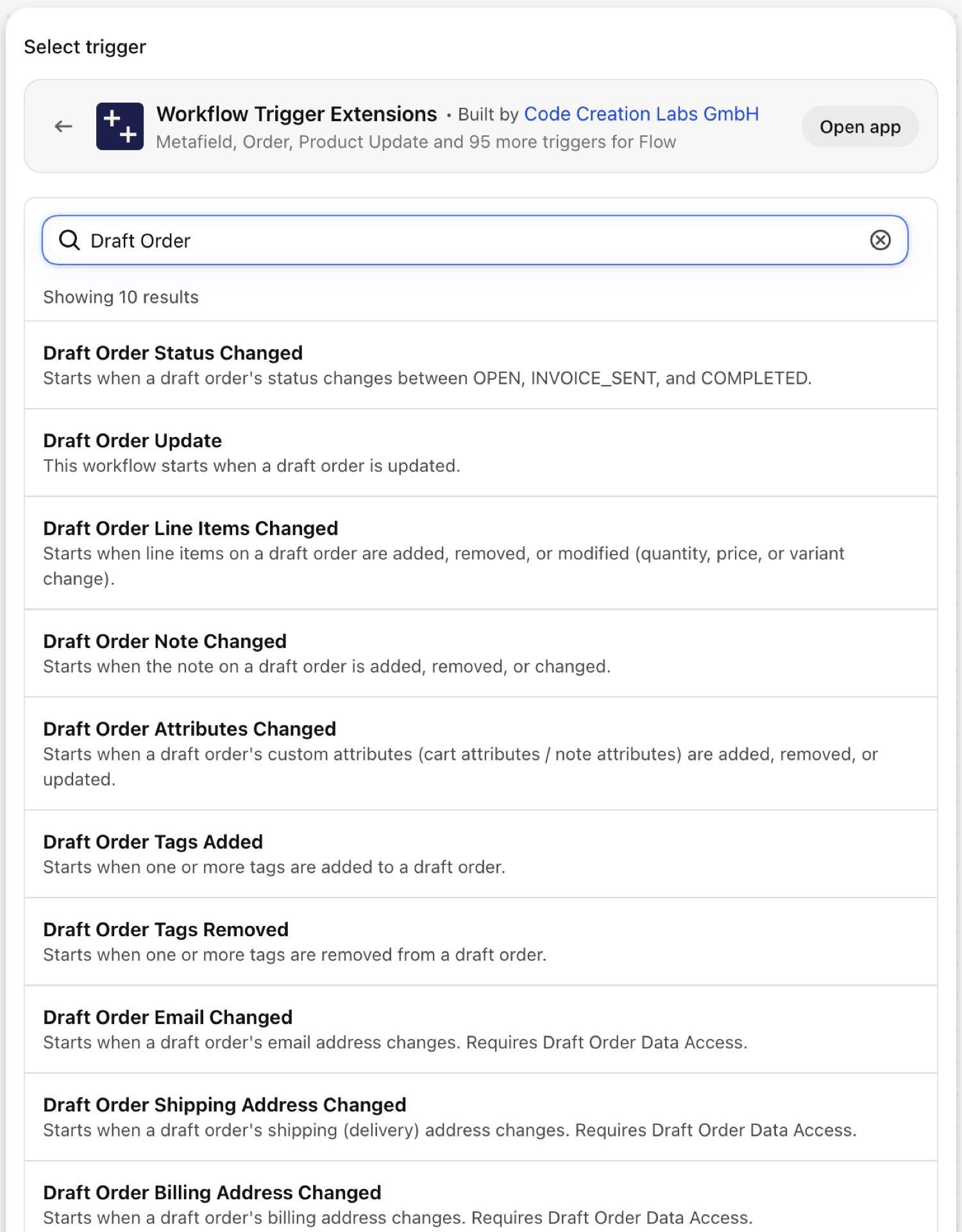
Draft Order Update
Fires on every save of a draft order.
| Fires from | Shopify webhook |
| Permission | Draft Order Data Access |
| Switched on | Turning on a Flow workflow that uses it switches it on. Its own switch is on the app's Triggers page |
Use it for
- Mirror quotes into a CRM.
- A catch-all while you work out which narrower trigger fits.
What Draft Order Update sends to your workflow
| Variable in Flow | Type | What it holds |
|---|---|---|
draftOrder |
Object | The draft order that was updated |
draftOrder.id |
ID | |
draftOrder.name |
Text | |
draftOrder.status |
Text | |
draftOrder.totalPrice |
Text | |
draftOrder.currencyCode |
Text | |
draftOrder.tags |
Text | |
draftOrder.note |
Text | |
draftOrder.invoiceUrl |
Text | |
draftOrder.updatedAt |
Text | |
payload |
Text | JSON object containing the GID of the draft order that was updated (e.g. {"id":"gid://shopify/DraftOrder/123"}) |
eventId |
Text | The id of this event. Search for it in the app's Event History to see exactly what was sent. |
Example: Mirror every quote change into the CRM
- Pick Draft Order Update as the trigger.
- Add Send HTTP request with
{{draftOrder.id}},{{draftOrder.name}},{{draftOrder.status}}and{{draftOrder.totalPrice}} {{draftOrder.currencyCode}}. - Turn the workflow on.
Draft Order Status Changed
Fires when a draft order moves between open, invoice_sent and completed.
| Fires from | Shopify webhook plus change detection |
| Permission | Draft Order Data Access |
| Switched on | Turning on a Flow workflow that uses it switches it on. Its own switch is on the app's Triggers page |
Use it for
- Start a reminder sequence when an invoice is sent.
- Tell the account manager when a quote turns into an order.
What Draft Order Status Changed sends to your workflow
| Variable in Flow | Type | What it holds |
|---|---|---|
draftOrder |
Object | The draft order whose status changed |
draftOrder.id |
ID | |
draftOrder.name |
Text | |
draftOrder.status |
Text | |
oldStatus |
Text | The previous status of the draft order (open / invoice_sent / completed) |
newStatus |
Text | The new status of the draft order (open / invoice_sent / completed) |
eventId |
Text | The id of this event. Search for it in the app's Event History to see exactly what was sent. |
Example: Remind the customer three days after the invoice
- Pick Draft Order Status Changed as the trigger.
- Add a Condition:
newStatusEqual toinvoice_sent. - Add Wait for 3 days, then Send HTTP request to your email tool with
{{draftOrder.name}}. - Turn the workflow on.
Draft Order Line Items Changed
Fires when the items of a draft order change: added, removed, quantity, price or variant. Same changes.items structure as the order trigger.
| Fires from | Shopify webhook plus change detection |
| Permission | Draft Order Data Access |
| Switched on | Turning on a Flow workflow that uses it switches it on. Its own switch is on the app's Triggers page |
Use it for
- Require approval when a sales rep lowers a price on a quote.
- Keep a reservation system in step with quotes.
What Draft Order Line Items Changed sends to your workflow
| Variable in Flow | Type | What it holds |
|---|---|---|
draftOrder |
Object | The draft order whose line items changed |
draftOrder.id |
ID | |
draftOrder.name |
Text | |
draftOrder.status |
Text | |
changes |
Object | The line item changes: added, removed, quantity, price and variant changes with their old and new values |
changes.items |
List of objects | List of detected changes |
changes.items (each).changeType |
Text | Type of change: added, removed, quantity_changed, price_changed, variant_changed |
changes.items (each).lineItemId |
ID | Line item ID (if available) |
changes.items (each).productTitle |
Text | Product title |
changes.items (each).variantTitle |
Text | Variant title |
changes.items (each).oldVariantId |
ID | Old variant GID (for removed or variant_changed) |
changes.items (each).newVariantId |
ID | New variant GID (for added or variant_changed) |
changes.items (each).oldProductId |
ID | Old product GID (for removed or variant_changed) |
changes.items (each).newProductId |
ID | New product GID (for added or variant_changed) |
changes.items (each).oldQuantity |
Number | Old quantity (for quantity_changed) |
changes.items (each).newQuantity |
Number | New quantity (for quantity_changed) |
changes.items (each).oldPrice |
Text | Old price (for price_changed) |
changes.items (each).newPrice |
Text | New price (for price_changed) |
changes.items (each).lineItemData |
Text | Full line item data as JSON |
eventId |
Text | The id of this event. Search for it in the app's Event History to see exactly what was sent. |
Example: Ask for approval when a quote price is changed
- Pick Draft Order Line Items Changed as the trigger.
- Add a Condition: At least one of
changes.itemshaschangeTypeEqual toprice_changed. - Add Add draft order tags
needs-approvaland Send internal email to the sales lead with theoldPriceandnewPriceof the changed entries (a Liquidforloop overchanges.items). - Turn the workflow on.
Draft Order Tags Added
Fires when at least one tag is added to a draft order.
| Fires from | Shopify webhook plus change detection |
| Permission | Draft Order Data Access |
| Switched on | Turning on a Flow workflow that uses it switches it on. Its own switch is on the app's Triggers page |
Use it for
- Let sales start a process by tagging a quote:
approved,rush.
What Draft Order Tags Added sends to your workflow
| Variable in Flow | Type | What it holds |
|---|---|---|
draftOrder |
Object | The draft order whose tags changed |
draftOrder.id |
ID | |
draftOrder.name |
Text | |
draftOrder.status |
Text | |
draftOrder.tags |
Text | |
addedTags |
Text | Comma-separated list of tags that were added to the draft order |
removedTags |
Text | Comma-separated list of tags that were removed from the draft order in the same update (may be empty) |
currentTags |
Text | Comma-separated list of all current tags on the draft order |
previousTags |
Text | Comma-separated list of all previous tags on the draft order before this update |
eventId |
Text | The id of this event. Search for it in the app's Event History to see exactly what was sent. |
Example: Notify finance when a quote is approved
- Pick Draft Order Tags Added as the trigger.
- Add a Condition:
addedTagsIncludesapproved. - Add Send internal email to finance with
{{draftOrder.name}}. - Turn the workflow on.
Draft Order Tags Removed
Fires when at least one tag is removed from a draft order.
| Fires from | Shopify webhook plus change detection |
| Permission | Draft Order Data Access |
| Switched on | Turning on a Flow workflow that uses it switches it on. Its own switch is on the app's Triggers page |
Use it for
- Undo what the matching tag-added workflow did.
What Draft Order Tags Removed sends to your workflow
| Variable in Flow | Type | What it holds |
|---|---|---|
draftOrder |
Object | The draft order whose tags changed |
draftOrder.id |
ID | |
draftOrder.name |
Text | |
draftOrder.status |
Text | |
draftOrder.tags |
Text | |
addedTags |
Text | Comma-separated list of tags that were added to the draft order in the same update (may be empty) |
removedTags |
Text | Comma-separated list of tags that were removed from the draft order |
currentTags |
Text | Comma-separated list of all current tags on the draft order |
previousTags |
Text | Comma-separated list of all previous tags on the draft order before this update |
eventId |
Text | The id of this event. Search for it in the app's Event History to see exactly what was sent. |
Example: Tell sales when approval is withdrawn
- Pick Draft Order Tags Removed as the trigger.
- Add a Condition:
removedTagsIncludesapproved. - Add Send internal email to the sales rep.
- Turn the workflow on.
Draft Order Note Changed
Fires when the note of a draft order is added, changed or cleared.
| Fires from | Shopify webhook plus change detection |
| Permission | Draft Order Data Access |
| Switched on | Turning on a Flow workflow that uses it switches it on. Its own switch is on the app's Triggers page |
Use it for
- Pass internal remarks on a quote to the next team.
What Draft Order Note Changed sends to your workflow
| Variable in Flow | Type | What it holds |
|---|---|---|
draftOrder |
Object | The draft order whose note changed |
draftOrder.id |
ID | |
draftOrder.name |
Text | |
draftOrder.status |
Text | |
draftOrder.note |
Text | |
oldNote |
Text | The previous note on the draft order (empty if the note was not set before) |
newNote |
Text | The new note on the draft order (empty if the note was cleared) |
eventId |
Text | The id of this event. Search for it in the app's Event History to see exactly what was sent. |
Example: Forward quote notes to the account channel
- Pick Draft Order Note Changed as the trigger.
- Add Send HTTP request to Slack with
{{draftOrder.name}}: {{newNote}}. - Turn the workflow on.
Draft Order Attributes Changed
Fires when custom attributes on a draft order are added, removed or changed.
| Fires from | Shopify webhook plus change detection |
| Permission | Draft Order Data Access |
| Switched on | Turning on a Flow workflow that uses it switches it on. Its own switch is on the app's Triggers page |
Use it for
- React to a PO number or a requested delivery week stored as an attribute.
What Draft Order Attributes Changed sends to your workflow
| Variable in Flow | Type | What it holds |
|---|---|---|
draftOrder |
Object | The draft order whose custom attributes changed |
draftOrder.id |
ID | |
draftOrder.name |
Text | |
draftOrder.status |
Text | |
changes |
Object | Detected attribute changes. Each item has a changeType (added, removed, or changed), the key, and the old and new values. |
changes.items |
List of objects | List of detected attribute changes |
changes.items (each).changeType |
Text | Type of change: added, removed, changed |
changes.items (each).key |
Text | The attribute key |
changes.items (each).oldValue |
Text | The previous value (empty string when changeType is 'added') |
changes.items (each).newValue |
Text | The new value (empty string when changeType is 'removed') |
eventId |
Text | The id of this event. Search for it in the app's Event History to see exactly what was sent. |
Example: Catch a purchase order number
- Pick Draft Order Attributes Changed as the trigger.
- Add a Condition: At least one of
changes.itemshaskeyEqual topo_number. - Add Send HTTP request to the ERP with the new value.
- Turn the workflow on.
Draft Order Email Changed
Fires when the email address on a draft order changes. It carries the current address.
| Fires from | Shopify webhook plus change detection |
| Permission | Draft Order Data Access |
| Switched on | Turning on a Flow workflow that uses it switches it on. Its own switch is on the app's Triggers page |
Use it for
- Make sure invoices go to the corrected address.
What Draft Order Email Changed sends to your workflow
| Variable in Flow | Type | What it holds |
|---|---|---|
draftOrder |
Object | The draft order whose email changed |
draftOrder.id |
ID | |
draftOrder.name |
Text | |
draftOrder.status |
Text | |
draftOrder.note |
Text | |
email |
Text | The draft order's current email address |
eventId |
Text | The id of this event. Search for it in the app's Event History to see exactly what was sent. |
Example: Re-send the invoice after an email correction
- Pick Draft Order Email Changed in Flow.
- Add a Condition:
draftOrder.statusEqual toinvoice_sent. - Add Send internal email asking the rep to re-send the invoice.
- Turn the workflow on.
Draft Order Shipping Address Changed
Fires when the shipping address of a draft order changes.
| Fires from | Shopify webhook plus change detection |
| Permission | Draft Order Data Access |
| Switched on | Turning on a Flow workflow that uses it switches it on. Its own switch is on the app's Triggers page |
Use it for
- Recalculate shipping or taxes on a quote when the destination changes.
What Draft Order Shipping Address Changed sends to your workflow
| Variable in Flow | Type | What it holds |
|---|---|---|
draftOrder |
Object | The draft order whose shipping address changed |
draftOrder.id |
ID | |
draftOrder.name |
Text | |
draftOrder.status |
Text | |
draftOrder.note |
Text | |
shippingAddress |
Text | The draft order's current shipping (delivery) address as a single formatted line (may be empty) |
shippingAddressDetails |
Object | The draft order's current shipping (delivery) address as structured fields (may be empty) |
shippingAddressDetails.firstName |
Text | First name on the address |
shippingAddressDetails.lastName |
Text | Last name on the address |
shippingAddressDetails.name |
Text | Full name, derived from firstName and lastName |
shippingAddressDetails.company |
Text | Company or organization name |
shippingAddressDetails.address1 |
Text | First line - street address or PO box number |
shippingAddressDetails.address2 |
Text | Second line - apartment, suite, or unit |
shippingAddressDetails.city |
Text | City, district, village, or town |
shippingAddressDetails.province |
Text | Region - province, state, or district |
shippingAddressDetails.provinceCode |
Text | Region code (for example ON) |
shippingAddressDetails.zip |
Text | ZIP or postal code |
shippingAddressDetails.country |
Text | Country name |
shippingAddressDetails.countryCode |
Text | Two-letter country code (for example US) |
shippingAddressDetails.phone |
Text | Phone number on the address |
eventId |
Text | The id of this event. Search for it in the app's Event History to see exactly what was sent. |
Example: Flag quotes whose destination country changed
- Pick Draft Order Shipping Address Changed in Flow.
- Add Add draft order tags
recheck-shippingand mention{{shippingAddressDetails.countryCode}}in an internal email. - Turn the workflow on.
Draft Order Billing Address Changed
Fires when the billing address of a draft order changes.
| Fires from | Shopify webhook plus change detection |
| Permission | Draft Order Data Access |
| Switched on | Turning on a Flow workflow that uses it switches it on. Its own switch is on the app's Triggers page |
Use it for
- Keep the debtor record of an ERP current before the invoice is issued.
What Draft Order Billing Address Changed sends to your workflow
| Variable in Flow | Type | What it holds |
|---|---|---|
draftOrder |
Object | The draft order whose billing address changed |
draftOrder.id |
ID | |
draftOrder.name |
Text | |
draftOrder.status |
Text | |
draftOrder.note |
Text | |
billingAddress |
Text | The draft order's current billing address as a single formatted line (may be empty) |
billingAddressDetails |
Object | The draft order's current billing address as structured fields (may be empty) |
billingAddressDetails.firstName |
Text | First name on the address |
billingAddressDetails.lastName |
Text | Last name on the address |
billingAddressDetails.name |
Text | Full name, derived from firstName and lastName |
billingAddressDetails.company |
Text | Company or organization name |
billingAddressDetails.address1 |
Text | First line - street address or PO box number |
billingAddressDetails.address2 |
Text | Second line - apartment, suite, or unit |
billingAddressDetails.city |
Text | City, district, village, or town |
billingAddressDetails.province |
Text | Region - province, state, or district |
billingAddressDetails.provinceCode |
Text | Region code (for example ON) |
billingAddressDetails.zip |
Text | ZIP or postal code |
billingAddressDetails.country |
Text | Country name |
billingAddressDetails.countryCode |
Text | Two-letter country code (for example US) |
billingAddressDetails.phone |
Text | Phone number on the address |
eventId |
Text | The id of this event. Search for it in the app's Event History to see exactly what was sent. |
Example: Update the ERP before invoicing
- Pick Draft Order Billing Address Changed in Flow.
- Add Send HTTP request with
{{draftOrder.id}}and the fields ofbillingAddressDetails. - Turn the workflow on.
Next steps
A draft order is not a Flow reference type, so these triggers deliver a draftOrder object with the id, name and status. For anything else add a Send Admin API request or Run code step with draftOrder.id.
- Complete trigger reference - every trigger on one page.
- Choosing the right trigger - which one fits your case.
- Custom triggers - when no built-in trigger fits, write your own.
- Event history and troubleshooting - see what fired and what it carried.
- Trigger events on a record's admin page - the latest events of one record, on its own page in the Shopify admin.