
Customer triggers, step by step
Step-by-step Shopify Flow tutorials for customer tags, note, account state, marketing consent and the opt-in name, email, phone and address triggers.
Eleven triggers for changes to a customer record. Seven of them work on data every store can use freely (tags, note, account state, marketing consent). Four read personal data - name, email, phone, address - and are opt-in on top of the permission.
On this page: Customer Update, Customer Tags Added, Customer Tags Removed, Customer Note Changed, Customer State Changed, Customer Email Marketing Consent Changed, Customer SMS Marketing Consent Changed, Customer Name Changed, Customer Email Changed, Customer Phone Changed, Customer Address Changed
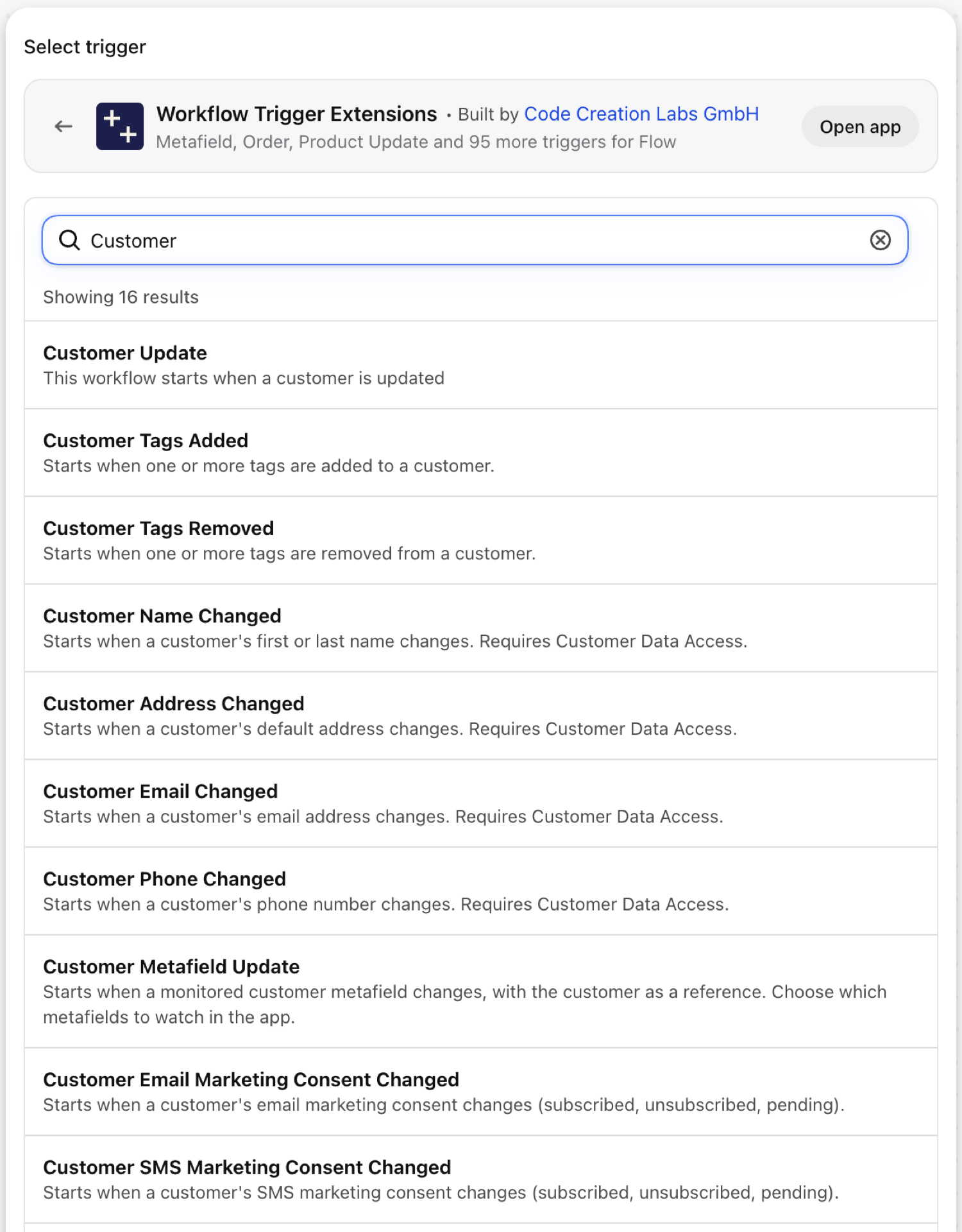
Customer Update
Fires on every save of a customer record. It carries changes: the tracked fields that changed (tags, note, account state) with the value before and after.
| Fires from | Shopify webhook plus change detection |
| Permission | Customer Data Access |
| Switched on | Turning on a Flow workflow that uses it switches it on. Its own switch is on the app's Triggers page |
Use it for
- One workflow for several kinds of customer edits, branching on
changes.fields. - Sync every customer change to a CRM.
What Customer Update sends to your workflow
| Variable in Flow | Type | What it holds |
|---|---|---|
customer |
Customer (Shopify) | The customer. A full Shopify customer, so all of its fields and Flow's own customer actions are available. |
payload |
Text | JSON object containing the GID of the customer that was updated (e.g. {"id":"gid://shopify/Customer/123"}) |
changes |
Object | Which tracked fields changed (tags, note, account state), with the old and new value of each |
changes.fields |
List of text | Names of the tracked fields that changed |
changes.items |
List of objects | Old and new value per changed field |
changes.items (each).field |
Text | The field that changed: tags, note or state |
changes.items (each).oldValue |
Text | The value before the update. Long values are shortened |
changes.items (each).newValue |
Text | The value after the update. Long values are shortened |
eventId |
Text | The id of this event. Search for it in the app's Event History to see exactly what was sent. |
Example: Forward tracked customer changes to a CRM
- Pick Customer Update as the trigger.
- Add a Condition:
changes.fieldsNot empty and exists. - Add Send HTTP request to your CRM with
{{customer.id}}and a loop overchanges.items(field,oldValue,newValue). - Turn the workflow on.
Customer Tags Added
Fires when at least one tag is added to a customer. addedTags holds only the new ones.
| Fires from | Shopify webhook plus change detection |
| Permission | Customer Data Access |
| Switched on | Turning on a Flow workflow that uses it switches it on. Its own switch is on the app's Triggers page |
Use it for
- Start onboarding when staff or another app tags a customer
wholesaleorvip. - React to tags written by loyalty, subscription or review apps.
What Customer Tags Added sends to your workflow
| Variable in Flow | Type | What it holds |
|---|---|---|
customer |
Customer (Shopify) | The customer whose tags changed. A full Shopify customer, so all of its fields and Flow's own customer actions are available. |
addedTags |
Text | Comma-separated list of tags that were added to the customer |
removedTags |
Text | Comma-separated list of tags that were removed from the customer in the same update (may be empty) |
currentTags |
Text | Comma-separated list of all current tags on the customer |
previousTags |
Text | Comma-separated list of all previous tags on the customer before this update |
eventId |
Text | The id of this event. Search for it in the app's Event History to see exactly what was sent. |
Example: Welcome a new wholesale customer
- Pick Customer Tags Added as the trigger.
- Add a Condition:
addedTagsIncludeswholesale. - Add Send internal email to the account manager with
{{customer.displayName}}, or Send HTTP request to your email tool to start the welcome series. - Turn the workflow on.
Customer Tags Removed
Fires when at least one tag is removed from a customer. removedTags holds the ones that went away.
| Fires from | Shopify webhook plus change detection |
| Permission | Customer Data Access |
| Switched on | Turning on a Flow workflow that uses it switches it on. Its own switch is on the app's Triggers page |
Use it for
- Revoke a benefit when a membership tag disappears.
- Notify the team when a subscription app removes its
active-subscribertag.
What Customer Tags Removed sends to your workflow
| Variable in Flow | Type | What it holds |
|---|---|---|
customer |
Customer (Shopify) | The customer whose tags changed. A full Shopify customer, so all of its fields and Flow's own customer actions are available. |
addedTags |
Text | Comma-separated list of tags that were added to the customer in the same update (may be empty) |
removedTags |
Text | Comma-separated list of tags that were removed from the customer |
currentTags |
Text | Comma-separated list of all current tags on the customer |
previousTags |
Text | Comma-separated list of all previous tags on the customer before this update |
eventId |
Text | The id of this event. Search for it in the app's Event History to see exactly what was sent. |
Example: Follow up when a subscriber tag is removed
- Pick Customer Tags Removed as the trigger.
- Add a Condition:
removedTagsIncludesactive-subscriber. - Add Add customer tags with
winbackand Send internal email to retention. - Turn the workflow on.
Customer Note Changed
Fires when the note on a customer is added, changed or cleared.
| Fires from | Shopify webhook plus change detection |
| Permission | Customer Data Access |
| Switched on | Turning on a Flow workflow that uses it switches it on. Its own switch is on the app's Triggers page |
Use it for
- Route notes written by support to the account owner.
- Parse a keyword from the note (
#callback) and start a task.
What Customer Note Changed sends to your workflow
| Variable in Flow | Type | What it holds |
|---|---|---|
customer |
Customer (Shopify) | The customer whose note changed. A full Shopify customer, so all of its fields and Flow's own customer actions are available. |
oldNote |
Text | The previous note on the customer (empty if the note was not set before) |
newNote |
Text | The new note on the customer (empty if the note was cleared) |
eventId |
Text | The id of this event. Search for it in the app's Event History to see exactly what was sent. |
Example: Create a callback task from a note
- Pick Customer Note Changed as the trigger.
- Add a Condition:
newNoteIncludes#callback. - Add Send internal email or a request to your task tool with
{{customer.displayName}}and{{newNote}}. - Turn the workflow on.
Customer State Changed
Fires when the account state of a customer changes between disabled, enabled, invited and declined.
| Fires from | Shopify webhook plus change detection |
| Permission | Customer Data Access |
| Switched on | Turning on a Flow workflow that uses it switches it on. Its own switch is on the app's Triggers page |
Use it for
- Greet customers when they activate their account.
- See who declined an account invitation.
What Customer State Changed sends to your workflow
| Variable in Flow | Type | What it holds |
|---|---|---|
customer |
Customer (Shopify) | The customer whose account state changed. A full Shopify customer, so all of its fields and Flow's own customer actions are available. |
oldState |
Text | The previous account state (disabled, enabled, invited, or declined) |
newState |
Text | The new account state (disabled, enabled, invited, or declined) |
eventId |
Text | The id of this event. Search for it in the app's Event History to see exactly what was sent. |
Example: Tag customers who activated their account
- Pick Customer State Changed as the trigger.
- Add a Condition:
newStateEqual toenabled. - Add Add customer tags with
account-active. - Turn the workflow on.
Customer Email Marketing Consent Changed
Fires when a customer's email marketing consent changes. consentState is the new state: subscribed, not_subscribed, pending, unsubscribed or redacted.
| Fires from | Shopify webhook |
| Permission | Customer Data Access |
| Switched on | Turning on a Flow workflow that uses it switches it on. Its own switch is on the app's Triggers page |
Use it for
- Keep an external email tool in step with Shopify, in both directions.
- Record unsubscribes for compliance.
What Customer Email Marketing Consent Changed sends to your workflow
| Variable in Flow | Type | What it holds |
|---|---|---|
customer |
Customer (Shopify) | The customer whose email marketing consent changed. A full Shopify customer, so all of its fields and Flow's own customer actions are available. |
consentState |
Text | The new email marketing consent state: subscribed, not_subscribed, pending, unsubscribed, or redacted |
optInLevel |
Text | The opt-in level: single_opt_in, confirmed_opt_in, or unknown (may be empty) |
consentUpdatedAt |
Text | ISO-8601 timestamp when the customer last updated this consent (may be empty) |
eventId |
Text | The id of this event. Search for it in the app's Event History to see exactly what was sent. |
Example: Remove unsubscribed customers from an external list
- Pick Customer Email Marketing Consent Changed as the trigger.
- Add a Condition:
consentStateEqual tounsubscribed. - Add Send HTTP request to your email tool's unsubscribe endpoint with
{{customer.id}}. - Turn the workflow on.
Customer SMS Marketing Consent Changed
Fires when a customer's SMS marketing consent changes.
| Fires from | Shopify webhook |
| Permission | Customer Data Access |
| Switched on | Turning on a Flow workflow that uses it switches it on. Its own switch is on the app's Triggers page |
Use it for
- Mirror SMS consent into an SMS provider.
- Stop SMS flows right after an opt-out.
What Customer SMS Marketing Consent Changed sends to your workflow
| Variable in Flow | Type | What it holds |
|---|---|---|
customer |
Customer (Shopify) | The customer whose SMS marketing consent changed. A full Shopify customer, so all of its fields and Flow's own customer actions are available. |
consentState |
Text | The new SMS marketing consent state: subscribed, not_subscribed, pending, unsubscribed, or redacted |
optInLevel |
Text | The opt-in level: single_opt_in, confirmed_opt_in, or unknown (may be empty) |
consentUpdatedAt |
Text | ISO-8601 timestamp when the customer last updated this consent (may be empty) |
eventId |
Text | The id of this event. Search for it in the app's Event History to see exactly what was sent. |
Example: Tag SMS subscribers
- Pick Customer SMS Marketing Consent Changed as the trigger.
- Add a Condition:
consentStateEqual tosubscribed. Under Then add Add customer tagssms-subscriber. - Under Otherwise add Remove customer tags
sms-subscriber. - Turn the workflow on.
Customer Name Changed
Fires when the first or last name of a customer changes. It carries the current name.
| Fires from | Shopify webhook plus change detection |
| Permission | Customer Data Access |
| Switched on | Turning on a Flow workflow that uses it switches it on. Its own switch is on the app's Triggers page |
Use it for
- Keep names in a CRM, an ERP or a loyalty tool current.
What Customer Name Changed sends to your workflow
| Variable in Flow | Type | What it holds |
|---|---|---|
customer |
Customer (Shopify) | The customer whose name changed. A full Shopify customer, so all of its fields and Flow's own customer actions are available. |
firstName |
Text | The customer's current first name |
lastName |
Text | The customer's current last name |
eventId |
Text | The id of this event. Search for it in the app's Event History to see exactly what was sent. |
Example: Push a changed name to the ERP
- Pick Customer Name Changed as the trigger in Flow.
- Add Send HTTP request with
{{customer.id}},{{firstName}}and{{lastName}}. - Turn the workflow on.
Customer Email Changed
Fires when the email address of a customer changes. It carries the current address.
| Fires from | Shopify webhook plus change detection |
| Permission | Customer Data Access |
| Switched on | Turning on a Flow workflow that uses it switches it on. Its own switch is on the app's Triggers page |
Use it for
- Update the address in tools that key on email.
- Send a security notice about the change.
What Customer Email Changed sends to your workflow
| Variable in Flow | Type | What it holds |
|---|---|---|
customer |
Customer (Shopify) | The customer whose email changed. A full Shopify customer, so all of its fields and Flow's own customer actions are available. |
email |
Text | The customer's current default email address |
eventId |
Text | The id of this event. Search for it in the app's Event History to see exactly what was sent. |
Example: Notify support about an email change
- Pick Customer Email Changed in Flow.
- Add Send internal email to support with
{{customer.displayName}}and the admin link. Think twice before putting{{email}}into a channel many people read. - Turn the workflow on.
Customer Phone Changed
Fires when the phone number of a customer changes. It carries the current number.
| Fires from | Shopify webhook plus change detection |
| Permission | Customer Data Access |
| Switched on | Turning on a Flow workflow that uses it switches it on. Its own switch is on the app's Triggers page |
Use it for
- Keep an SMS or telephony tool current.
What Customer Phone Changed sends to your workflow
| Variable in Flow | Type | What it holds |
|---|---|---|
customer |
Customer (Shopify) | The customer whose phone number changed. A full Shopify customer, so all of its fields and Flow's own customer actions are available. |
phone |
Text | The customer's current default phone number |
eventId |
Text | The id of this event. Search for it in the app's Event History to see exactly what was sent. |
Example: Sync a new phone number to the SMS provider
- Pick Customer Phone Changed in Flow.
- Add Send HTTP request to the provider with
{{customer.id}}and{{phone}}. - Turn the workflow on.
Customer Address Changed
Fires when the default address of a customer changes. address is one formatted line, addressDetails the same address in separate fields.
| Fires from | Shopify webhook plus change detection |
| Permission | Customer Data Access |
| Switched on | Turning on a Flow workflow that uses it switches it on. Its own switch is on the app's Triggers page |
Use it for
- Re-check tax or shipping zone assignments when a customer moves country.
- Update an ERP debtor record.
What Customer Address Changed sends to your workflow
| Variable in Flow | Type | What it holds |
|---|---|---|
customer |
Customer (Shopify) | The customer whose default address changed. A full Shopify customer, so all of its fields and Flow's own customer actions are available. |
address |
Text | The customer's current default address as a single formatted line (may be empty) |
addressDetails |
Object | The customer's current default address as structured fields (may be empty) |
addressDetails.firstName |
Text | First name on the address |
addressDetails.lastName |
Text | Last name on the address |
addressDetails.name |
Text | Full name, derived from firstName and lastName |
addressDetails.company |
Text | Company or organization name |
addressDetails.address1 |
Text | First line - street address or PO box number |
addressDetails.address2 |
Text | Second line - apartment, suite, or unit |
addressDetails.city |
Text | City, district, village, or town |
addressDetails.province |
Text | Region - province, state, or district |
addressDetails.provinceCode |
Text | Region code (for example ON) |
addressDetails.zip |
Text | ZIP or postal code |
addressDetails.country |
Text | Country name |
addressDetails.countryCode |
Text | Two-letter country code (for example US) |
addressDetails.phone |
Text | Phone number on the address |
eventId |
Text | The id of this event. Search for it in the app's Event History to see exactly what was sent. |
Example: Flag customers who moved to another country
- Pick Customer Address Changed in Flow.
- Add a Condition:
addressDetails.countryCodeNot equal toDE(your home market). - Add Add customer tags with
international. - Turn the workflow on.
Next steps
- Complete trigger reference - every trigger on one page.
- Choosing the right trigger - which one fits your case.
- Custom triggers - when no built-in trigger fits, write your own.
- Event history and troubleshooting - see what fired and what it carried.
- Trigger events on a record's admin page - the latest events of one record, on its own page in the Shopify admin.