
B2B company triggers, step by step
Step-by-step Shopify Flow tutorials for B2B: company and company location updates, tax exemption changes and company contact changes.
Five triggers for stores on Shopify's B2B features: companies, their locations, their contacts and the tax exemptions of a location.
On this page: Company Update, Company Location Update, Company Location Tax Exemptions Changed, Company Contact Updated, Customer Removed from Company
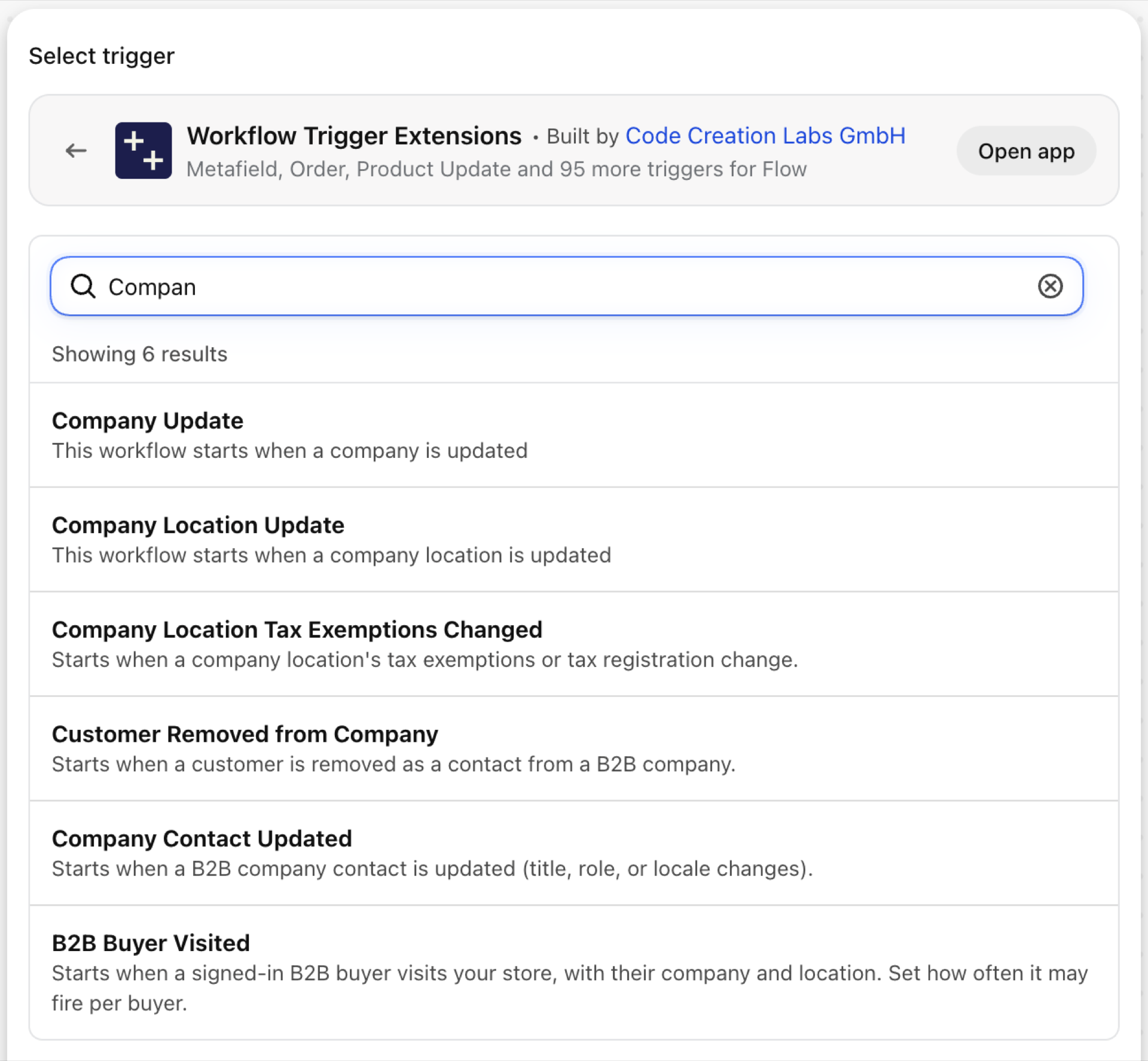
Company Update
Fires when a company record is updated: name, note, external ID.
| Fires from | Shopify webhook |
| Permission | Company & Company Location Data Access (B2B) |
| Switched on | Turning on a Flow workflow that uses it switches it on. Its own switch is on the app's Triggers page |
Use it for
- Sync companies to an ERP keyed on
externalId.
What Company Update sends to your workflow
| Variable in Flow | Type | What it holds |
|---|---|---|
company |
Object | The company that was updated |
company.id |
ID | |
company.name |
Text | |
company.note |
Text | |
company.externalId |
Text | |
company.customerSince |
Text | |
company.createdAt |
Text | |
company.updatedAt |
Text | |
eventId |
Text | The id of this event. Search for it in the app's Event History to see exactly what was sent. |
Example: Sync a company to the ERP
- Pick Company Update as the trigger.
- Add a Condition:
company.externalIdNot empty and exists. - Add Send HTTP request with
{{company.externalId}},{{company.name}}and{{company.note}}. - Turn the workflow on.
Company Location Update
Fires when a company location is updated: name, phone, locale, note, external ID.
| Fires from | Shopify webhook |
| Permission | Company & Company Location Data Access (B2B) |
| Switched on | Turning on a Flow workflow that uses it switches it on. Its own switch is on the app's Triggers page |
Use it for
- Keep ship-to records of an ERP current.
What Company Location Update sends to your workflow
| Variable in Flow | Type | What it holds |
|---|---|---|
companyLocation |
Object | The company location that was updated |
companyLocation.id |
ID | |
companyLocation.name |
Text | |
companyLocation.note |
Text | |
companyLocation.externalId |
Text | |
companyLocation.locale |
Text | |
companyLocation.phone |
Text | |
companyLocation.currency |
Text | |
companyLocation.createdAt |
Text | |
companyLocation.updatedAt |
Text | |
eventId |
Text | The id of this event. Search for it in the app's Event History to see exactly what was sent. |
Example: Sync a ship-to location
- Pick Company Location Update as the trigger.
- Add Send HTTP request with
{{companyLocation.externalId}},{{companyLocation.name}}and{{companyLocation.currency}}. - Turn the workflow on.
Company Location Tax Exemptions Changed
Fires when the tax exemptions, the tax registration ID or the tax-exempt flag of a company location change. changes.added and changes.removed are lists of exemptions, each with a code and a readable label.
| Fires from | Checked on a schedule, because Shopify sends no webhook for it |
| Permission | Company & Company Location Data Access (B2B) |
| Switched on | Turning on a Flow workflow that uses it switches it on. Its own switch is on the app's Triggers page |
Use it for
- Have finance verify every new exemption before the next order.
- Keep a tax engine in step.
What Company Location Tax Exemptions Changed sends to your workflow
| Variable in Flow | Type | What it holds |
|---|---|---|
companyLocation |
Object | The company location whose tax exemptions changed |
companyLocation.id |
ID | |
companyLocation.name |
Text | |
changes |
Object | The added / removed / current tax exemptions (each a code + label), plus the tax registration ID and tax-exempt flag |
changes.added |
List of objects | Tax exemptions added in this change. |
changes.added (each).code |
Text | The Shopify tax exemption enum value (e.g. CA_BC_RESELLER_EXEMPTION, EU_REVERSE_CHARGE_EXEMPTION_RULE). |
changes.added (each).label |
Text | A human-readable label derived from the code (e.g. "CA BC Reseller Exemption"). |
changes.removed |
List of objects | Tax exemptions removed in this change. |
changes.removed (each).code |
Text | The Shopify tax exemption enum value (e.g. CA_BC_RESELLER_EXEMPTION, EU_REVERSE_CHARGE_EXEMPTION_RULE). |
changes.removed (each).label |
Text | A human-readable label derived from the code (e.g. "CA BC Reseller Exemption"). |
changes.current |
List of objects | All tax exemptions currently on the company location (after this change). |
changes.current (each).code |
Text | The Shopify tax exemption enum value (e.g. CA_BC_RESELLER_EXEMPTION, EU_REVERSE_CHARGE_EXEMPTION_RULE). |
changes.current (each).label |
Text | A human-readable label derived from the code (e.g. "CA BC Reseller Exemption"). |
changes.taxRegistrationId |
Text | The company location's tax registration ID (empty if not set). |
changes.taxExempt |
True / false | Whether the company location is fully tax exempt. |
eventId |
Text | The id of this event. Search for it in the app's Event History to see exactly what was sent. |
Example: Send new tax exemptions to finance
- Pick Company Location Tax Exemptions Changed as the trigger.
- Add a Condition:
changes.addedNot empty and exists. - Add Send internal email with
{{companyLocation.name}}and a Liquidforloop overchanges.addedthat prints each exemption'slabelandcode. - Turn the workflow on.
Company Contact Updated
Fires when a company contact is updated: job title, locale, main-contact flag.
| Fires from | Shopify webhook |
| Permission | Company & Company Location Data Access (B2B) + Customer Data Access |
| Switched on | Turning on a Flow workflow that uses it switches it on. Its own switch is on the app's Triggers page |
Use it for
- Tell the account manager when the main contact of a company changes.
What Company Contact Updated sends to your workflow
| Variable in Flow | Type | What it holds |
|---|---|---|
customer |
Customer (Shopify) | The customer whose company contact was updated. A full Shopify customer, so all of its fields and Flow's own customer actions are available. |
company |
Object | The company the contact belongs to (id, name, external ID, note) |
company.id |
ID | |
company.name |
Text | |
company.externalId |
Text | |
company.note |
Text | |
companyContact |
Object | The updated contact (id, job title, locale, whether they are the main contact) |
companyContact.id |
ID | |
companyContact.title |
Text | |
companyContact.locale |
Text | |
companyContact.isMainContact |
True / false | |
eventId |
Text | The id of this event. Search for it in the app's Event History to see exactly what was sent. |
Example: Notify on a new main contact
- Pick Company Contact Updated as the trigger.
- Add a Condition:
companyContact.isMainContactEqual totrue. - Add Send internal email with
{{company.name}}and{{customer.displayName}}. - Turn the workflow on.
Customer Removed from Company
Fires when a customer is removed as a contact of a company.
| Fires from | Shopify webhook |
| Permission | Company & Company Location Data Access (B2B) + Customer Data Access |
| Switched on | Turning on a Flow workflow that uses it switches it on. Its own switch is on the app's Triggers page |
Use it for
- Remove B2B tags, price list access or portal logins of someone who left a company.
What Customer Removed from Company sends to your workflow
| Variable in Flow | Type | What it holds |
|---|---|---|
customer |
Customer (Shopify) | The customer who was removed from the company. A full Shopify customer, so all of its fields and Flow's own customer actions are available. |
company |
Object | The company the customer was removed from (id, name, external ID, note) |
company.id |
ID | |
company.name |
Text | |
company.externalId |
Text | |
company.note |
Text | |
companyContact |
Object | The removed contact (id, job title, locale, whether they were the main contact) |
companyContact.id |
ID | |
companyContact.title |
Text | |
companyContact.locale |
Text | |
companyContact.isMainContact |
True / false | |
eventId |
Text | The id of this event. Search for it in the app's Event History to see exactly what was sent. |
Example: Remove the wholesale tag from a removed contact
- Pick Customer Removed from Company as the trigger.
- Add Remove customer tags with
wholesale. - Add Send internal email to the account manager of
{{company.name}}. - Turn the workflow on.
Next steps
Company access depends on Customer Data Access: without it Shopify returns no companies at all. Grant Customer access first, then Company access. For B2B buyers visiting the storefront see Storefront triggers, step by step.
- Complete trigger reference - every trigger on one page.
- Choosing the right trigger - which one fits your case.
- Custom triggers - when no built-in trigger fits, write your own.
- Event history and troubleshooting - see what fired and what it carried.
- Trigger events on a record's admin page - the latest events of one record, on its own page in the Shopify admin.