
Location triggers, step by step
Step-by-step Shopify Flow tutorials for locations: created, updated, activated, deactivated and deleted.
Five triggers for the places you stock and ship from: warehouses, stores, pickup points.
On this page: Location Created, Location Updated, Location Activated, Location Deactivated, Location Deleted
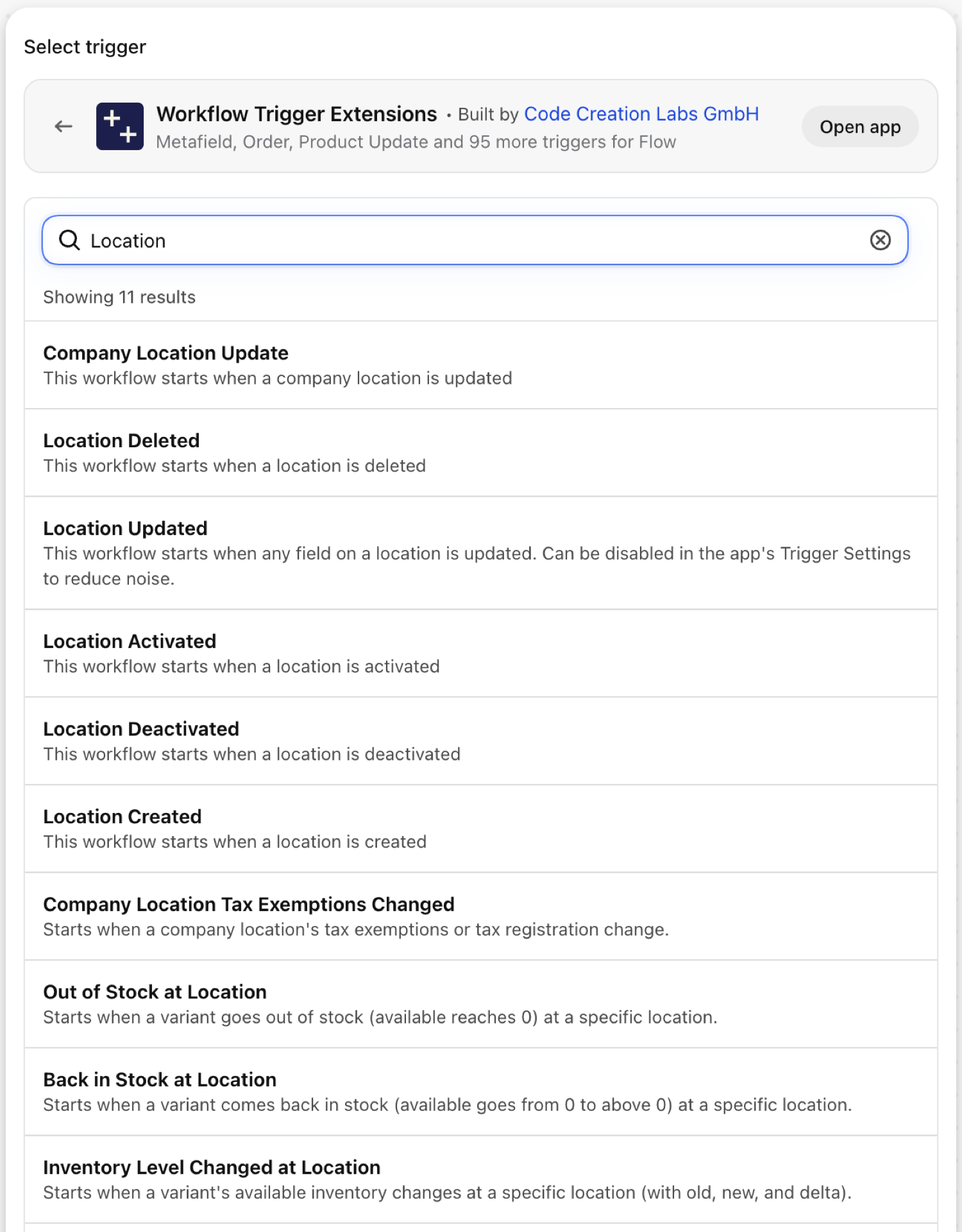
Location Created
Fires when a location is created.
| Fires from | Shopify webhook |
| Permission | Locations Data Access |
| Switched on | Turning on a Flow workflow that uses it switches it on. Its own switch is on the app's Triggers page |
Use it for
- Onboard a new store: create it in the ERP, the WMS and the store locator.
What Location Created sends to your workflow
| Variable in Flow | Type | What it holds |
|---|---|---|
location |
Object | The created location |
location.id |
ID | The Shopify GID of the location |
location.name |
Text | The merchant-visible name of the location |
location.active |
True / false | Whether the location is active |
location.fulfillsOnlineOrders |
True / false | Whether the location can fulfill online orders |
location.address1 |
Text | Address line 1 |
location.address2 |
Text | Address line 2 |
location.city |
Text | City |
location.province |
Text | Province / state name |
location.provinceCode |
Text | ISO 3166-2 province code |
location.country |
Text | Country name |
location.countryCode |
Text | ISO 3166-1 alpha-2 country code |
location.zip |
Text | Postal / ZIP code |
location.phone |
Text | Phone number |
eventId |
Text | The id of this event. Search for it in the app's Event History to see exactly what was sent. |
Example: Create the new location in your ERP
- Pick Location Created as the trigger.
- Add Send HTTP request with
{{location.id}},{{location.name}},{{location.city}}and{{location.countryCode}}. - Turn the workflow on.
Location Updated
Fires when any field of a location is edited: name, address, whether it fulfils online orders.
| Fires from | Shopify webhook |
| Permission | Locations Data Access |
| Switched on | Turning on a Flow workflow that uses it switches it on. Its own switch is on the app's Triggers page |
Use it for
- Keep a store locator or an ERP in step with address changes.
- Notice when a location stops fulfilling online orders.
What Location Updated sends to your workflow
| Variable in Flow | Type | What it holds |
|---|---|---|
location |
Object | The updated location |
location.id |
ID | The Shopify GID of the location |
location.name |
Text | The merchant-visible name of the location |
location.active |
True / false | Whether the location is active |
location.fulfillsOnlineOrders |
True / false | Whether the location can fulfill online orders |
location.address1 |
Text | Address line 1 |
location.address2 |
Text | Address line 2 |
location.city |
Text | City |
location.province |
Text | Province / state name |
location.provinceCode |
Text | ISO 3166-2 province code |
location.country |
Text | Country name |
location.countryCode |
Text | ISO 3166-1 alpha-2 country code |
location.zip |
Text | Postal / ZIP code |
location.phone |
Text | Phone number |
eventId |
Text | The id of this event. Search for it in the app's Event History to see exactly what was sent. |
Example: Warn when a location stops fulfilling online orders
- Pick Location Updated as the trigger.
- Add a Condition:
location.fulfillsOnlineOrdersEqual tofalse. - Add Send internal email to operations with
{{location.name}}. - Turn the workflow on.
Location Activated
Fires when a deactivated location is activated again.
| Fires from | Shopify webhook |
| Permission | Locations Data Access |
| Switched on | Turning on a Flow workflow that uses it switches it on. Its own switch is on the app's Triggers page |
Use it for
- Re-enable a store in connected systems after a seasonal closure.
What Location Activated sends to your workflow
| Variable in Flow | Type | What it holds |
|---|---|---|
location |
Object | The activated location |
location.id |
ID | The Shopify GID of the location |
location.name |
Text | The merchant-visible name of the location |
location.active |
True / false | Whether the location is active |
location.fulfillsOnlineOrders |
True / false | Whether the location can fulfill online orders |
location.address1 |
Text | Address line 1 |
location.address2 |
Text | Address line 2 |
location.city |
Text | City |
location.province |
Text | Province / state name |
location.provinceCode |
Text | ISO 3166-2 province code |
location.country |
Text | Country name |
location.countryCode |
Text | ISO 3166-1 alpha-2 country code |
location.zip |
Text | Postal / ZIP code |
location.phone |
Text | Phone number |
eventId |
Text | The id of this event. Search for it in the app's Event History to see exactly what was sent. |
Example: Announce a reopened location
- Pick Location Activated as the trigger.
- Add Send internal email:
{{location.name}} is active again. - Turn the workflow on.
Location Deactivated
Fires when a location is deactivated.
| Fires from | Shopify webhook |
| Permission | Locations Data Access |
| Switched on | Turning on a Flow workflow that uses it switches it on. Its own switch is on the app's Triggers page |
Use it for
- Stop routing to a closed store.
- Check that its stock was moved before it closed.
What Location Deactivated sends to your workflow
| Variable in Flow | Type | What it holds |
|---|---|---|
location |
Object | The deactivated location |
location.id |
ID | The Shopify GID of the location |
location.name |
Text | The merchant-visible name of the location |
location.active |
True / false | Whether the location is active |
location.fulfillsOnlineOrders |
True / false | Whether the location can fulfill online orders |
location.address1 |
Text | Address line 1 |
location.address2 |
Text | Address line 2 |
location.city |
Text | City |
location.province |
Text | Province / state name |
location.provinceCode |
Text | ISO 3166-2 province code |
location.country |
Text | Country name |
location.countryCode |
Text | ISO 3166-1 alpha-2 country code |
location.zip |
Text | Postal / ZIP code |
location.phone |
Text | Phone number |
eventId |
Text | The id of this event. Search for it in the app's Event History to see exactly what was sent. |
Example: Check stock when a location closes
- Pick Location Deactivated as the trigger.
- Add Send internal email to logistics with
{{location.name}}and a reminder to verify the stock transfer. - Turn the workflow on.
Location Deleted
Fires when a location is deleted.
| Fires from | Shopify webhook |
| Permission | Locations Data Access |
| Switched on | Turning on a Flow workflow that uses it switches it on. Its own switch is on the app's Triggers page |
Use it for
- Remove the location from an ERP or a store locator.
What Location Deleted sends to your workflow
| Variable in Flow | Type | What it holds |
|---|---|---|
locationId |
Text | The Shopify GID of the deleted location |
deletedAt |
Text | ISO timestamp of when the location was deleted |
eventId |
Text | The id of this event. Search for it in the app's Event History to see exactly what was sent. |
Example: Remove a deleted location from the store locator
- Pick Location Deleted as the trigger.
- Add Send HTTP request to the store locator with
{{locationId}}. - Turn the workflow on.
Next steps
- Complete trigger reference - every trigger on one page.
- Choosing the right trigger - which one fits your case.
- Custom triggers - when no built-in trigger fits, write your own.
- Event history and troubleshooting - see what fired and what it carried.