
Metafield triggers, step by step
Step-by-step Shopify Flow tutorials for metafield changes on products, variants, orders, customers and eight more owner types, with the previous value.
Metafields are where a store keeps what Shopify has no field for, and Shopify Flow cannot react to them changing. These five triggers can - and they carry previousValue, so a workflow can tell a rise from a fall.
All of them work per definition: you choose which metafields to watch on the app's Metafield Triggers page. Nothing fires for a metafield you did not add there. See Metafield triggers for the setup.
On this page: Metafield Update, Product Metafield Update, Product Variant Metafield Update, Order Metafield Update, Customer Metafield Update
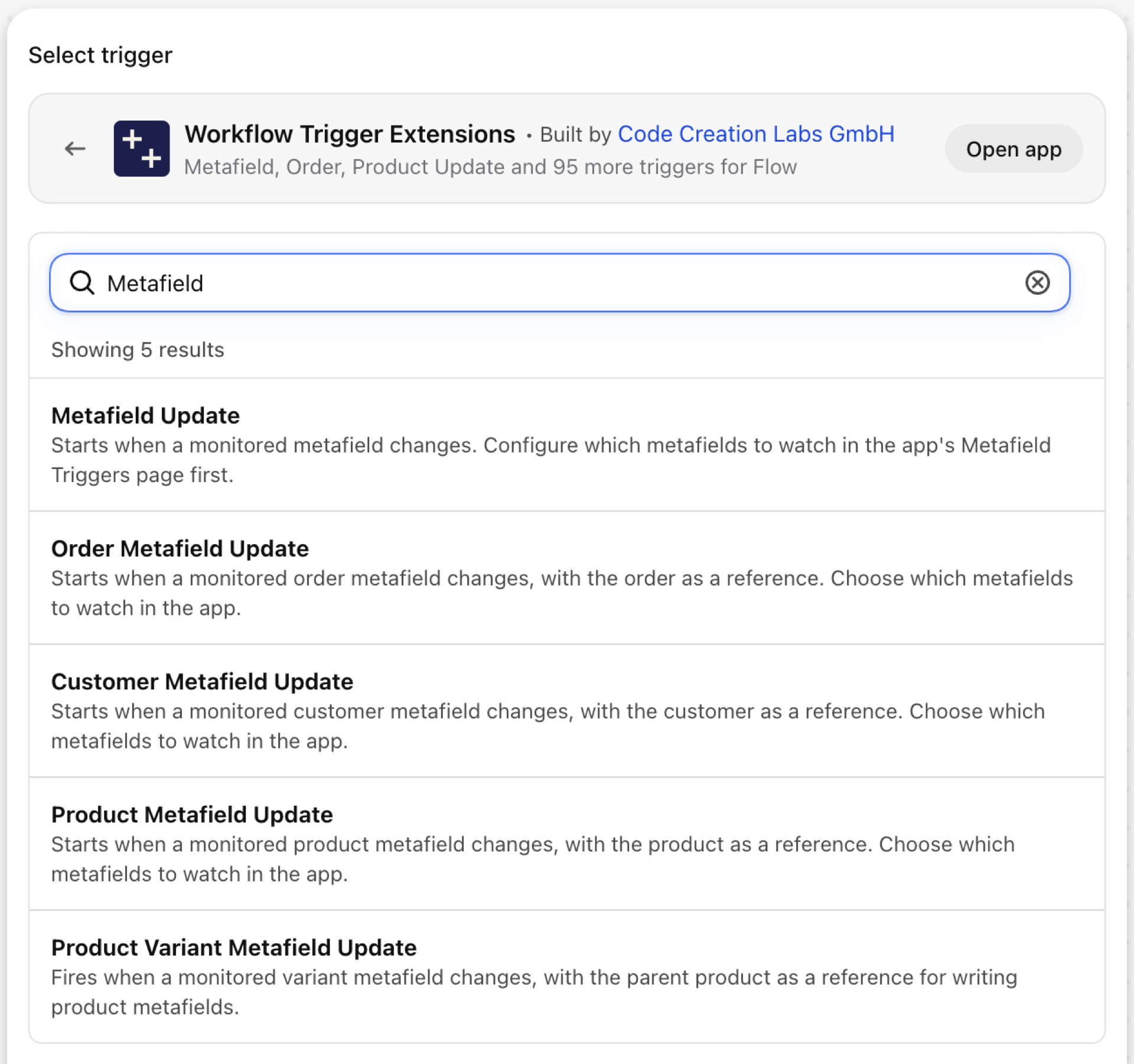
Metafield Update
Fires when a watched metafield changes, on any owner type: product, variant, collection, customer, order, draft order, company, company location, blog, blog post or page.
| Fires from | Shopify webhook plus change detection. Variant, blog, blog post and page metafields are checked on a schedule |
| Permission | Product, Variant & Collection Data Access |
| Switched on | Per metafield definition, on the app's Metafield Triggers page |
Use it for
- Owner types that have no typed trigger: collections, companies, pages, blog posts.
- One workflow that watches several metafields and branches on
metafieldKey.
What Metafield Update sends to your workflow
| Variable in Flow | Type | What it holds |
|---|---|---|
metafieldKey |
Text | The namespace.key of the metafield that was updated (for filtering in Flow) |
resourceType |
Text | The type of resource (PRODUCT, PRODUCTVARIANT, COLLECTION, CUSTOMER, ORDER, COMPANY, COMPANYLOCATION, ARTICLE, BLOG, PAGE) |
resourceId |
Text | The GID of the resource that was updated |
metafield |
Object | The metafield that was updated |
metafield.id |
ID | Global ID of the metafield |
metafield.namespace |
Text | The namespace of the metafield |
metafield.key |
Text | The key of the metafield |
metafield.value |
Text | The value of the metafield |
metafield.previousValue |
Text | The value before this change. Null when the metafield was just created |
metafield.type |
Text | The type of the metafield |
eventId |
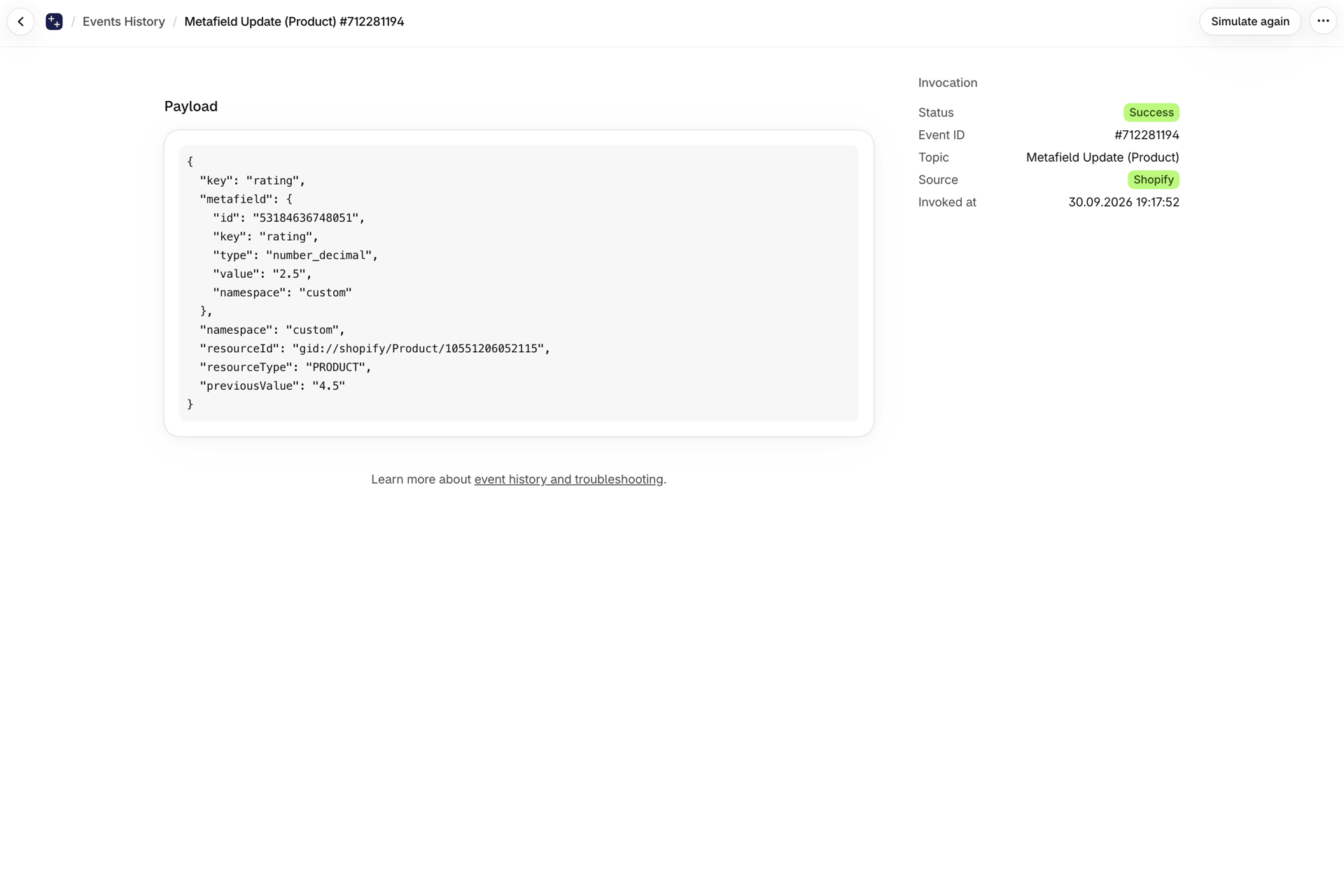
Text | The id of this event. Search for it in the app's Event History to see exactly what was sent. |
Example: React to a changed collection metafield
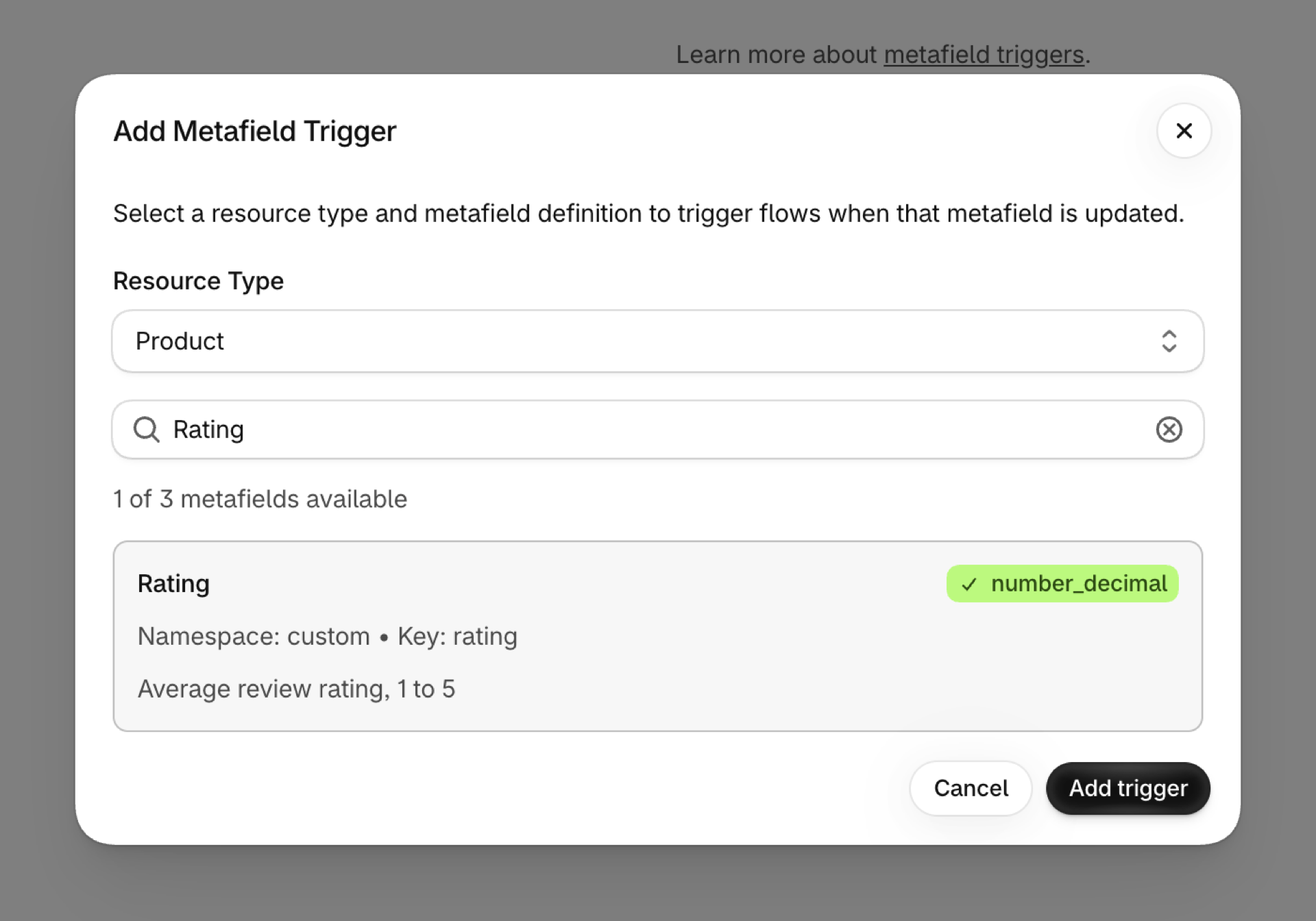
- In the app open Metafield Triggers, click Add trigger, choose the owner type Collection and the definition, and save.
- In Flow pick Metafield Update as the trigger.
- Add a Condition:
metafieldKeyEqual tocustom.banner_textandresourceTypeEqual toCOLLECTION. - Add Send internal email with
{{metafield.previousValue}} -> {{metafield.value}}and{{resourceId}}. - Turn the workflow on.
Product Metafield Update
Fires when a watched product metafield changes, with the product as a native Flow reference.
| Fires from | Shopify webhook plus change detection |
| Permission | Product, Variant & Collection Data Access |
| Switched on | Turning on a Flow workflow that uses it switches it on. Its own switch is on the app's Triggers page |
Use it for
- Act on the product directly: tag it, publish it, update another metafield.
- Thresholds on numeric metafields: a rating, a stock forecast, a supplier lead time.
What Product Metafield Update sends to your workflow
| Variable in Flow | Type | What it holds |
|---|---|---|
product |
Product (Shopify) | The product whose metafield changed. A full Shopify product, so all of its fields and Flow's own product actions are available. |
metafieldKey |
Text | The namespace.key of the metafield that changed (for filtering in Flow) |
metafield |
Object | The metafield that was updated |
metafield.id |
ID | Global ID of the metafield |
metafield.namespace |
Text | The namespace of the metafield |
metafield.key |
Text | The key of the metafield |
metafield.value |
Text | The value of the metafield |
metafield.previousValue |
Text | The value before this change. Null when the metafield was just created |
metafield.type |
Text | The type of the metafield |
eventId |
Text | The id of this event. Search for it in the app's Event History to see exactly what was sent. |
Example: Tag products whose rating falls below 3
- Add the product metafield on the app's Metafield Triggers page.
- Pick Product Metafield Update in Flow.
- Add a Condition:
metafieldKeyEqual toreviews.rating. - Add Run code to compare numbers, because metafield values arrive as text: return
dropped: Number(input.metafield.value) < 3 && Number(input.metafield.previousValue) >= 3. - Add a Condition on the code's
droppedoutput, then Add product tagslow-rating. - Turn the workflow on.
Product Variant Metafield Update
Fires when a watched variant metafield changes. The parent product arrives as a reference, the variant as resourceId.
| Fires from | Checked on a schedule, because Shopify sends no webhook for it |
| Permission | Product, Variant & Collection Data Access |
| Switched on | Turning on a Flow workflow that uses it switches it on. Its own switch is on the app's Triggers page |
Use it for
- Roll variant data up to the product, for example the lowest lead time of all variants.
- Sync variant-level attributes to a feed.
What Product Variant Metafield Update sends to your workflow
| Variable in Flow | Type | What it holds |
|---|---|---|
product |
Product (Shopify) | The parent product of the variant whose metafield changed (use this to write product metafields). A full Shopify product, so all of its fields and Flow's own product actions are available. |
resourceId |
Text | The GID of the product variant whose metafield changed |
metafieldKey |
Text | The namespace.key of the metafield that changed (for filtering in Flow) |
metafield |
Object | The metafield that was updated |
metafield.id |
ID | Global ID of the metafield |
metafield.namespace |
Text | The namespace of the metafield |
metafield.key |
Text | The key of the metafield |
metafield.value |
Text | The value of the metafield |
metafield.previousValue |
Text | The value before this change. Null when the metafield was just created |
metafield.type |
Text | The type of the metafield |
eventId |
Text | The id of this event. Search for it in the app's Event History to see exactly what was sent. |
Example: Copy a variant metafield up to its product
- Add the variant metafield on the Metafield Triggers page.
- Pick Product Variant Metafield Update in Flow.
- Add Update product metafield on
productwith the value{{metafield.value}}. - Turn the workflow on.
Order Metafield Update
Fires when a watched order metafield changes, with the order as a native reference.
| Fires from | Shopify webhook plus change detection |
| Permission | Order Data Access |
| Switched on | Turning on a Flow workflow that uses it switches it on. Its own switch is on the app's Triggers page |
Use it for
- React to data that apps write onto orders: a delivery date, a risk score, an ERP number.
- Start fulfillment steps when an approval metafield flips.
What Order Metafield Update sends to your workflow
| Variable in Flow | Type | What it holds |
|---|---|---|
order |
Order (Shopify) | The order whose metafield changed. A full Shopify order, so all of its fields and Flow's own order actions are available. |
metafieldKey |
Text | The namespace.key of the metafield that changed (for filtering in Flow) |
metafield |
Object | The metafield that was updated |
metafield.id |
ID | Global ID of the metafield |
metafield.namespace |
Text | The namespace of the metafield |
metafield.key |
Text | The key of the metafield |
metafield.value |
Text | The value of the metafield |
metafield.previousValue |
Text | The value before this change. Null when the metafield was just created |
metafield.type |
Text | The type of the metafield |
eventId |
Text | The id of this event. Search for it in the app's Event History to see exactly what was sent. |
Example: Release an order when its approval metafield turns true
- Add the order metafield on the Metafield Triggers page.
- Pick Order Metafield Update in Flow.
- Add a Condition:
metafieldKeyEqual tocustom.approvedandmetafield.valueEqual totrue. - Add a For each over
order.fulfillmentOrderswith Release fulfillment order hold. - Turn the workflow on.
Customer Metafield Update
Fires when a watched customer metafield changes, with the customer as a native reference.
| Fires from | Shopify webhook plus change detection |
| Permission | Customer Data Access |
| Switched on | Turning on a Flow workflow that uses it switches it on. Its own switch is on the app's Triggers page |
Use it for
- Loyalty tiers, credit limits or birthdays kept in metafields.
- Sync customer attributes written by forms or apps to a CRM.
What Customer Metafield Update sends to your workflow
| Variable in Flow | Type | What it holds |
|---|---|---|
customer |
Customer (Shopify) | The customer whose metafield changed. A full Shopify customer, so all of its fields and Flow's own customer actions are available. |
metafieldKey |
Text | The namespace.key of the metafield that changed (for filtering in Flow) |
metafield |
Object | The metafield that was updated |
metafield.id |
ID | Global ID of the metafield |
metafield.namespace |
Text | The namespace of the metafield |
metafield.key |
Text | The key of the metafield |
metafield.value |
Text | The value of the metafield |
metafield.previousValue |
Text | The value before this change. Null when the metafield was just created |
metafield.type |
Text | The type of the metafield |
eventId |
Text | The id of this event. Search for it in the app's Event History to see exactly what was sent. |
Example: Tag customers who reach the gold tier
- Add the customer metafield on the Metafield Triggers page.
- Pick Customer Metafield Update in Flow.
- Add a Condition:
metafieldKeyEqual toloyalty.tierandmetafield.valueEqual togold. - Add Add customer tags
goldand Send internal email to the VIP team. - Turn the workflow on.
Next steps
The typed triggers fire in addition to the generic one and share its event, so switching both on does not count twice against your plan.
- Complete trigger reference - every trigger on one page.
- Choosing the right trigger - which one fits your case.
- Custom triggers - when no built-in trigger fits, write your own.
- Event history and troubleshooting - see what fired and what it carried.