
Collection triggers, step by step
Step-by-step Shopify Flow tutorials for collection updates and for collection title, handle and description changes with old and new values.
Four triggers for collections: one for any update, three for the fields that matter for SEO and navigation. Collections have no tags in Shopify, which is why there are no tag triggers here.
On this page: Collection Update, Collection Title Changed, Collection Handle Changed, Collection Description Changed
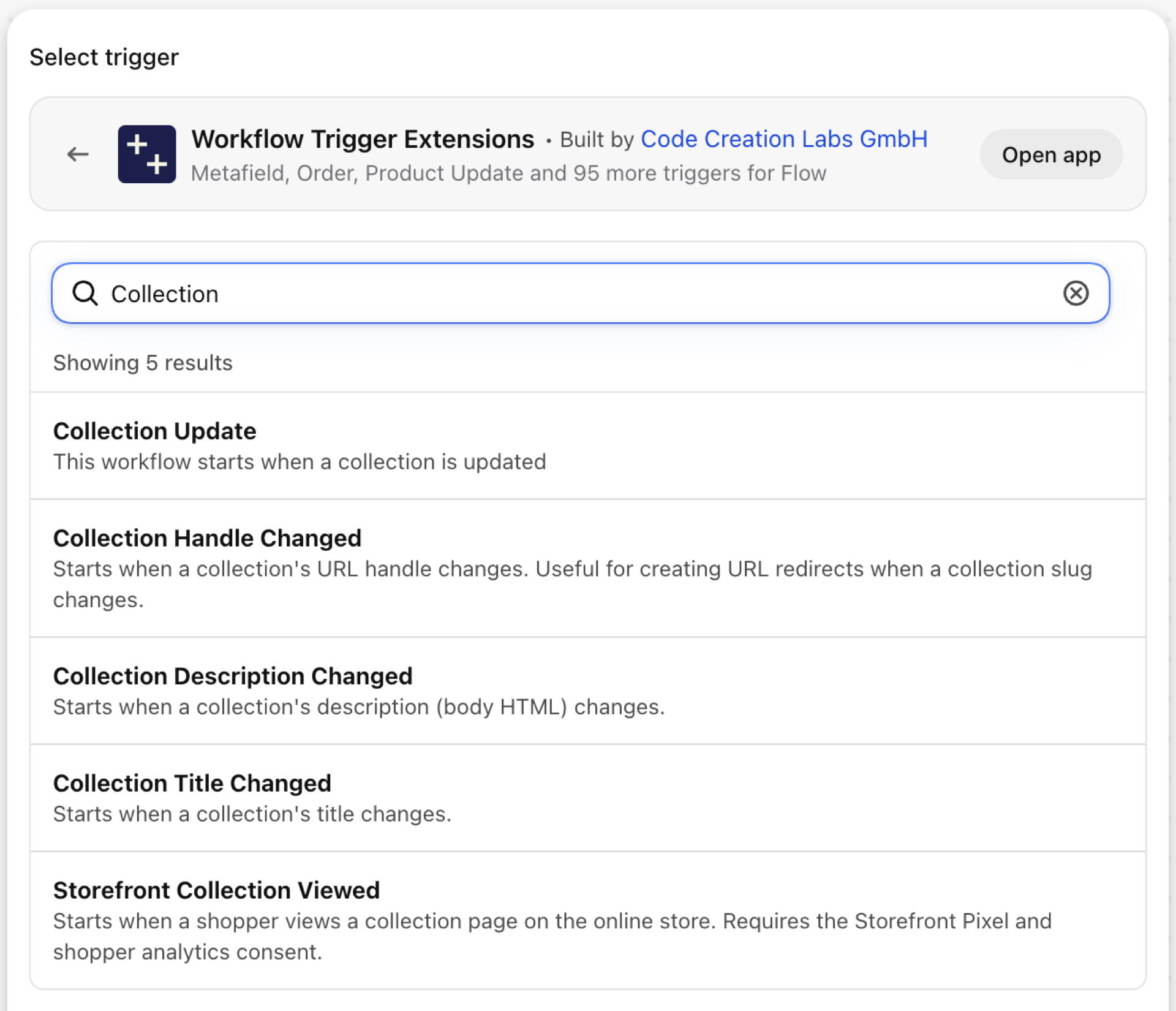
Collection Update
Fires on every save of a collection, including a change to the conditions of an automated collection.
| Fires from | Shopify webhook |
| Permission | Product, Variant & Collection Data Access |
| Switched on | Turning on a Flow workflow that uses it switches it on. Its own switch is on the app's Triggers page |
Use it for
- Invalidate a cache or rebuild a navigation menu when a collection changes.
- Review changes to the rules of automated collections.
What Collection Update sends to your workflow
| Variable in Flow | Type | What it holds |
|---|---|---|
collection |
Object | The collection that was updated |
collection.id |
ID | |
collection.title |
Text | |
collection.handle |
Text | |
collection.description |
Text | |
collection.descriptionHtml |
Text | |
collection.updatedAt |
Text | |
collection.ruleSet |
Object | |
collection.ruleSet.appliedDisjunctively |
True / false | |
collection.ruleSet.rules |
List of objects | |
payload |
Text | JSON object containing the GID of the collection that was updated (e.g. {"id":"gid://shopify/Collection/123"}) |
eventId |
Text | The id of this event. Search for it in the app's Event History to see exactly what was sent. |
Example: Get notified when a collection's rules change
- Pick Collection Update as the trigger.
- Add Send internal email with
{{collection.title}}and, for automated collections, a loop overcollection.ruleSet.rulesprintingcolumn,relationandcondition. - Turn the workflow on.
Collection Title Changed
Fires when the title of a collection changes.
| Fires from | Shopify webhook plus change detection |
| Permission | Product, Variant & Collection Data Access |
| Switched on | Turning on a Flow workflow that uses it switches it on. Its own switch is on the app's Triggers page |
Use it for
- Keep menu labels, landing pages or ad groups in line with the collection name.
What Collection Title Changed sends to your workflow
| Variable in Flow | Type | What it holds |
|---|---|---|
collection |
Object | The collection whose title changed |
collection.id |
ID | |
collection.title |
Text | |
collection.handle |
Text | |
collection.description |
Text | |
collection.descriptionHtml |
Text | |
collection.updatedAt |
Text | |
collection.ruleSet |
Object | |
collection.ruleSet.appliedDisjunctively |
True / false | |
collection.ruleSet.rules |
List of objects | |
oldTitle |
Text | The previous title of the collection |
newTitle |
Text | The new title of the collection |
eventId |
Text | The id of this event. Search for it in the app's Event History to see exactly what was sent. |
Example: Tell marketing about a renamed collection
- Pick Collection Title Changed as the trigger.
- Add Send internal email:
"{{oldTitle}}" is now "{{newTitle}}". - Turn the workflow on.
Collection Handle Changed
Fires when the URL handle of a collection changes.
| Fires from | Shopify webhook plus change detection |
| Permission | Product, Variant & Collection Data Access |
| Switched on | Turning on a Flow workflow that uses it switches it on. Its own switch is on the app's Triggers page |
Use it for
- Create the redirect from the old collection URL automatically.
What Collection Handle Changed sends to your workflow
| Variable in Flow | Type | What it holds |
|---|---|---|
collection |
Object | The collection whose handle changed |
collection.id |
ID | |
collection.title |
Text | |
collection.handle |
Text | |
collection.description |
Text | |
collection.descriptionHtml |
Text | |
collection.updatedAt |
Text | |
collection.ruleSet |
Object | |
collection.ruleSet.appliedDisjunctively |
True / false | |
collection.ruleSet.rules |
List of objects | |
oldHandle |
Text | The previous URL handle of the collection |
newHandle |
Text | The new URL handle of the collection |
eventId |
Text | The id of this event. Search for it in the app's Event History to see exactly what was sent. |
Example: Redirect the old collection URL
- Pick Collection Handle Changed as the trigger.
- Add Create URL redirect with Path
/collections/{{oldHandle}}and Target/collections/{{newHandle}}. - Turn the workflow on.
Collection Description Changed
Fires when the description of a collection changes.
| Fires from | Shopify webhook plus change detection |
| Permission | Product, Variant & Collection Data Access |
| Switched on | Turning on a Flow workflow that uses it switches it on. Its own switch is on the app's Triggers page |
Use it for
- Trigger a translation or an SEO check for category texts.
What Collection Description Changed sends to your workflow
| Variable in Flow | Type | What it holds |
|---|---|---|
collection |
Object | The collection whose description changed |
collection.id |
ID | |
collection.title |
Text | |
collection.handle |
Text | |
collection.description |
Text | |
collection.descriptionHtml |
Text | |
collection.updatedAt |
Text | |
collection.ruleSet |
Object | |
collection.ruleSet.appliedDisjunctively |
True / false | |
collection.ruleSet.rules |
List of objects | |
oldDescription |
Text | The previous description (truncated to 4000 characters; fetch the full description via the collection reference if needed) |
newDescription |
Text | The new description (truncated to 4000 characters; fetch the full description via the collection reference if needed) |
eventId |
Text | The id of this event. Search for it in the app's Event History to see exactly what was sent. |
Example: Queue a changed description for translation
- Pick Collection Description Changed as the trigger.
- Add Send HTTP request to your translation tool with
{{collection.id}}and{{newDescription}}. - Turn the workflow on.
Next steps
- Complete trigger reference - every trigger on one page.
- Choosing the right trigger - which one fits your case.
- Custom triggers - when no built-in trigger fits, write your own.
- Event history and troubleshooting - see what fired and what it carried.
- Trigger events on a record's admin page - the latest events of one record, on its own page in the Shopify admin.