
Product triggers, step by step
Step-by-step Shopify Flow tutorials for product triggers that expose old and new values for status, title, handle, vendor, type and tags.
Shopify Flow can tell you that a product was updated. It cannot tell you what changed, and it cannot tell you what the value was before. These eleven triggers do both: each one fires for one kind of change and hands your workflow the value before and after.
Every section below is a small tutorial: what makes the trigger fire, what arrives in Flow, and a workflow you can rebuild in a few minutes.
On this page: Product Update, Product Status Changed, Product Title Changed, Product Handle Changed, Product Description Changed, Product Vendor Changed, Product Type Changed, Product Tags Added, Product Tags Removed, Product Published to Channel, Product Unpublished from Channel
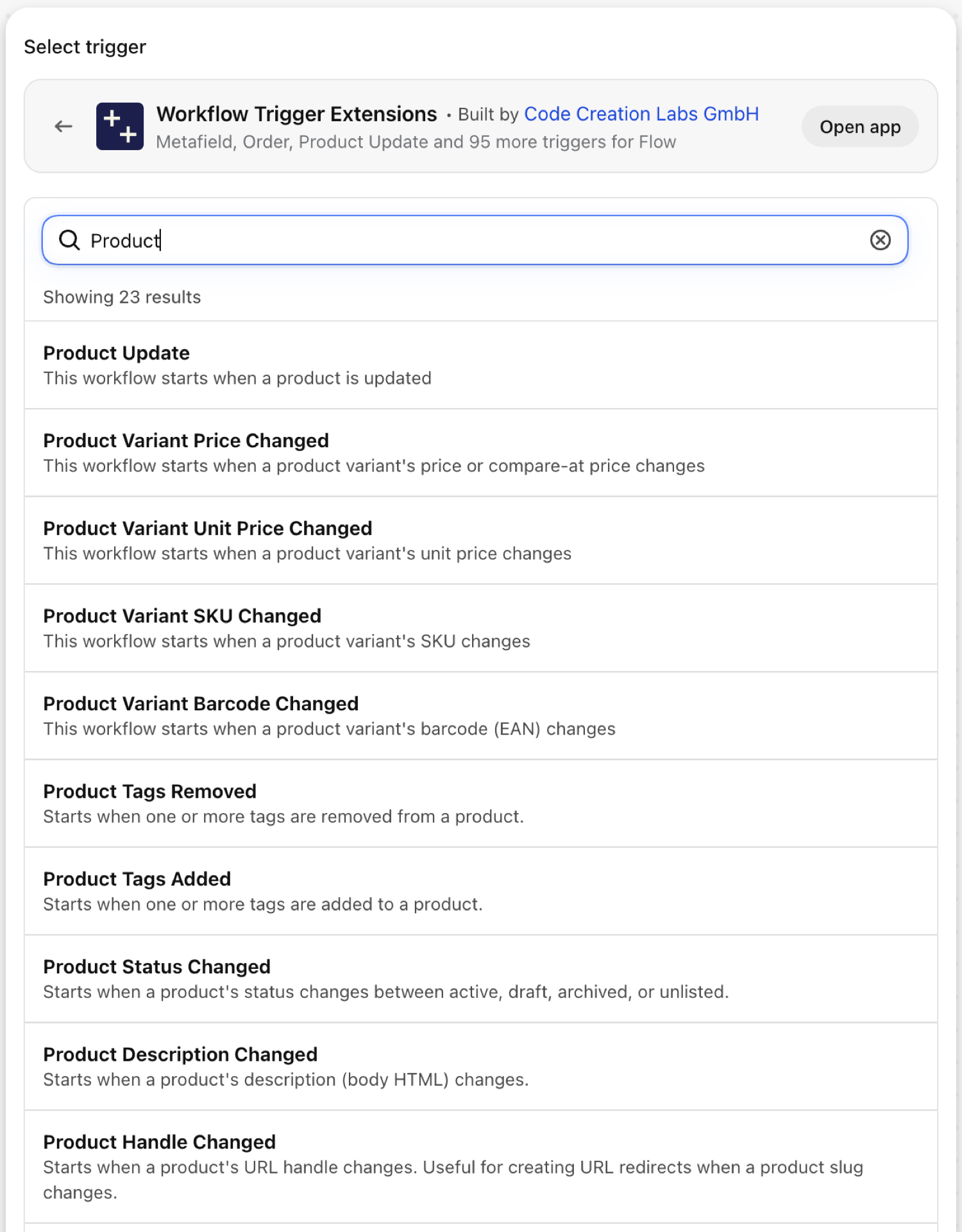
Product Update
Fires on every save of a product, whatever changed. Since 2.10.0 it also carries changes: the tracked fields that changed (title, handle, description, status, vendor, type, tags) with the value before and after.
| Fires from | Shopify webhook plus change detection |
| Permission | Product, Variant & Collection Data Access |
| Switched on | Turning on a Flow workflow that uses it switches it on. Its own switch is on the app's Triggers page |
Use it for
- One workflow that reacts to several kinds of product edits and branches on
changes.fields. - An audit trail: write every tracked change, old and new, to a sheet or a Slack channel.
- A catch-all while you find out which narrower trigger you really need.
What Product Update sends to your workflow
| Variable in Flow | Type | What it holds |
|---|---|---|
product |
Product (Shopify) | The product that was updated. A full Shopify product, so all of its fields and Flow's own product actions are available. |
payload |
Text | JSON object containing the GID of the product that was updated (e.g. {"id":"gid://shopify/Product/123"}) |
changes |
Object | Which tracked fields changed (title, handle, description, status, vendor, type, tags), with the old and new value of each |
changes.fields |
List of text | Names of the tracked fields that changed |
changes.items |
List of objects | Old and new value per changed field |
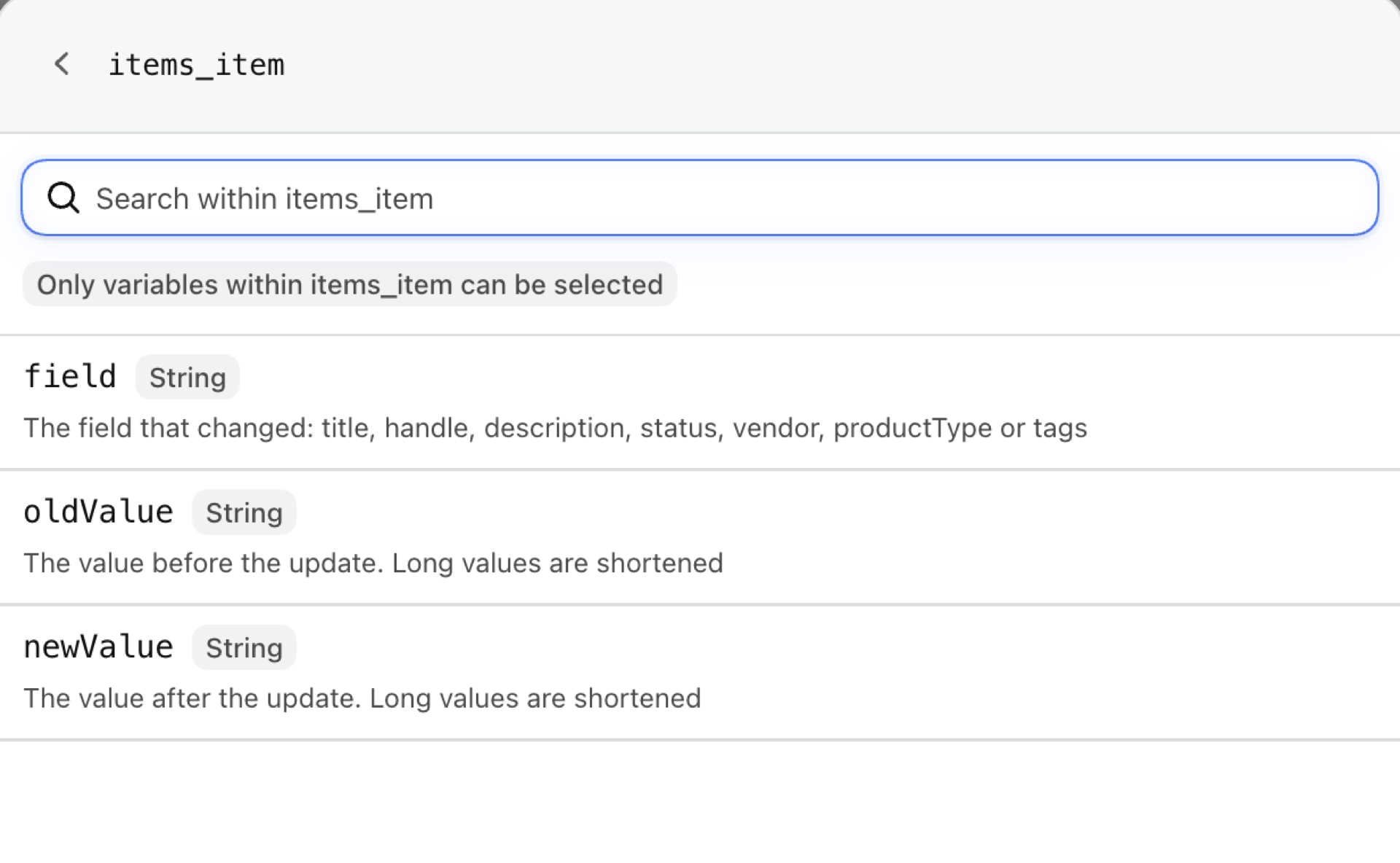
changes.items (each).field |
Text | The field that changed: title, handle, description, status, vendor, productType or tags |
changes.items (each).oldValue |
Text | The value before the update. Long values are shortened |
changes.items (each).newValue |
Text | The value after the update. Long values are shortened |
eventId |
Text | The id of this event. Search for it in the app's Event History to see exactly what was sent. |
Example: Log every tracked product change with its old and new value
- In Shopify Flow choose Select a trigger, open Workflow Trigger Extensions and pick Product Update.
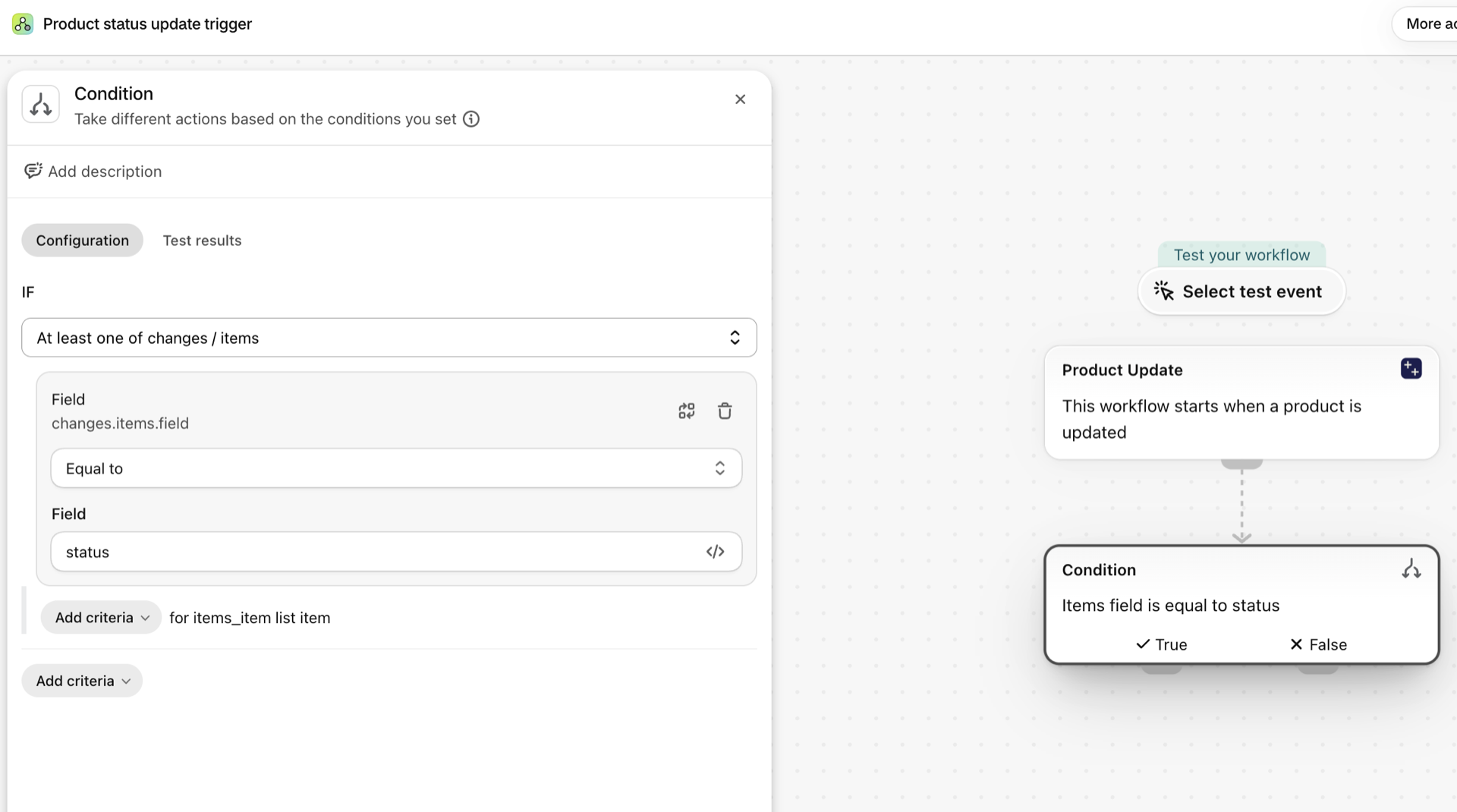
- Add a Condition:
changes.fieldsNot empty and exists. Updates outside the tracked fields (a price edit, an image) arrive with an empty list and stop here. - Add Send internal email (or Send HTTP request to Slack). Flow's text fields accept Liquid, so a
forloop overchanges.itemscan print one line per change: the entry'sfield, then itsoldValueandnewValue, next to{{product.title}}. - Turn the workflow on. That switches the trigger on in the app as well.
Product Status Changed
Fires when a product moves between active, draft, archived and unlisted. A save that leaves the status alone does not fire it.
| Fires from | Shopify webhook plus change detection |
| Permission | Product, Variant & Collection Data Access |
| Switched on | Turning on a Flow workflow that uses it switches it on. Its own switch is on the app's Triggers page |
Use it for
- Tell the marketing team the moment a product goes live.
- Remove a product from a feed or a bundle when it is archived.
- Catch products that were set back to draft by mistake.
What Product Status Changed sends to your workflow
| Variable in Flow | Type | What it holds |
|---|---|---|
product |
Product (Shopify) | The product whose status changed. A full Shopify product, so all of its fields and Flow's own product actions are available. |
oldStatus |
Text | The previous product status (active, draft, archived, or unlisted) |
newStatus |
Text | The new product status (active, draft, archived, or unlisted) |
eventId |
Text | The id of this event. Search for it in the app's Event History to see exactly what was sent. |
Example: Announce a product that just went live
- Pick Product Status Changed as the trigger.
- Add a Condition:
newStatusEqual toactive, and a second criterionoldStatusEqual todraft. - Under Then add Send internal email: subject
Now live: {{product.title}}, body with{{product.onlineStoreUrl}}. - Optional: add Add product tags with
new-arrivalso a collection picks it up. - Turn the workflow on.
Product Title Changed
Fires when the title of a product changes. Nothing else on the product fires it.
| Fires from | Shopify webhook plus change detection |
| Permission | Product, Variant & Collection Data Access |
| Switched on | Turning on a Flow workflow that uses it switches it on. Its own switch is on the app's Triggers page |
Use it for
- Keep an external catalogue, a PIM or a translation tool in sync with renamed products.
- Ask for an SEO review whenever a title changes on a best seller.
- Spot accidental renames from bulk edits.
What Product Title Changed sends to your workflow
| Variable in Flow | Type | What it holds |
|---|---|---|
product |
Product (Shopify) | The product whose title changed. A full Shopify product, so all of its fields and Flow's own product actions are available. |
oldTitle |
Text | The previous title of the product |
newTitle |
Text | The new title of the product |
eventId |
Text | The id of this event. Search for it in the app's Event History to see exactly what was sent. |
Example: Send a rename to your team with both titles
- Pick Product Title Changed as the trigger.
- Add Send internal email with the subject
Product renamedand the body"{{oldTitle}}" is now "{{newTitle}}" - {{product.onlineStoreUrl}}. - If only some products matter, put a Condition in front:
product.vendorEqual to your brand, orproduct.tagsIncludeshero. - Turn the workflow on.
Product Handle Changed
Fires when the URL handle of a product changes, which is the part of the address after /products/.
| Fires from | Shopify webhook plus change detection |
| Permission | Product, Variant & Collection Data Access |
| Switched on | Turning on a Flow workflow that uses it switches it on. Its own switch is on the app's Triggers page |
Use it for
- Create a redirect from the old URL automatically, so links and search results keep working.
- Tell whoever maintains ads or email campaigns that a landing page moved.
What Product Handle Changed sends to your workflow
| Variable in Flow | Type | What it holds |
|---|---|---|
product |
Product (Shopify) | The product whose handle changed. A full Shopify product, so all of its fields and Flow's own product actions are available. |
oldHandle |
Text | The previous URL handle of the product |
newHandle |
Text | The new URL handle of the product |
eventId |
Text | The id of this event. Search for it in the app's Event History to see exactly what was sent. |
Example: Create a URL redirect from the old handle
- Pick Product Handle Changed as the trigger.
- Add the action Create URL redirect.
- Set Path to
/products/{{oldHandle}}and Target to/products/{{newHandle}}. - Turn the workflow on, then change a test product's handle and open the old URL.
Product Description Changed
Fires when the description (body HTML) of a product changes.
| Fires from | Shopify webhook plus change detection |
| Permission | Product, Variant & Collection Data Access |
| Switched on | Turning on a Flow workflow that uses it switches it on. Its own switch is on the app's Triggers page |
Use it for
- Re-run a translation or an AI summary only when the source text really changed.
- Ask legal or compliance to re-check regulated products after an edit.
- Refresh a product feed that carries the description.
What Product Description Changed sends to your workflow
| Variable in Flow | Type | What it holds |
|---|---|---|
product |
Product (Shopify) | The product whose description changed. A full Shopify product, so all of its fields and Flow's own product actions are available. |
oldDescription |
Text | The previous description (truncated to 4000 characters; fetch the full description via the product reference if needed) |
newDescription |
Text | The new description (truncated to 4000 characters; fetch the full description via the product reference if needed) |
eventId |
Text | The id of this event. Search for it in the app's Event History to see exactly what was sent. |
Example: Flag an edited description for review
- Pick Product Description Changed as the trigger.
- Add Add product tags with
needs-copy-review. - Add Send internal email to the reviewer with
{{product.title}}and a link to the product in the admin. - When the review is done the reviewer removes the tag. Pair it with Product Tags Removed if something should happen then.
Product Vendor Changed
Fires when the vendor of a product changes.
| Fires from | Shopify webhook plus change detection |
| Permission | Product, Variant & Collection Data Access |
| Switched on | Turning on a Flow workflow that uses it switches it on. Its own switch is on the app's Triggers page |
Use it for
- Move products between vendor-based collections or price lists.
- Notify purchasing when a product is reassigned to another supplier.
What Product Vendor Changed sends to your workflow
| Variable in Flow | Type | What it holds |
|---|---|---|
product |
Product (Shopify) | The product whose vendor changed. A full Shopify product, so all of its fields and Flow's own product actions are available. |
oldVendor |
Text | The previous vendor |
newVendor |
Text | The new vendor |
eventId |
Text | The id of this event. Search for it in the app's Event History to see exactly what was sent. |
Example: Swap a vendor tag when the vendor changes
- Pick Product Vendor Changed as the trigger.
- Add Remove product tags with
vendor:{{oldVendor}}. - Add Add product tags with
vendor:{{newVendor}}. - Turn the workflow on.
Product Type Changed
Fires when the product type changes. This is the free-text Type field, not Shopify's standard product category.
| Fires from | Shopify webhook plus change detection |
| Permission | Product, Variant & Collection Data Access |
| Switched on | Turning on a Flow workflow that uses it switches it on. Its own switch is on the app's Triggers page |
Use it for
- Re-sort products into type-based automated collections or shipping profiles.
- Keep a tax or customs mapping in an external system current.
What Product Type Changed sends to your workflow
| Variable in Flow | Type | What it holds |
|---|---|---|
product |
Product (Shopify) | The product whose type changed. A full Shopify product, so all of its fields and Flow's own product actions are available. |
oldType |
Text | The previous product type |
newType |
Text | The new product type |
eventId |
Text | The id of this event. Search for it in the app's Event History to see exactly what was sent. |
Example: Notify operations when a product changes type
- Pick Product Type Changed as the trigger.
- Add a Condition if only some types matter:
newTypeEqual toHazardous. - Add Send internal email:
{{product.title}} moved from type "{{oldType}}" to "{{newType}}". - Turn the workflow on.
Product Tags Added
Fires when at least one tag is added to a product. addedTags holds only the new ones, so you do not have to compare lists yourself.
| Fires from | Shopify webhook plus change detection |
| Permission | Product, Variant & Collection Data Access |
| Switched on | Turning on a Flow workflow that uses it switches it on. Its own switch is on the app's Triggers page |
Use it for
- Start a process from a tag:
photo-ready,approved,clearance. - Let staff trigger automation from the product page without opening Flow.
What Product Tags Added sends to your workflow
| Variable in Flow | Type | What it holds |
|---|---|---|
product |
Product (Shopify) | The product whose tags changed. A full Shopify product, so all of its fields and Flow's own product actions are available. |
addedTags |
Text | Comma-separated list of tags that were added to the product |
removedTags |
Text | Comma-separated list of tags that were removed from the product in the same update (may be empty) |
currentTags |
Text | Comma-separated list of all current tags on the product |
previousTags |
Text | Comma-separated list of all previous tags on the product before this update |
eventId |
Text | The id of this event. Search for it in the app's Event History to see exactly what was sent. |
Example: Publish a product when it gets the tag approved
- Pick Product Tags Added as the trigger.
- Add a Condition:
addedTagsIncludesapproved. - Under Then add Update product status with
Active(or Publish product to a channel). - Add Remove product tags with
approvedif the tag is only a signal. - Turn the workflow on.
Product Tags Removed
Fires when at least one tag is removed from a product. removedTags holds exactly the ones that went away.
| Fires from | Shopify webhook plus change detection |
| Permission | Product, Variant & Collection Data Access |
| Switched on | Turning on a Flow workflow that uses it switches it on. Its own switch is on the app's Triggers page |
Use it for
- End a process when a status tag is taken off: a sale ends when
clearanceis removed. - Undo what the matching Tags Added workflow did.
What Product Tags Removed sends to your workflow
| Variable in Flow | Type | What it holds |
|---|---|---|
product |
Product (Shopify) | The product whose tags changed. A full Shopify product, so all of its fields and Flow's own product actions are available. |
addedTags |
Text | Comma-separated list of tags that were added to the product in the same update (may be empty) |
removedTags |
Text | Comma-separated list of tags that were removed from the product |
currentTags |
Text | Comma-separated list of all current tags on the product |
previousTags |
Text | Comma-separated list of all previous tags on the product before this update |
eventId |
Text | The id of this event. Search for it in the app's Event History to see exactly what was sent. |
Example: End a sale when the clearance tag is removed
- Pick Product Tags Removed as the trigger.
- Add a Condition:
removedTagsIncludesclearance. - Add the actions that undo the sale, for example Remove product tags
sale-badgeand Send internal email to merchandising. - Turn the workflow on.
Product Published to Channel
Fires when a product is published to one or more sales channels, markets or B2B catalogs. channels.added lists where it just appeared, channels.current everywhere it is now.
| Fires from | Shopify webhook plus change detection |
| Permission | Publications Data Access + Product, Variant & Collection Data Access |
| Switched on | Turning on a Flow workflow that uses it switches it on. Its own switch is on the app's Triggers page |
Use it for
- Start a launch checklist when a product reaches the Online Store.
- Push a product to a marketplace feed only once it is published to that channel.
- Tell the retail team when something becomes available on Point of Sale.
What Product Published to Channel sends to your workflow
| Variable in Flow | Type | What it holds |
|---|---|---|
product |
Product (Shopify) | The product that was published. A full Shopify product, so all of its fields and Flow's own product actions are available. |
channels |
Object | The channels added / removed / currently published, each a Publication (id, name, type, catalogId) |
channels.added |
List of objects | Channels the product was just published to in this event. |
channels.added (each).id |
ID | The publication GID (gid://shopify/Publication/...) |
channels.added (each).name |
Text | The channel / context name (e.g. Online Store, Point of Sale, Google & YouTube, a market name, or a B2B location name) |
channels.added (each).type |
Text | The kind of selling context: Sales Channel, Market, or B2B Location |
channels.added (each).catalogId |
ID | The catalog GID backing this publication (AppCatalog, MarketCatalog, or CompanyLocationCatalog) |
channels.removed |
List of objects | Channels the product was just unpublished from in this event. |
channels.removed (each).id |
ID | The publication GID (gid://shopify/Publication/...) |
channels.removed (each).name |
Text | The channel / context name (e.g. Online Store, Point of Sale, Google & YouTube, a market name, or a B2B location name) |
channels.removed (each).type |
Text | The kind of selling context: Sales Channel, Market, or B2B Location |
channels.removed (each).catalogId |
ID | The catalog GID backing this publication (AppCatalog, MarketCatalog, or CompanyLocationCatalog) |
channels.current |
List of objects | All channels the product is currently published to (after this change). |
channels.current (each).id |
ID | The publication GID (gid://shopify/Publication/...) |
channels.current (each).name |
Text | The channel / context name (e.g. Online Store, Point of Sale, Google & YouTube, a market name, or a B2B location name) |
channels.current (each).type |
Text | The kind of selling context: Sales Channel, Market, or B2B Location |
channels.current (each).catalogId |
ID | The catalog GID backing this publication (AppCatalog, MarketCatalog, or CompanyLocationCatalog) |
eventId |
Text | The id of this event. Search for it in the app's Event History to see exactly what was sent. |
Example: Alert the retail team when a product reaches Point of Sale
- Pick Product Published to Channel as the trigger.
- Add a Condition: At least one of
channels.addedhasnameEqual toPoint of Sale. - Add Send internal email:
{{product.title}} is now available on POS. - Turn the workflow on.
Product Unpublished from Channel
Fires when a product is removed from one or more sales channels. channels.removed lists where it disappeared.
| Fires from | Shopify webhook plus change detection |
| Permission | Publications Data Access + Product, Variant & Collection Data Access |
| Switched on | Turning on a Flow workflow that uses it switches it on. Its own switch is on the app's Triggers page |
Use it for
- Catch products that silently dropped off the Online Store.
- Pause ads for a product the moment it leaves the channel the ads point to.
What Product Unpublished from Channel sends to your workflow
| Variable in Flow | Type | What it holds |
|---|---|---|
product |
Product (Shopify) | The product that was unpublished. A full Shopify product, so all of its fields and Flow's own product actions are available. |
channels |
Object | The channels added / removed / currently published, each a Publication (id, name, type, catalogId) |
channels.added |
List of objects | Channels the product was just published to in this event. |
channels.added (each).id |
ID | The publication GID (gid://shopify/Publication/...) |
channels.added (each).name |
Text | The channel / context name (e.g. Online Store, Point of Sale, Google & YouTube, a market name, or a B2B location name) |
channels.added (each).type |
Text | The kind of selling context: Sales Channel, Market, or B2B Location |
channels.added (each).catalogId |
ID | The catalog GID backing this publication (AppCatalog, MarketCatalog, or CompanyLocationCatalog) |
channels.removed |
List of objects | Channels the product was just unpublished from in this event. |
channels.removed (each).id |
ID | The publication GID (gid://shopify/Publication/...) |
channels.removed (each).name |
Text | The channel / context name (e.g. Online Store, Point of Sale, Google & YouTube, a market name, or a B2B location name) |
channels.removed (each).type |
Text | The kind of selling context: Sales Channel, Market, or B2B Location |
channels.removed (each).catalogId |
ID | The catalog GID backing this publication (AppCatalog, MarketCatalog, or CompanyLocationCatalog) |
channels.current |
List of objects | All channels the product is currently published to (after this change). |
channels.current (each).id |
ID | The publication GID (gid://shopify/Publication/...) |
channels.current (each).name |
Text | The channel / context name (e.g. Online Store, Point of Sale, Google & YouTube, a market name, or a B2B location name) |
channels.current (each).type |
Text | The kind of selling context: Sales Channel, Market, or B2B Location |
channels.current (each).catalogId |
ID | The catalog GID backing this publication (AppCatalog, MarketCatalog, or CompanyLocationCatalog) |
eventId |
Text | The id of this event. Search for it in the app's Event History to see exactly what was sent. |
Example: Warn when a product leaves the Online Store
- Pick Product Unpublished from Channel as the trigger.
- Add a Condition: At least one of
channels.removedhasnameEqual toOnline Store. - Add Send internal email or a Slack request with
{{product.title}}and the admin link. - Turn the workflow on.
Next steps
- Complete trigger reference - every trigger on one page.
- Choosing the right trigger - which one fits your case.
- Custom triggers - when no built-in trigger fits, write your own.
- Event history and troubleshooting - see what fired and what it carried.
- Trigger events on a record's admin page - the latest events of one record, on its own page in the Shopify admin.