
Discount triggers, step by step
Step-by-step Shopify Flow tutorials for the discount lifecycle: created, updated, deleted, expired, code added and code removed.
Six triggers for the whole life of a discount: created, updated, deleted, a code added, a code removed, and expired - which Shopify never reports at all.
On this page: Discount Created, Discount Updated, Discount Deleted, Discount Expired, Discount Code Added, Discount Code Removed
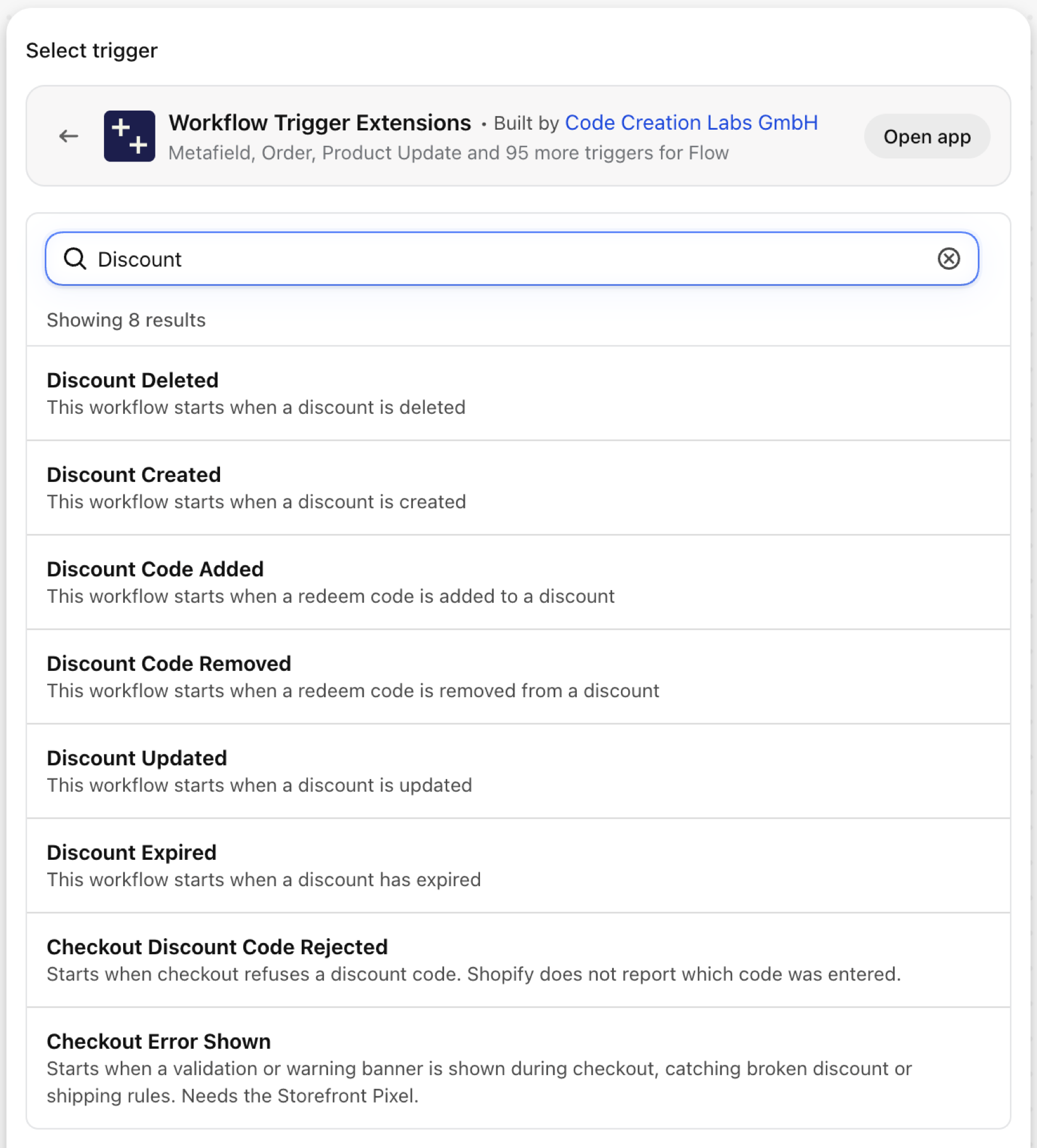
Discount Created
Fires when a discount is created, automatic or code based, by staff or by an app.
| Fires from | Shopify webhook |
| Permission | Discount Data Access |
| Switched on | Turning on a Flow workflow that uses it switches it on. Its own switch is on the app's Triggers page |
Use it for
- Announce new promotions to support, so nobody is surprised by a code.
- Audit discounts created by apps or by staff without approval.
What Discount Created sends to your workflow
| Variable in Flow | Type | What it holds |
|---|---|---|
discount |
Object | The created discount |
discount.id |
ID | The Shopify GID of the discount |
discount.title |
Text | The title of the discount |
discount.status |
Text | The status of the discount (ACTIVE, EXPIRED, SCHEDULED) |
discount.createdAt |
Text | When the discount was created |
discount.updatedAt |
Text | When the discount was last updated |
discount.startsAt |
Text | When the discount becomes active |
discount.endsAt |
Text | When the discount expires |
eventId |
Text | The id of this event. Search for it in the app's Event History to see exactly what was sent. |
Example: Announce every new discount in Slack
- Pick Discount Created as the trigger.
- Add Send HTTP request to a Slack webhook:
New discount "{{discount.title}}" ({{discount.status}}), runs {{discount.startsAt}} to {{discount.endsAt}}. - Turn the workflow on.
Discount Updated
Fires when a discount is edited: title, value, dates, eligibility, status.
| Fires from | Shopify webhook |
| Permission | Discount Data Access |
| Switched on | Turning on a Flow workflow that uses it switches it on. Its own switch is on the app's Triggers page |
Use it for
- Review changes to running promotions.
- Re-sync promotion data to a storefront banner or an email tool.
What Discount Updated sends to your workflow
| Variable in Flow | Type | What it holds |
|---|---|---|
discount |
Object | The updated discount |
discount.id |
ID | The Shopify GID of the discount |
discount.title |
Text | The title of the discount |
discount.status |
Text | The status of the discount (ACTIVE, EXPIRED, SCHEDULED) |
discount.createdAt |
Text | When the discount was created |
discount.updatedAt |
Text | When the discount was last updated |
discount.startsAt |
Text | When the discount becomes active |
discount.endsAt |
Text | When the discount expires |
eventId |
Text | The id of this event. Search for it in the app's Event History to see exactly what was sent. |
Example: Review edits to active discounts
- Pick Discount Updated as the trigger.
- Add a Condition:
discount.statusEqual toACTIVE. - Add Send internal email with
{{discount.title}}and the discount's admin link. - Turn the workflow on.
Discount Deleted
Fires when a discount is deleted. Only the id and the time are left to report.
| Fires from | Shopify webhook |
| Permission | Discount Data Access |
| Switched on | Turning on a Flow workflow that uses it switches it on. Its own switch is on the app's Triggers page |
Use it for
- Remove a deleted promotion from banners, feeds or an email tool.
What Discount Deleted sends to your workflow
| Variable in Flow | Type | What it holds |
|---|---|---|
discountId |
Text | The Shopify GID of the discount |
deletedAt |
Text | The timestamp when the discount was deleted |
eventId |
Text | The id of this event. Search for it in the app's Event History to see exactly what was sent. |
Example: Clean up after a deleted discount
- Pick Discount Deleted as the trigger.
- Add Send HTTP request to the system that mirrors your promotions, with
{{discountId}}and{{deletedAt}}. - Turn the workflow on.
Discount Expired
Fires when a discount passes its end date. Shopify sends nothing at that moment, so the app checks on a schedule and fires once per expired discount.
| Fires from | Checked on a schedule, because Shopify sends no webhook for it |
| Permission | Discount Data Access |
| Switched on | Turning on a Flow workflow that uses it switches it on. Its own switch is on the app's Triggers page |
Use it for
- Take a promotion banner down when its code stops working.
- Tell support that a campaign ended.
- Start the follow-up campaign.
What Discount Expired sends to your workflow
| Variable in Flow | Type | What it holds |
|---|---|---|
discount |
Object | The expired discount |
discount.id |
ID | The Shopify GID of the discount |
discount.title |
Text | The title of the discount |
discount.status |
Text | The status of the discount |
discount.endsAt |
Text | When the discount expired |
discount.startsAt |
Text | When the discount became active |
eventId |
Text | The id of this event. Search for it in the app's Event History to see exactly what was sent. |
Example: Take the promo banner down when the code expires
- Pick Discount Expired as the trigger.
- Add Update shop metafield (or Send Admin API request) that clears the metafield your theme reads the banner from.
- Add Send internal email:
{{discount.title}} expired at {{discount.endsAt}}. - Turn the workflow on. To test, create a discount whose end time is a few minutes away.
Discount Code Added
Fires when a redeem code is added to a code discount, including codes generated in bulk.
| Fires from | Shopify webhook |
| Permission | Discount Data Access |
| Switched on | Turning on a Flow workflow that uses it switches it on. Its own switch is on the app's Triggers page |
Use it for
- Register new codes with an affiliate or influencer tool.
- Audit who adds codes to a running campaign.
What Discount Code Added sends to your workflow
| Variable in Flow | Type | What it holds |
|---|---|---|
discount |
Object | The discount the code was added to |
discount.id |
ID | The Shopify GID of the discount |
discount.updatedAt |
Text | When the discount was last updated |
redeemCode |
Object | The redeem code that was added |
redeemCode.id |
ID | The Shopify GID of the redeem code |
redeemCode.code |
Text | The redeem code string |
eventId |
Text | The id of this event. Search for it in the app's Event History to see exactly what was sent. |
Example: Register a new code with your affiliate tool
- Pick Discount Code Added as the trigger.
- Add Send HTTP request with
{{redeemCode.code}}and{{discount.id}}. - Turn the workflow on.
Discount Code Removed
Fires when a redeem code is removed from a discount. It carries the code, how often it was used, and whether it was part of a bulk removal.
| Fires from | Shopify webhook |
| Permission | Discount Data Access |
| Switched on | Turning on a Flow workflow that uses it switches it on. Its own switch is on the app's Triggers page |
Use it for
- Notice when a code that is still in circulation is removed.
- Keep partner systems from advertising dead codes.
What Discount Code Removed sends to your workflow
| Variable in Flow | Type | What it holds |
|---|---|---|
discount |
Object | The discount the code was removed from |
discount.id |
ID | The Shopify GID of the discount |
discount.updatedAt |
Text | When the discount was last updated |
discount.totalUsageCount |
Number | Total number of times the whole discount has been used across all of its codes. |
redeemCode |
Object | The redeem code that was removed |
redeemCode.id |
ID | The Shopify GID of the redeem code |
redeemCode.code |
Text | The redeem code string |
redeemCode.usageCount |
Number | How many times this code was used before it was removed. Null when it was part of a bulk removal (per-code usage can't be split) or could not be determined. |
redeemCode.bulkRemoval |
True / false | True when the code was removed as part of a bulk deletion, where per-code usage is unavailable. |
eventId |
Text | The id of this event. Search for it in the app's Event History to see exactly what was sent. |
Example: Warn when a used code is removed
- Pick Discount Code Removed as the trigger.
- Add a Condition:
redeemCode.usageCountGreater than0andredeemCode.bulkRemovalEqual tofalse. - Add Send internal email:
Code {{redeemCode.code}} was removed after {{redeemCode.usageCount}} uses. - Turn the workflow on.
Next steps
Longer walkthroughs with a Slack setup: Send new discounts to Slack, Trigger a Shopify Flow when a discount expires and Discount code removed alerts.
- Complete trigger reference - every trigger on one page.
- Choosing the right trigger - which one fits your case.
- Custom triggers - when no built-in trigger fits, write your own.
- Event history and troubleshooting - see what fired and what it carried.