
Flow's Customer updated trigger and the customer triggers of this app
What Shopify Flow's Customer updated trigger can watch, when it also runs without a change, and which customer triggers carry the value before and after.
Flow's Customer updated trigger starts a workflow when one of up to five fields of a customer profile or its addresses changes. In the words of Shopify's help page: "The Customer updated trigger provides only the current values of the customer and its addresses." and "The previous values of the fields that changed aren't available in the workflow."
This app has eleven customer triggers. Ten of them fire for one kind of change and carry the value before and after. Consent, email and address workflows in particular depend on knowing what the value was before.
What Customer updated can watch
The fields of Shopify's help page, as of November 20, 2026:
| Group | Fields |
|---|---|
| Customer | amountSpent, dataSaleOptOut, defaultAddress, firstName, image, lastName, lastOrder, locale, metafield.value, multipassIdentifier, note, numberOfOrders, productSubscriberStatus, state, tags, taxExempt, taxExemptions, verifiedEmail |
| Email address | defaultEmailAddress and below it marketingOptInLevel, marketingState, marketingUpdatedAt, openTrackingLevel, sourceLocation |
| Phone number | defaultPhoneNumber, defaultPhoneNumber.smsMarketingConsent and below it optInLevel, sourceLocation, state, updatedAt |
| Addresses | addressesV2 and below it address1, address2, city, company, countryCodeV2, firstName, lastName, latitude, longitude, phone, provinceCode, zip |
What Shopify's page adds:
- You select at least one field and at most five. A metafield definition or a whole namespace counts as one of the five.
- "In most cases, changes to fields that you didn't select don't start the workflow."
- Shopify can record a change to the default email address or the default phone number as a whole. A workflow that watches a nested field, such as
defaultEmailAddress.marketingState, then also runs, even if that nested field did not change. Shopify recommends a condition that checks the value. - Adding or removing an address counts as a change to that address, and starts a workflow that watches a field of the Addresses group.
- The Mailing Address variable can be empty when the workflow runs, for example when an address was removed.
Field by field
| What changed | Flow's Customer updated | Trigger of this app | What the workflow gets on top |
|---|---|---|---|
| Email marketing consent | defaultEmailAddress.marketingState, marketingOptInLevel: current values |
Customer Email Marketing Consent Changed | consentState, optInLevel, consentUpdatedAt, oldConsentState, oldOptInLevel |
| SMS marketing consent | defaultPhoneNumber.smsMarketingConsent.state, optInLevel: current values |
Customer SMS Marketing Consent Changed | consentState, optInLevel, consentUpdatedAt, oldConsentState, oldOptInLevel |
| Email address | defaultEmailAddress: the new address |
Customer Email Changed | email, oldEmail |
| Phone number | defaultPhoneNumber: the new number |
Customer Phone Changed | phone, oldPhone |
| Name | firstName, lastName: the new name |
Customer Name Changed | firstName, lastName, oldFirstName, oldLastName |
| Default address | defaultAddress: the new address |
Customer Address Changed | address and oldAddress, and every part of both as its own field |
| Tags | tags: the tag list after the change |
Customer Tags Added, Customer Tags Removed | addedTags, removedTags, previousTags, currentTags |
| Note | note: the new note |
Customer Note Changed | oldNote, newNote |
| Account state | state: the new state |
Customer State Changed | oldState, newState |
| Customer metafield | metafield.value: the new value |
Customer Metafield Update | metafield.value, metafield.previousValue |
| Amount spent, number of orders, last order, locale, tax exemptions, other addresses | on Flow's list | Customer Update fires on these updates. No trigger of this app carries their old value |
For tags, Flow also has its own Customer tags added and Customer tags removed triggers, which list the tags that were added or removed.
Why consent workflows need the state before
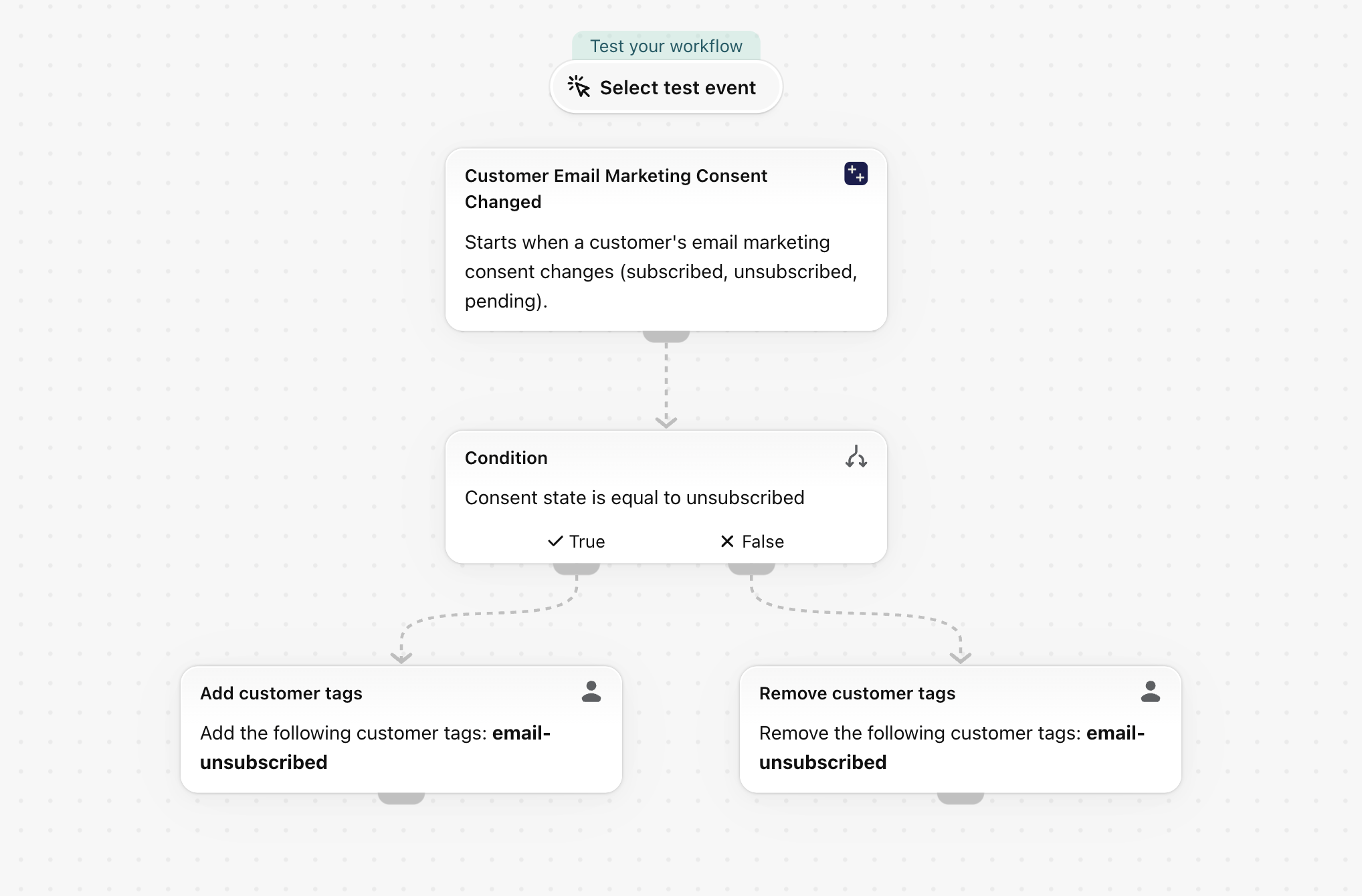
A consent workflow has to answer one question: did this customer just subscribe, or just unsubscribe? The current state alone does not say. A customer who is unsubscribed now may have unsubscribed a second ago or a year ago, and Shopify's own page notes that a workflow on a nested email or phone field can run although that field did not change.
Customer Email Marketing Consent Changed and Customer SMS Marketing Consent Changed carry oldConsentState next to consentState. A condition such as oldConsentState Equal to subscribed and consentState Equal to unsubscribed is true once, at the moment of the change. Ready to use: Tag customers when they unsubscribe from email marketing and Tag customers when they unsubscribe from SMS marketing.
More workflows that need the value before
Warn the old address when an email changes. Customer Email Changed carries oldEmail and email. A notice to the old address is a common safeguard against account takeover, and it needs an email action that accepts a variable as recipient, for example Workflow Transactional Email. Without oldEmail there is nobody left to warn.
Re-check tax or shipping rules when a customer moves. Customer Address Changed carries the country and province before and after, so a workflow can act only when the country changed.
Welcome a customer whose account was activated. Customer State Changed carries oldState and newState, so the workflow reacts to the step from invited to enabled and stays quiet on every other state change.
React to one step of a custom status. A metafield such as a loyalty tier moves from silver to gold: Customer Metafield Update carries the value before and after, so the workflow can congratulate on the upgrade and stay quiet on a downgrade.
When Customer updated is the right choice
- You watch the amount spent, the number of orders, the last order, the locale or tax exemptions.
- You watch any address of the customer, not only the default one, or the moment an address is added or removed.
- A simple alert with the current values is enough.
Both can run in the same store, and they do not interfere.
Does Customer updated give the previous email address or the previous consent state?
No. Shopify's help page says the trigger provides only the current values of the customer and its addresses. Customer Email Changed carries oldEmail, and the two consent triggers carry oldConsentState.
Why does my workflow on a marketing field run although consent did not change?
Shopify's help page explains it: Shopify can record a change to the default email address or phone number as a whole, and a workflow that watches a nested field then also runs. With the current value only, the workflow cannot tell. The consent triggers of this app carry the state before and after, so a condition can compare them.
How do I run a workflow only when a customer unsubscribes?
Use Customer Email Marketing Consent Changed with the condition consentState Equal to unsubscribed, and add oldConsentState Equal to subscribed if it should act on the change only.
Do the customer triggers store personal data?
Only the four that compare personal data (name, email, phone, address) and only when you switch them on. See Permissions and data access.
Next steps
- Customer triggers, step by step - every customer trigger with an example.
- Old and new values: what a workflow can do with them - all values before and after, by trigger.
- Flow's updated triggers and Workflow Trigger Extensions - the overview.