
Old and new values: what a workflow can do with them
Shopify Flow's updated triggers give a workflow only the current values. See which triggers carry the value before and after, and what you can build with it.
Flow's own updated triggers hand a workflow the record as it is now. Shopify's help pages say it for each of them: only the current values are available, the values before the change are not. For an alert that something changed, that is enough.
Many workflows need more than that. "The price dropped by more than 10 percent" needs the old price. "The handle changed, redirect the old URL" needs the old handle. "The customer unsubscribed" needs to know they were subscribed before. Every change trigger of this app carries both values, so these workflows are a condition and an action, with no code and nothing stored by hand.
Where the value before comes from
The app remembers the last known value of the fields it watches, per record. When Shopify reports an update, it compares, and when a watched field differs it fires the trigger with both values. Two details matter in practice:
- The first time the app sees a record it only remembers it. Nothing fires, because there is nothing to compare with. When you switch a trigger on, the app reads your existing records once in the background, so that the first real change already fires. For orders it reads the last 60 days by default, and you can extend that range in the app.
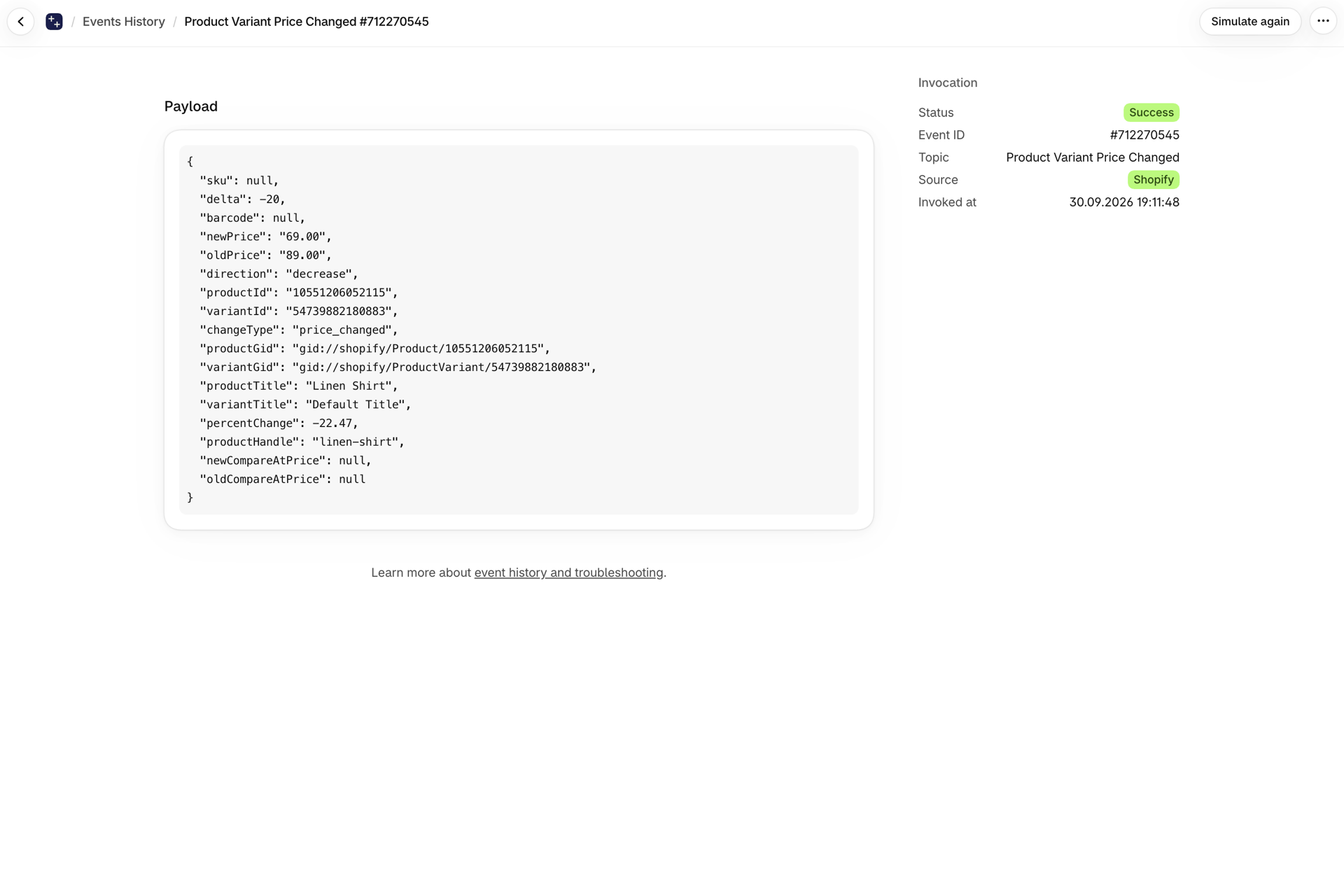
- The values belong to the moment of the change. A workflow on a Flow updated trigger reads the record when the workflow runs. If the record changes again a second later, or is deleted, that workflow sees the newer state or fails to load the record. An event of this app keeps the values it was created with. You can look at them later in the app's Event History.
What you can only build with the value before
| Workflow | Trigger | The condition that needs the old value | Ready to use |
|---|---|---|---|
| Redirect the old URL when a product or collection is renamed | Product Handle Changed, Collection Handle Changed | none: the redirect goes from oldHandle to newHandle |
Redirect old product URLs when a product handle changes, Redirect old collection URLs when a collection handle changes |
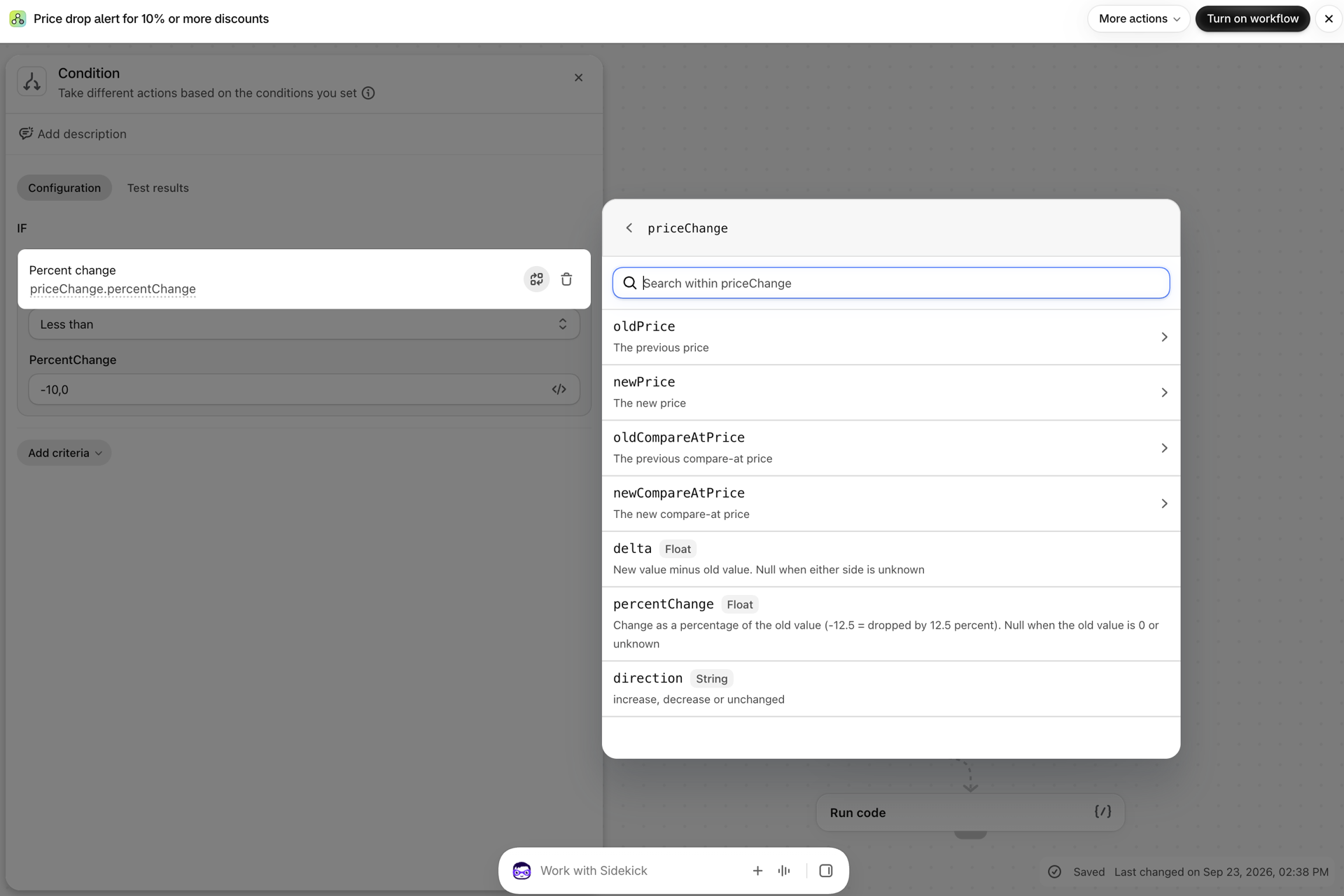
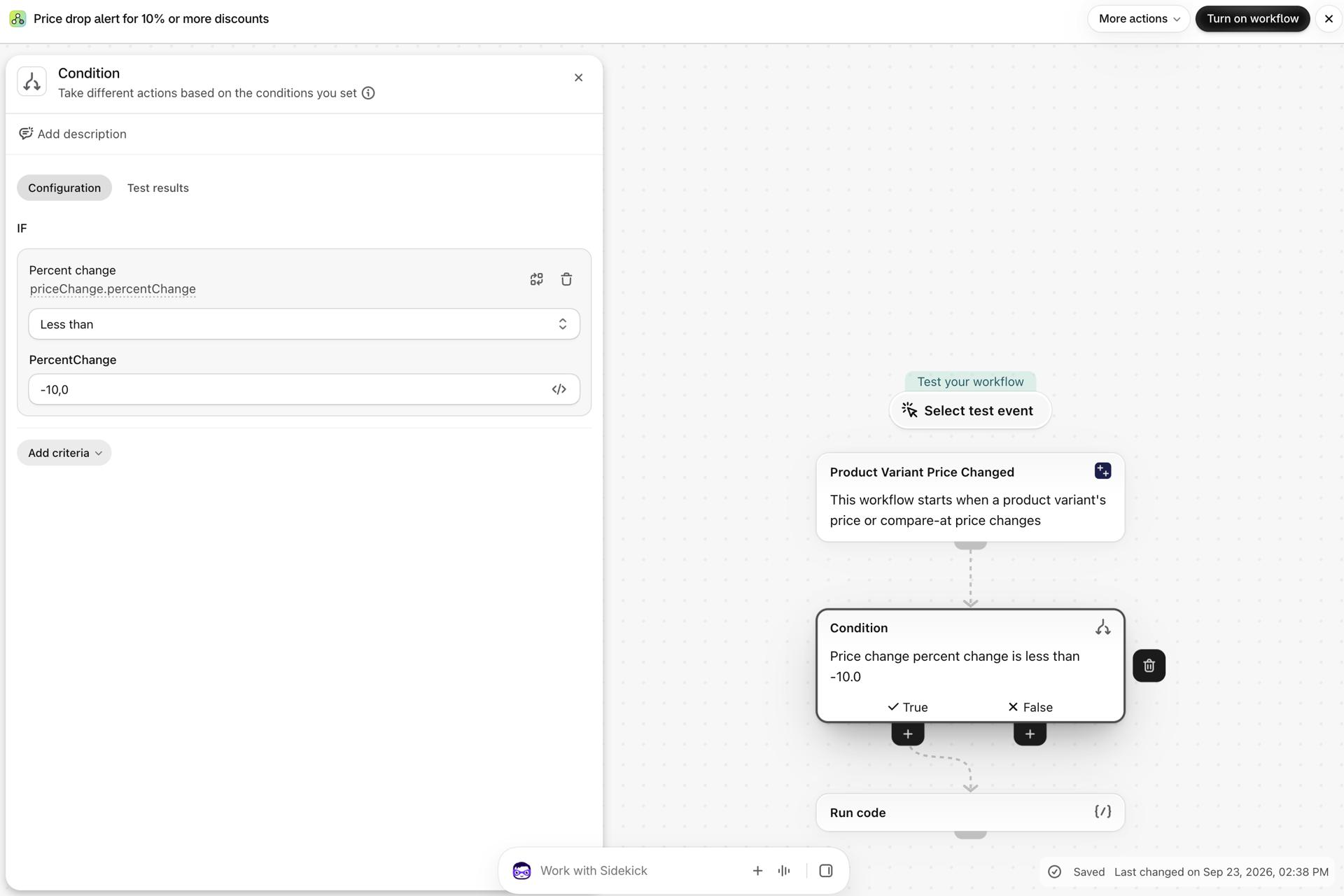
| Tag products whose price dropped by 10 percent or more | Product Variant Price Changed | priceChange.percentChange less than or equal to -10 |
Tag products when a variant price drops by 10 percent or more |
| Mark a product as on sale, and take the mark off again | Product Variant Price Changed | priceChange.oldCompareAtPrice.amount is empty and priceChange.newCompareAtPrice.amount is not, or the other way round |
Tag products as on sale when a compare at price is added, Remove the sale tag when a compare at price is removed |
| Release an order when a pending payment arrives | Order Financial Status Changed | oldFinancialStatus equal to pending and newFinancialStatus equal to paid |
Tag orders when a pending payment is received |
| Warn the warehouse when the address changes after checkout | Order Shipping Address Changed | none: the message shows oldShippingAddress and shippingAddress |
Tag orders when the shipping address changes after checkout |
| Tag customers who unsubscribe, and untag them when they come back | Customer Email Marketing Consent Changed | consentState equal to unsubscribed; oldConsentState tells you what it was before |
Tag customers when they unsubscribe from email marketing |
| Keep the previous SKU for your ERP or feed | Product Variant SKU Changed | none: skuChange.oldSku is written to a metafield |
Save the previous SKU when a variant SKU changes |
| Review the margin when a cost goes up | Product Variant Cost Changed | variantCostChange.percentChange greater than 5 |
Tag products for a margin review when a variant cost rises |
| Tag a product as low stock once, when it crosses the line | Inventory Level Changed at Location | inventoryLevel.oldAvailable greater than or equal to 5 and inventoryLevel.newAvailable less than 5 |
Tag products as low stock when inventory drops below five |
Three more that merchants build themselves:
- Tell the old address when a customer's email changes. Customer Email Changed carries
oldEmailandemail. Send the notice tooldEmailwith an email action that takes a variable as recipient, for example Workflow Transactional Email. Without the old address there is nobody left to warn. - React to a step in a custom status. A metafield
loyalty.tiermoves fromsilvertogold: Customer Metafield Update carriesmetafield.previousValueandmetafield.value, so the workflow can congratulate on the upgrade and stay quiet on a downgrade. - Act on one removed tag. After a tag is removed, a record looks like one that never had it. Order, Customer, Product and Draft Order Tags Removed name the removed tags. See Run a workflow when one specific tag is added or removed.
Every value before and after, by trigger
Orders
| Trigger | Before and after |
|---|---|
| Order Tags Added, Order Tags Removed | addedTags, removedTags, previousTags, currentTags |
| Order Note Changed | oldNote, newNote |
| Order Financial Status Changed | oldFinancialStatus, newFinancialStatus |
| Order Fulfillment Changed | oldFulfillmentStatus, newFulfillmentStatus, and per line or shipment in changes.items: fulfilled, unfulfilled, tracking updated with number, URL and company |
| Order Display Status Changed | oldDisplayFulfillmentStatus, newDisplayFulfillmentStatus |
| Order Attributes Changed | changes.items with changeType, key, oldValue, newValue |
| Order Line Items Changed | changes.items with changeType (added, removed, quantity, price or variant changed) and the old and new quantity, price and variant |
| Order Shipping Address Changed | shippingAddress and oldShippingAddress, each also as separate fields |
| Order Metafield Update | metafield.value, metafield.previousValue |
| Order Update | changes.fields and changes.items with field, oldValue, newValue for financial status, fulfillment status, tags, note, line items and custom attributes |
Customers
| Trigger | Before and after |
|---|---|
| Customer Tags Added, Customer Tags Removed | addedTags, removedTags, previousTags, currentTags |
| Customer Note Changed | oldNote, newNote |
| Customer State Changed | oldState, newState |
| Customer Name Changed | firstName, lastName, oldFirstName, oldLastName |
| Customer Email Changed | email, oldEmail |
| Customer Phone Changed | phone, oldPhone |
| Customer Address Changed | address and oldAddress, each also as separate fields |
| Customer Email Marketing Consent Changed, Customer SMS Marketing Consent Changed | consentState, optInLevel, oldConsentState, oldOptInLevel |
| Customer Metafield Update | metafield.value, metafield.previousValue |
| Customer Update | changes.fields and changes.items for tags, note and state |
Products and variants
| Trigger | Before and after |
|---|---|
| Product Tags Added, Product Tags Removed | addedTags, removedTags, previousTags, currentTags |
| Product Title, Handle, Description, Status, Vendor and Type Changed | the old and the new value, for example oldTitle and newTitle |
| Product Published to Channel, Product Unpublished from Channel | channels.added, channels.removed, channels.current |
| Product Variant Price Changed | priceChange.oldPrice, newPrice, oldCompareAtPrice, newCompareAtPrice, delta, percentChange, direction |
| Product Variant Unit Price Changed | unitPriceChange.oldUnitPrice, newUnitPrice, delta, percentChange, direction |
| Product Variant Cost Changed | variantCostChange.oldCost, newCost, delta, percentChange, direction |
| Product Variant SKU Changed | skuChange.oldSku, newSku |
| Product Variant Barcode Changed | barcodeChange.oldBarcode, newBarcode, the old and new barcode lists, added, removed |
| Product Metafield Update, Product Variant Metafield Update | metafield.value, metafield.previousValue |
| Product Update | changes.fields and changes.items for title, handle, description, status, vendor, product type and tags, and per variant for price, compare-at price, SKU, barcode, inventory policy, taxable, title, options and image |
Stock, collections, locations and more
| Trigger | Before and after |
|---|---|
| Inventory Level Changed, Out of Stock and Back in Stock at Location | inventoryLevel.oldAvailable, newAvailable, delta, percentChange, direction, with the location |
| Collection Title, Handle and Description Changed | the old and the new value |
| Location Updated, Company Update, Company Location Update, Discount Updated, Blog Update, Blog Post Update, Page Update | changes.fields and changes.items on the record, always |
| Collection Update, Draft Order Update, Market Updated | the same changes list, when Send old and new values is on |
| The ten draft order triggers | the same pattern as orders: tags, note, attributes, line items, status, email and addresses |
| Metafield Update for 15 kinds of records | metafield.value, metafield.previousValue |
Complete trigger reference lists every trigger with all of its fields.
Numbers come with the arithmetic done
Flow conditions compare, they do not calculate, and money amounts arrive in Flow as text. So "dropped by more than 10 percent" cannot be worked out inside a workflow from two prices. The price, unit price, cost and stock triggers therefore send the result as numbers:
| Field | Meaning | Example |
|---|---|---|
delta |
new value minus old value | -5 |
percentChange |
the change as a percentage of the old value | -12.5 means dropped by 12.5 percent |
direction |
increase, decrease or unchanged |
decrease |
Does Shopify Flow provide the previous value of a field?
Not with its own updated triggers. Shopify's help pages for Product updated, Order updated, Customer updated and the other updated triggers say that only the current values are available in the workflow. The triggers of this app send the value before and after.
Can I work out the old value inside Flow?
Only if you stored it yourself before the change, for example by copying a value into a metafield with another workflow and reading it back. That copy has to exist before the first change and be kept in step for every record. The app does this bookkeeping for the fields it watches.
Is the previous value available for metafields?
Yes. Every metafield trigger of this app carries metafield.previousValue next to metafield.value, for 15 kinds of records. See Metafield changes in Flow: the updated triggers and the metafield triggers.
Why did nothing fire for the first change of a record?
The app needs a starting point. When a trigger is switched on, it reads your existing records once in the background. A change made before that reading reached the record is only remembered. The next change fires. Event history and troubleshooting shows the state of that sync.
Next steps
- Flow's updated triggers and Workflow Trigger Extensions - Flow's updated triggers and this app side by side.
- Watch more than five fields in one workflow - watch any number of fields in one workflow.
- Workflow templates - ready workflows built on old and new values.