
Watch more than five fields in one workflow
Flow's updated triggers watch 1 to 5 fields per workflow. How the limit works, what counts as a field, and how to watch any number of fields with one trigger.
Each of Flow's own updated triggers watches 1 to 5 fields. You choose them when you set up the trigger, and the workflow starts when one of them changes. There is no "any change" option, and a sixth field is not accepted: when we tried to save an Order updated trigger with six fields on November 20, 2026, Flow refused the configuration.
The limit is per workflow, not per store. That is the way around it inside Flow, and also its cost: more fields mean more workflows.
What counts as one field
From Shopify's help pages for the updated triggers:
- Every field you pick counts, also a nested one.
variants.priceandvariants.compareAtPriceare two fields. - A parent can stand for its children. On Location updated,
addresswatches every part of the address with one of your five fields. - A metafield counts as one field per definition or per namespace. Watching a whole namespace takes one field.
- Money fields come in two currencies. The plain field starts the workflow when either amount changes. With
.shopMoneyor.presentmentMoneyyou watch one of them.
Fields that are not on a trigger's list cannot be watched with it. Examples: an order's shipping address, a product's sales channels and unit price, stock quantities, and the name of a location.
Four ways to watch more
| Way | How | What to keep in mind |
|---|---|---|
| Several Flow workflows | Copy the workflow and give each copy five other fields | Conditions and actions exist several times and have to be changed in every copy. An edit that touches fields of two copies runs both. |
| One generic Update trigger of this app | Product Update, Order Update, Customer Update, Draft Order Update, Collection Update and Market Updated fire on every update, or on the fields you tick | Any number of fields in one workflow. With Send old and new values the event lists which of them changed. The selection applies to every workflow on that trigger. |
| One custom trigger per workflow | The templates Product fields changed (before and after), Order fields changed (before and after) and Customer fields changed (before and after) | Each workflow gets its own set of fields, as many as it needs, with the value before and after of each. |
| One trigger per kind of change | Product Title Changed, Order Note Changed, Customer Tags Added and so on | Best when a workflow is about one kind of change. Each trigger carries the value before and after. |
Narrow a generic Update trigger to the fields you care about
- Open the app and go to Triggers.
- Find Product Update, Order Update or Customer Update. When the trigger is switched on, its row ends with a settings button. Click it.
- Under Which changes fire this, tick the fields. The list is built from a real record of your store, so you see the fields the app actually receives, variants and line items included. Ticking a parent covers everything below it.
- Turn on Send old and new values if the workflow should see what changed.
- Save.
From then on the trigger fires only when one of the ticked fields changes. With nothing ticked it fires on every update, as it always did.
The selection belongs to the trigger, so it applies to every workflow that uses it. When two workflows need different fields, give one of them its own custom trigger: the settings dialog has a button Create a custom trigger for these fields that sets one up from your selection. A custom trigger fires when one of its fields changes and sends each value before and after. See Custom triggers.
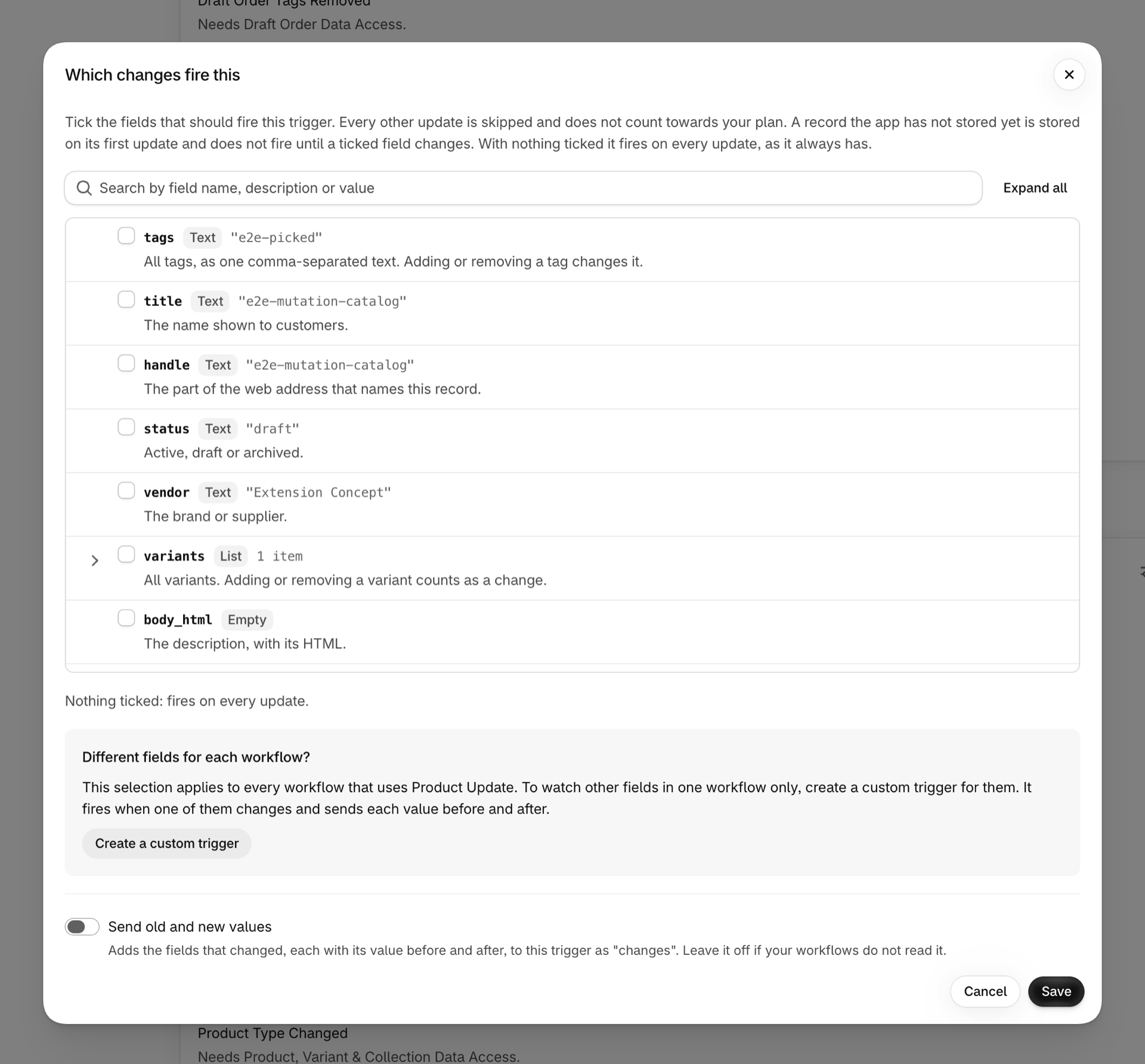
Example: one workflow for seven product fields
A feed team wants one workflow that tells them when the title, description, vendor, product type, a variant's price, compare-at price or barcode changes. On Flow's Product updated that is two workflows. Here it is one:
- On the Triggers page, open the settings of Product Update, tick
title,body_html,vendor,product_typeand undervariantsthe fieldsprice,compare_at_priceandbarcode. Turn on Send old and new values and save. - In Shopify Flow create a workflow with the trigger Product Update.
- Add Send internal email. Flow's text fields accept Liquid, so a
forloop overchanges.itemsprints one line per change with itsfield,oldValueandnewValue. - Turn the workflow on.
No condition is needed: the trigger only fires when one of the ticked fields changed.
The email names every field that changed in that save, with the value before and after, for the product and for each variant.
How many fields can a Shopify Flow updated trigger watch?
Between 1 and 5 per workflow. A metafield counts as one field per definition or per namespace. The limit applies to each workflow separately, so two workflows can watch ten fields between them.
Is there a Flow trigger that runs on any change of a product or order?
Not among Flow's own updated triggers: they need at least one field and take at most five. Product Update, Order Update and Customer Update of this app fire on every update of the record when no field is ticked.
Can I see which of my fields changed?
With the generic Update triggers of this app, yes: turn on Send old and new values, and changes.fields lists them. A workflow on a Flow updated trigger is not told which of its fields changed.
Does a narrowed trigger use fewer events of my plan?
Yes. An update that changes none of the ticked fields is skipped before it is counted.
Next steps
- Flow's updated triggers and Workflow Trigger Extensions - Flow's updated triggers and this app side by side.
- Old and new values: what a workflow can do with them - what a workflow can do with the value before a change.
- The Triggers page (formerly Settings) - every switch and setting of the Triggers page.
- Custom triggers - a trigger of your own for one workflow.