
Flow's Inventory item updated trigger, and SKU, cost and stock in this app
Flow's Inventory item updated trigger watches SKU, unit cost and customs data, not quantities. See how to get old and new SKU, cost and stock per location.
Flow's Inventory item updated trigger starts a workflow when one of up to five fields of an inventory item changes. The inventory item is where Shopify keeps a variant's SKU, cost, weight and customs data. As Shopify's help page puts it: "The Inventory item updated trigger provides only the current values of the inventory item." and "The trigger doesn't monitor inventory quantities."
This app covers the three things merchants automate most in this area with the value before and after: the SKU, the cost per item, and the stock at each location.
What Inventory item updated can watch
The fields of Shopify's help page, as of November 20, 2026:
| Group | Fields |
|---|---|
| Inventory item | countryCodeOfOrigin, harmonizedSystemCode, provinceCodeOfOrigin, requiresShipping, sku, tracked, trackedEditable, unitCost |
| Measurement | measurement, measurement.weight, measurement.weight.unit, measurement.weight.value |
| Inventory levels | inventoryLevel.isActive (changes when the item becomes active or inactive at a location) |
| Variants | variants (runs when a variant that uses the item is added or removed) |
What Shopify's page adds:
- You select at least one field and at most five.
- Quantities are not monitored. For the quantity of a variant Shopify points to its Product variant inventory quantity changed trigger.
- When you watch fields of different types, the Inventory Level and Product Variant variables can be empty when the workflow runs. Shopify recommends a condition that checks them before an action uses them.
Field by field
| What changed | Flow's Inventory item updated | Trigger of this app | Before and after |
|---|---|---|---|
| SKU | sku, new value only |
Product Variant SKU Changed | skuChange.oldSku, skuChange.newSku, with the variant and its product |
| Cost per item | unitCost, new value only |
Product Variant Cost Changed | variantCostChange.oldCost, newCost, delta, percentChange, direction |
| Stock at a location | not monitored | Inventory Level Changed at Location | inventoryLevel.oldAvailable, newAvailable, delta, percentChange, direction, with locationName and locationId |
| Sold out at a location | not monitored | Out of Stock at Location | the same values, fired when the available quantity reaches zero |
| Back in stock at a location | not monitored | Back in Stock at Location | the same values, fired when stock returns |
| Weight | measurement.weight |
no trigger | |
| Country of origin, HS code | countryCodeOfOrigin, provinceCodeOfOrigin, harmonizedSystemCode |
no trigger | |
| Tracked, requires shipping | tracked, requiresShipping |
no trigger | |
| Active at a location | inventoryLevel.isActive |
no trigger |
For weight, customs data and the tracking switches, Flow's trigger is the one to use.
Why cost and stock workflows need the value before
Cost. "The cost went up by more than 5 percent" is a question about two numbers. With the new cost alone a workflow cannot answer it. Product Variant Cost Changed sends the old cost, the new cost and the change in percent, so the condition is variantCostChange.percentChange Greater than 5. Ready to use: Tag products for a margin review when a variant cost rises.
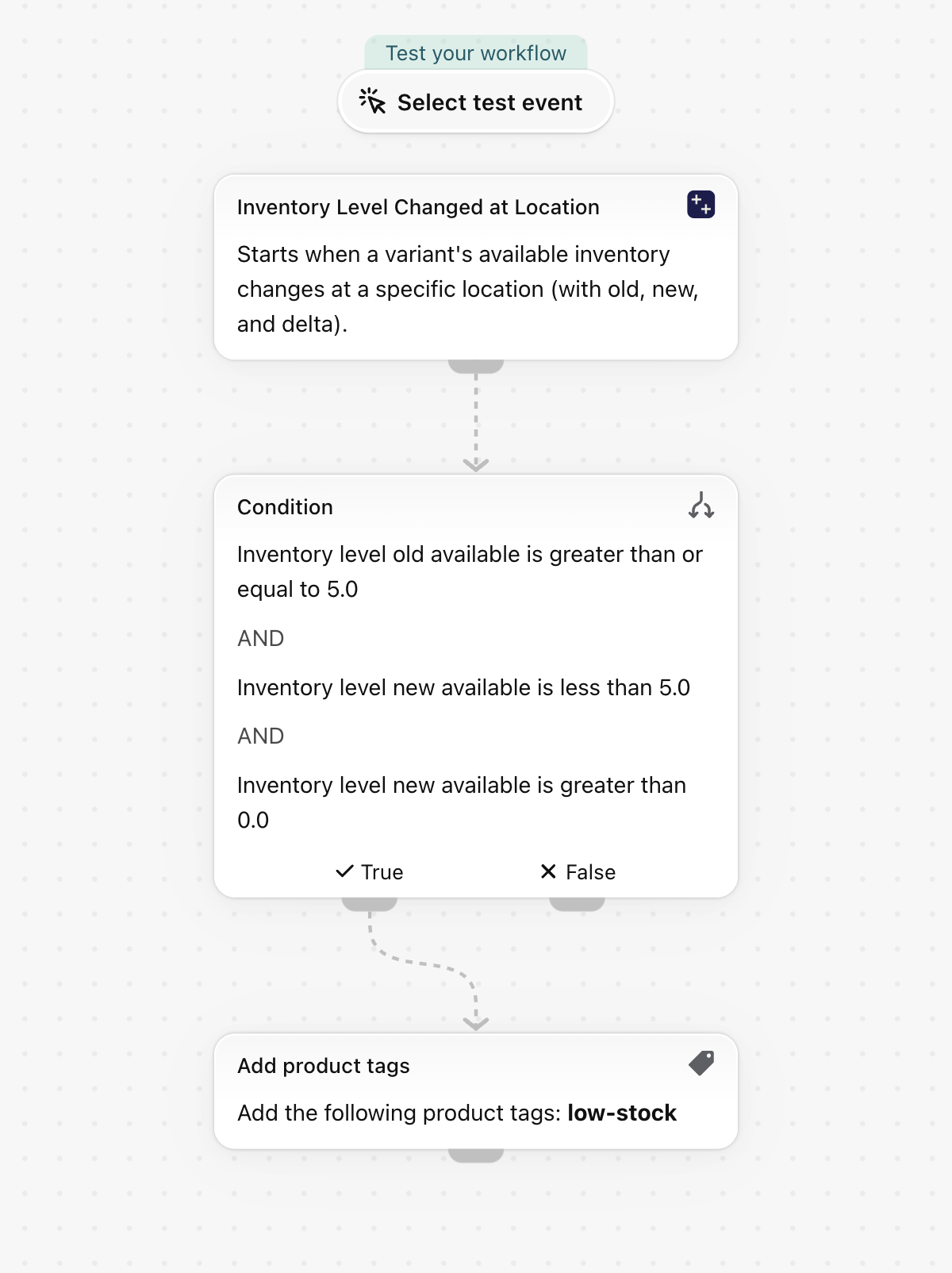
Stock. A low-stock workflow should act once, when the quantity crosses the line, and not on every sale below it. That needs the quantity before: inventoryLevel.oldAvailable Greater than or equal to 5 and inventoryLevel.newAvailable Less than 5. Ready to use: Tag products as low stock when inventory drops below five and Remove the low stock tag when inventory is back at five.
Stock per location. The inventory triggers of this app report each location on its own, with its name. A variant that sells out in one shop and is still available in the warehouse gives one event for that shop. Ready to use: Tag products when a variant sells out at a location and Remove the sold out tag when stock returns at a location.
SKU. When a SKU is renamed, an ERP or a feed often still knows the old one. Product Variant SKU Changed carries both, so a workflow can store the previous SKU or tell the other system which record to rename. Ready to use: Save the previous SKU when a variant SKU changes.
Does Inventory item updated run when the stock changes?
No. Shopify's help page says the trigger does not monitor inventory quantities. The inventory triggers of this app fire on quantity changes per location and carry the quantity before and after.
Can I get the old SKU in Flow?
Yes, with Product Variant SKU Changed. It carries skuChange.oldSku and skuChange.newSku. Flow's Inventory item updated can watch sku, with the current value only.
Can I see by how much a cost changed?
Yes. Product Variant Cost Changed carries the old and the new cost, the difference, the change in percent and the direction.
Which permission do the stock and cost triggers need?
Inventory access, which you grant in the app. See Permissions and data access.
Next steps
- Inventory triggers, step by step - the stock triggers with an example each.
- Product variant triggers, step by step - price, SKU, barcode and unit price.
- Flow's updated triggers and Workflow Trigger Extensions - the overview of all nine updated triggers.