
Flow's updated triggers and Workflow Trigger Extensions
What Shopify Flow's Order, Customer and Product updated triggers send, their five-field limit, and how to get the value before and after a change.
Shopify Flow has nine built-in triggers that start a workflow when a record is updated: Product updated, Order updated, Customer updated, Collection updated, Location updated, Inventory item updated, Fulfillment order updated, Refund updated and Return updated. You pick up to five fields, and the workflow starts when one of them changes.
They tell a workflow that a record changed. Workflow Trigger Extensions tells it what changed: the value before and after, the exact tag that was added or removed, the difference in a price, and as many fields as you need.
Both kinds of trigger can run in the same store, and they work well together. This guide puts them side by side so you can pick the right one for each workflow. Everything said here about Flow's triggers comes from Shopify's own help pages or from tests on a development store on November 20, 2026.
At a glance
| Flow's updated triggers | Workflow Trigger Extensions | |
|---|---|---|
| Starts a workflow when | one of 1 to 5 fields you picked changes | one kind of change happens (a tag is added, the note changes, a price changes), or on any update of the record |
| Values in the workflow | the record as it is when the workflow runs | the value before and after, as they were at the moment of the change |
| Which field changed | not offered to the workflow as a variable in our tests | one trigger per kind of change, or changes listing the changed fields with their old and new values |
| Tags | the whole tag list after the change | exactly the tags that were added or removed, plus the list before and after |
| Numbers (price, cost, stock) | the new value | old value, new value, difference, percent and direction |
| Fields you can watch in one workflow | 5 | no limit |
| Records | product, order, customer, collection, location, inventory item, fulfillment order, refund, return | product, variant, order, customer, collection and location, plus draft orders, discounts, B2B companies, markets, metaobjects, blogs and pages, stock per location, sales channels, storefront and checkout behaviour |
| Without an edit | no | time-based triggers from templates: not ordered for N days, unpaid for N days, a date in a metafield and more |
The same changes in both: a test
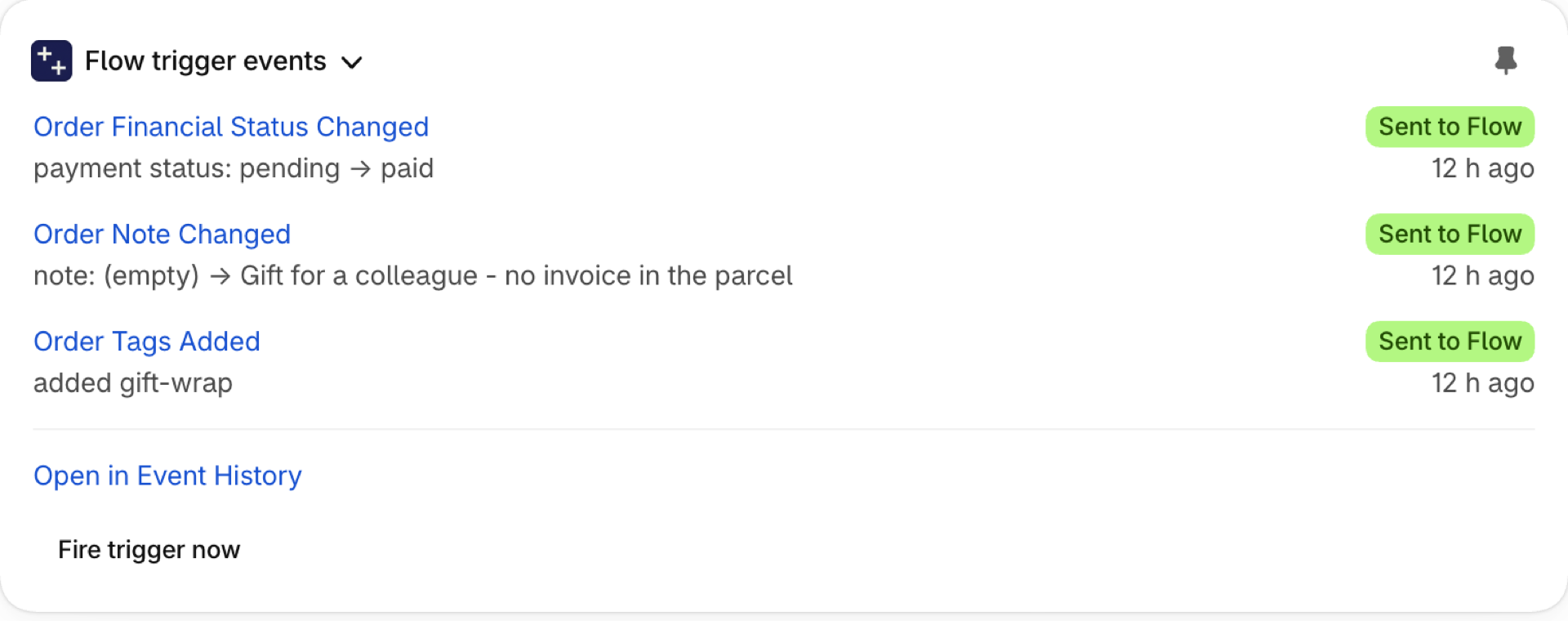
We created one order on a development store and changed it at known times. A workflow on Flow's Order updated watched tags, note, financial status, fulfillment status and custom attributes and wrote down what it saw. Next to it ran Order Tags Added, Order Tags Removed and Order Note Changed from this app.
| Change | Flow's Order updated | This app |
|---|---|---|
Tag exp-vip added |
1 run. The workflow sees the tags exp-vip |
Order Tags Added: addedTags = exp-vip, previousTags empty |
Tag exp-other added |
1 run. Sees exp-other, exp-vip |
Order Tags Added: addedTags = exp-other, previousTags = exp-vip |
Tag exp-other removed again |
1 run. Sees exp-vip |
Order Tags Removed: removedTags = exp-other |
| Note changed | 1 run. Sees the new note | Order Note Changed: oldNote = start, newNote = exp note 1 |
| Three tags added within one second | 3 runs. Two of them see all three new tags, one sees two | 1 event: addedTags = exp-a, exp-b, exp-c |
| Note changed twice within one second | 2 runs. Both show the final note | 1 event: oldNote = exp note 1, newNote = exp note 3 |
Tag exp-vip removed |
1 run. Sees the tags that are left | Order Tags Removed: removedTags = exp-vip |
Take the most common tag workflow: "when the tag exp-vip is added, do something". On Flow's trigger the condition can only be "the tags include exp-vip". Six tag changes happened while the tag was on the order, and that condition was true in the six runs they started, although the tag was added once. On Order Tags Added the condition is "addedTags includes exp-vip", and it was true once. Run a workflow when one specific tag is added or removed goes through this case step by step.
Flow's nine updated triggers, and the guide for each
| Flow trigger | What it can watch | Closest triggers in this app | Guide |
|---|---|---|---|
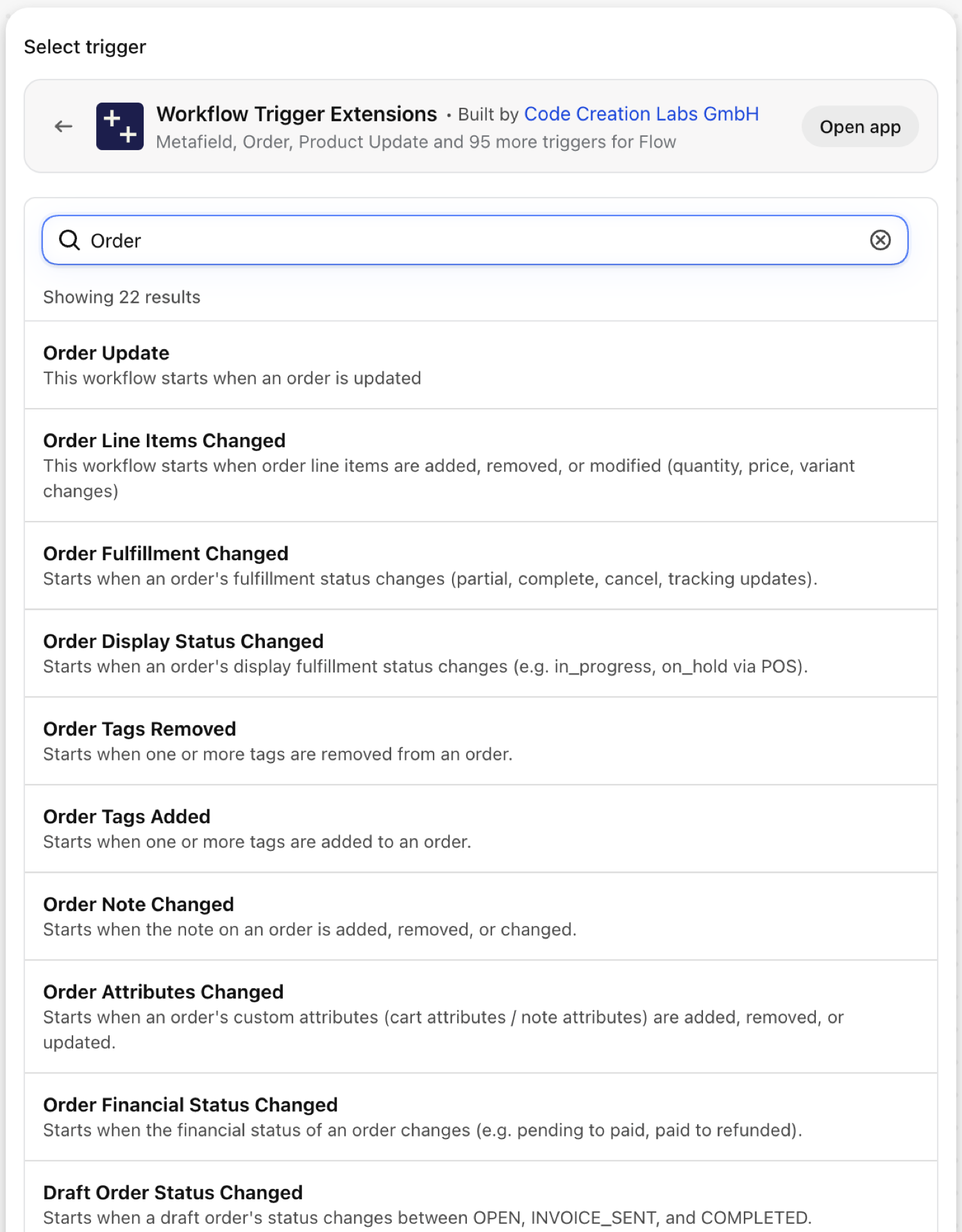
| Order updated | tags, note, email, phone, cancellation, custom attributes, financial and fulfillment status, totals, line items, shipping lines, metafields | Order Update, Order Tags Added, Order Tags Removed, Order Note Changed, Order Attributes Changed, Order Line Items Changed, Order Financial Status Changed, Order Fulfillment Changed, Order Display Status Changed, Order Shipping Address Changed, Order Metafield Update | Flow's Order updated trigger and the order triggers of this app |
| Customer updated | name, note, tags, state, tax exemptions, amount spent, email and email marketing, phone and SMS marketing, addresses, metafields | Customer Update, Customer Tags Added, Customer Tags Removed, Customer Note Changed, Customer State Changed, Customer Name Changed, Customer Email Changed, Customer Phone Changed, Customer Address Changed, Customer Email Marketing Consent Changed, Customer SMS Marketing Consent Changed, Customer Metafield Update | Flow's Customer updated trigger and the customer triggers of this app |
| Product updated | title, handle, description, status, tags, vendor, type, category, media, options, variant price, compare-at price and barcode, bundles, combined listings, metafields | Product Update, Product Tags Added, Product Tags Removed, Product Status Changed, Product Title Changed, Product Handle Changed, Product Description Changed, Product Vendor Changed, Product Type Changed, Product Variant Price Changed, Product Variant Barcode Changed, Product Published to Channel, Product Unpublished from Channel, Product Metafield Update, Product Variant Metafield Update | Flow's Product updated trigger and the product triggers of this app |
| Inventory item updated | SKU, unit cost, weight, tracked, requires shipping, country of origin, HS code, active at a location, variants | Product Variant SKU Changed, Product Variant Cost Changed, Inventory Level Changed at Location, Out of Stock at Location, Back in Stock at Location | Flow's Inventory item updated trigger, and SKU, cost and stock in this app |
| Collection updated | title, handle, description, image, sort order, template, products, metafields | Collection Update, Collection Title Changed, Collection Handle Changed, Collection Description Changed, collection metafields | Flow's Collection updated trigger and the collection triggers of this app |
| Location updated | active, deactivated at, fulfills online orders, ships inventory, address, metafields | Location Updated, Location Activated, Location Deactivated, Location Created, Location Deleted, location metafields | Flow's Location updated trigger and the location triggers of this app |
| Fulfillment order updated, Refund updated, Return updated | status, holds, destination, delivery method and tracking; refund line items and transactions; return status, items and fees | Order Fulfillment Changed, Order Display Status Changed, Order Financial Status Changed | Fulfillment order, Refund and Return updated triggers, and what this app adds |
Two guides cut across all of them: Old and new values: what a workflow can do with them and Watch more than five fields in one workflow. Metafields have their own: Metafield changes in Flow: the updated triggers and the metafield triggers.
Which one to use
A Flow updated trigger fits when
- the workflow only needs to know that one of up to five fields changed, and the current values are enough;
- you watch something this app has no trigger for: products added to or removed from a collection, a refund, a return, the holds of a fulfillment order, an inventory item's weight or customs data;
- the workflow has to start within a second or two of the change.
A trigger of this app fits when
- the workflow compares before and after: a price that dropped, a status that moved from one value to another, a renamed product, a changed address;
- it reacts to one specific tag being added or removed;
- it should act once per change, and not again when something else on the record changes;
- you watch more than five fields, or every update of a record;
- the record is a draft order, a discount, a B2B company, a market, a metaobject, a blog post or a page;
- the trigger is what shoppers do on the storefront, or a point in time rather than an edit.
Three things to know about how Flow's triggers run
These come from our tests and explain most surprises when a workflow moves from one kind of trigger to the other.
- The record is read when the workflow runs. A workflow on an updated trigger sees the record as it is at that moment. When several changes arrive close together, every run can show the same final state: three changes to one collection within two seconds gave three runs that all showed the last title. An event of this app keeps the values of its own change.
- A record that is gone cannot be read. A customer that was changed and deleted right after gave a run whose trigger step failed, because Flow could no longer load the customer.
- Some fields count as changed when a record is created. An order created from a draft order started Order updated twice, once for the financial status and once for the fulfillment status. Shopify's help page for Product updated says the same about variants: a workflow that monitors
variants.priceruns when a product is added. The change triggers of this app remember a new record and fire from its first real change on.
Using both in one store
The two kinds of trigger do not get in each other's way. A change that a Flow trigger and a trigger of this app both watch starts both workflows, so give each job to one of them. A common split: Flow's own triggers for the simple "something changed, look at it" alerts, this app for everything that needs the value before, an exact tag, a threshold or a record Flow has no updated trigger for.
Nothing changes for workflows you already run on this app's triggers. They keep working as before.
Does Shopify Flow have an Order updated trigger?
Yes. Since November 2026 Flow has built-in updated triggers for orders, customers, refunds, returns, fulfillment orders, collections, locations and inventory items, next to Product updated. Each one watches 1 to 5 fields that you pick and hands the workflow the record as it is when the workflow runs.
Can a Flow updated trigger give me the value before the change?
No. Shopify's help pages say for each of these triggers that it provides only the current values and that the previous values of the fields that changed are not available in the workflow. The triggers of this app carry both values. See Old and new values: what a workflow can do with them.
Can a workflow on Flow's trigger see which field changed?
Not as a variable, as far as we could find. You know it was one of the fields you picked. If you need to act differently per field, either build one workflow per field, or use the triggers of this app: there is one per kind of change, and the generic Product, Order and Customer Update triggers can list the changed fields with their old and new values.
Can I watch more than five fields?
Not in one workflow on a Flow updated trigger. In this app the generic Update triggers fire on every update, or on any number of fields you pick from a real record of your store. See Watch more than five fields in one workflow.
Do my existing workflows keep working?
Yes. Shopify's new triggers are an addition to Flow. Workflows on the triggers of this app are not affected.
Next steps
- Choosing the right trigger - which trigger of this app fits which job.
- Complete trigger reference - every trigger on one page.
- Workflow templates - ready workflows, several of them built on the value before a change.